About the Author:
Hello dosto! Mera naam MD Maqsood hai aur main pichle 7 saal se zyada time se digital media aur post-production industry mein ek professional video editor ke roop mein kaam kar raha hoon. Video editing aur visual effects ki practical techniques sikhane ke liye main apna YouTube channel m4editorofficial (13.6K+ subscribers) aur Instagram community @m4_editor_official (145K+ video creators) manage karta hoon. Mera main aim naye creators ko trending workflows, practical visual guidance aur genuine editing hacks bilkul free mein deliver karna hai, taaki bina kisi expensive machine ya complicated training ke koi bhi creator stunning visuals produce kar sake.
Flow AI Se 3D Animation Video Kaise Banayein? Complete Beginner-to-Pro Guide M4 189
Aaj ke samay mein digital media, storytelling aur short-form content jaise Instagram Reels aur YouTube Shorts par 3D animation videos ka craze sabse unche level par hai. Pehle ke time par ek clean 3D character ya cinematic world design karne ke liye Blender, Maya ya Unreal Engine jaise heavy software sikhne padte the, jinke liye high-end graphic cards aur mahino ki technical mehnat chahiye hoti thi. Lekin AI revolution ke aane se ye poora game badal chuka hai.
Modern artificial intelligence tools jaise Flow AI ne complex 3D rendering pipeline ko itna simple bana diya hai ki ab aap sirf realistic text descriptions aur smart reference images ki madad se studio-level 3D animated videos generate kar sakte hain. Chahe aap animated storytelling channel chalate hon, gaming content banate hon ya commercial ad campaigns create karte hon, 3D style visuals audience ka attention sabse pehle grab karte hain.
Agar aap bhi jaanna chahte hain ki Flow AI Se 3D Animation Video Kaise Banayein, toh ye in-depth practical guide aapke liye tayyar ki gayi hai. Isme hum base visual conception se lekar prompt writing, camera direction aur final post-production tak sabhi zaroori steps ko aasan Hinglish mein cover karenge.
1. Flow AI Se 3D Animation Video Banane Ke Liye Zaroori Requirements
Flow AI par smooth workflow maintain karne aur bina kisi technical interruption ke high-resolution 3D animation render karne ke liye kuch basic hardware, software aur creative resources ka setup pehle se ready hona chahiye.
- Hardware Device Setup: Flow AI cloud servers par render hota hai, isliye aapko kisi ultra-expensive graphics card wale PC ki compulsory zaroorat nahi hai. Ek modern smartphone (Android/iOS) jisme kam se kam 4GB se 6GB RAM ho, ya ek basic laptop/desktop jisme updated Google Chrome browser smoothly chale, kaafi hota hai.
- Stable High-Speed Internet: High-definition video preview, prompt rendering aur 4K downloads ke liye continuous internet connection (kam se kam 10 Mbps se 25 Mbps speed) hona zaroori hai, taaki generation token process ke waqt session timeout ya network error na aaye.
- Active Flow AI Account Aur Credits: Flow AI platform par official Google account se sign up karein. Shuruat mein free trial credits milte hain; continuous long-term projects ke liye standard credit plan ya subscription tier active rakhna best rehta hai taaki high-priority render queue access ho sake.
- Mobile Post-Production Editor: Generated AI raw clips ko merge, colour grade aur sound effects add karne ke liye VN Video Editor jaisa reliable timeline editor pehle se install hona chahiye.
- Reference Asset Folders: Character design ideas, colour palettes aur sample reference images (agar image-to-video workflow use karna ho) ko local storage mein systematically organise karke rakhein.
2. 3D Animation Ka Concept Samajhna Aur Storyboard Ready Karna
Kisi bhi AI tool ke dashboard par seedha prompt type karne se pehle ek solid visual plan ka hona sabse zaroori step hota hai. Flow AI ek powerful generator hai, lekin use clear instructions tabhi mil pati hain jab aapka base vision well-defined ho.
Scene Ke Core Elements Finalise Karein
- Art Style Ki Clarity: Pehle decide karein ki aapko kis type ka 3D animation look chahiye—jaise Pixar-style cute character, hyper-realistic Unreal Engine 5 cinematic style, ya fir stylised 3D claymation cartoon.
- Character Identity: Apne main character ka physical appearance, kapde, facial expressions aur unka unique colour palette decide karein taaki poore video sequence mein visual consistency bani rahe.
- Environment Setup: Character kis jagah par active hai—jaise neon-lit cyberpunk city, mysterious ancient jungle ya modern tech laboratory.
Beginner Practical Tip: Flow AI mein multi-shot animation generate karte waqt pehle se 3 se 4 lines ki micro-story likh lein. Shot 1 (Wide View), Shot 2 (Character Action) aur Shot 3 (Close-up Reaction) ka sequence pehle se decide hone par video mein professional cinematic pacing banti hai.
3. Flow AI Interface Setup Aur Initial Generation Settings
Flow AI platform par smooth workflow maintain karne ke liye dashboard ke core controls ko samajhna pehla technical step hai.
Dashboard Navigation Aur Project Setup
- Flow AI ke official dashboard par login karein aur Create New Project select karein.
- Canvas settings mein jakar apne desired platform ke mutabiq Aspect Ratio choose karein:
- Vertical Reels/Shorts ke liye 9:16 ratio set karein.
- YouTube landscape videos ya cinematic trailers ke liye 16:9 widescreen choose karein.
- Mode selection mein aapko do main functional pathways milenge: Text-to-Video aur Image-to-Video. Beginners ke liye agar aapke paas character ka pre-designed base image hai, toh Image-to-Video select karna character consistency maintain karne ka best tareeka hota hai. Agar aap scratch se shuru kar rahe hain, toh Text-to-Video module open karein.
4. High-Quality 3D Animation Prompts Likhne Ka Structure
Flow AI par aam generic prompt jaise “a 3D boy walking in a forest” likhne se flat ya low-detail cartoonish visual create hota hai. Studio-level 3D depth laane ke liye specific rendering keywords aur optical details prompt mein add karni padti hain.
3D Visual Rendering Ke Power Keywords
- Rendering Engines: Octane Render, Redshift Engine, Unreal Engine 5 cinematic render, Ray-traced subsurface scattering.
- Material Textures: Detailed stylised fabric, reflective metallic surfaces, glossy ceramic textures, soft vinyl skin tones.
- Lighting Modifiers: Volumetric god rays, dramatic rim lighting, soft diffuse studio lights, warm golden hour ambient glow.
Ready-To-Use Example Master Prompt
A high-end 3D animated cute adventurer boy standing in an enchanted bioluminescent forest, holding a glowing magical compass. Stylised 3D Pixar aesthetic, ray-traced subsurface scattering on skin, detailed fabric textures on leather jacket, expressive big eyes looking around with pure wonder. Volumetric magical mist, soft teal and amber ambient lighting, cinematic depth of field, Octane 3D render, smooth character motion, 4k resolution.
5. Camera Dynamics Aur Motion Scale Control
Ek animated video tabhi lively aur dynamic dikhti hai jab scene mein camera naturally move karta hai. Static camera angles 3D videos ko boring bana dete hain.
Smooth Camera Directives Add Karein
- Slow Pan Left/Right: Environment ki visual depth aur scale ko show karne ke liye prompt mein slow cinematic camera pan across the landscape zaroor likhein.
- Dolly In / Push-In: Emotional moments ya reveal shots ke liye gentle dolly-in motion tracking the character’s facial expression define karein.
- Motion Scale Slider (1 to 10): Flow AI ke settings panel mein Motion Intensity ka ek control slider hota hai.
- 3D animation ke liye motion intensity ko hamesha 4 se 6 ke darmiyan set karein.
- Agar aap motion ko 8 ya 10 par set kar dete hain, toh character ke hath, aankhein aur background objects distort (warp) hone lagte hain. Balanced motion se action smooth aur clean render hota hai.
6. Character Consistency Aur Seed Value Optimisation
3D animation storytelling mein sabse badi challenge ye aati hai ki alag-alag shots generate karte waqt character ka chehra ya uske kapde badal jate hain. Flow AI mein is problem ko solve karne ke liye advanced parameters diye gaye hain.
Seed Number Aur Reference Locking
- Seed Locking: Jab aapko kisi single prompt se ek perfect 3D character design mil jata hai, toh us clip ki info mein ja kar uska Seed Number copy karein. Agle shot ke prompt mein wahi exact Seed number apply karein taaki AI usi base facial geometry ko next action mein retain kare.
- Consistent Outfit Descriptions: Har consecutive prompt mein character ki specific traits (jaise wearing round wooden spectacles, red hoodie with white stripes, curly brown hair) ko word-to-word identical copy karein.
- Image-to-Video Continuity: Pehle shot ka final high-resolution frame export karke use next shot ke liye reference image ke roop mein feed karein. Is technique se scenes ke beech zero visual jump dekhne ko milta hai.
7. Sound Design, Lip-Sync Aur Post-Production Workflow
Kewal silent 3D animated clip audience ko engage nahi kar sakti. 3D animation ko screen par real feel karwane ke liye visual pacing aur sound ka perfect sync hona zaroori hai.
VN Video Editor Mein Final Polish
- Flow AI se apni sabhi generated 3D clips ko highest resolution mein download karein aur mobile editing app VN Video Editor mein import karein.
- Smooth Speed Ramping: Clips ke darmiyan natural pacing lane ke liye VN ke speed curve tool se clips ko halka sa slow-motion ya ramp transition dein.
- Sound Effects (SFX) Layering: 3D animated environment ke anusaar background foley sounds add karein—jaise footsteps on grass, cloth rustle, magical whoosh sounds, aur ambient wind.
- Subtle Film Grain Effect: Pure AI 3D renders aksar thode artificial lagte hain. VN Editor ke andar jakar 5% se 10% opacity par halka sa Film Grain overlay karein. Yeh grain digital pixels ko organically bind karta hai aur scene ko theatrical cinema film jaisa texture provide karta hai.
8. Bonus Tip: High-Quality Upscaling Aur Frame Interpolation
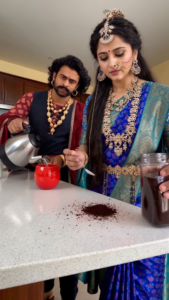
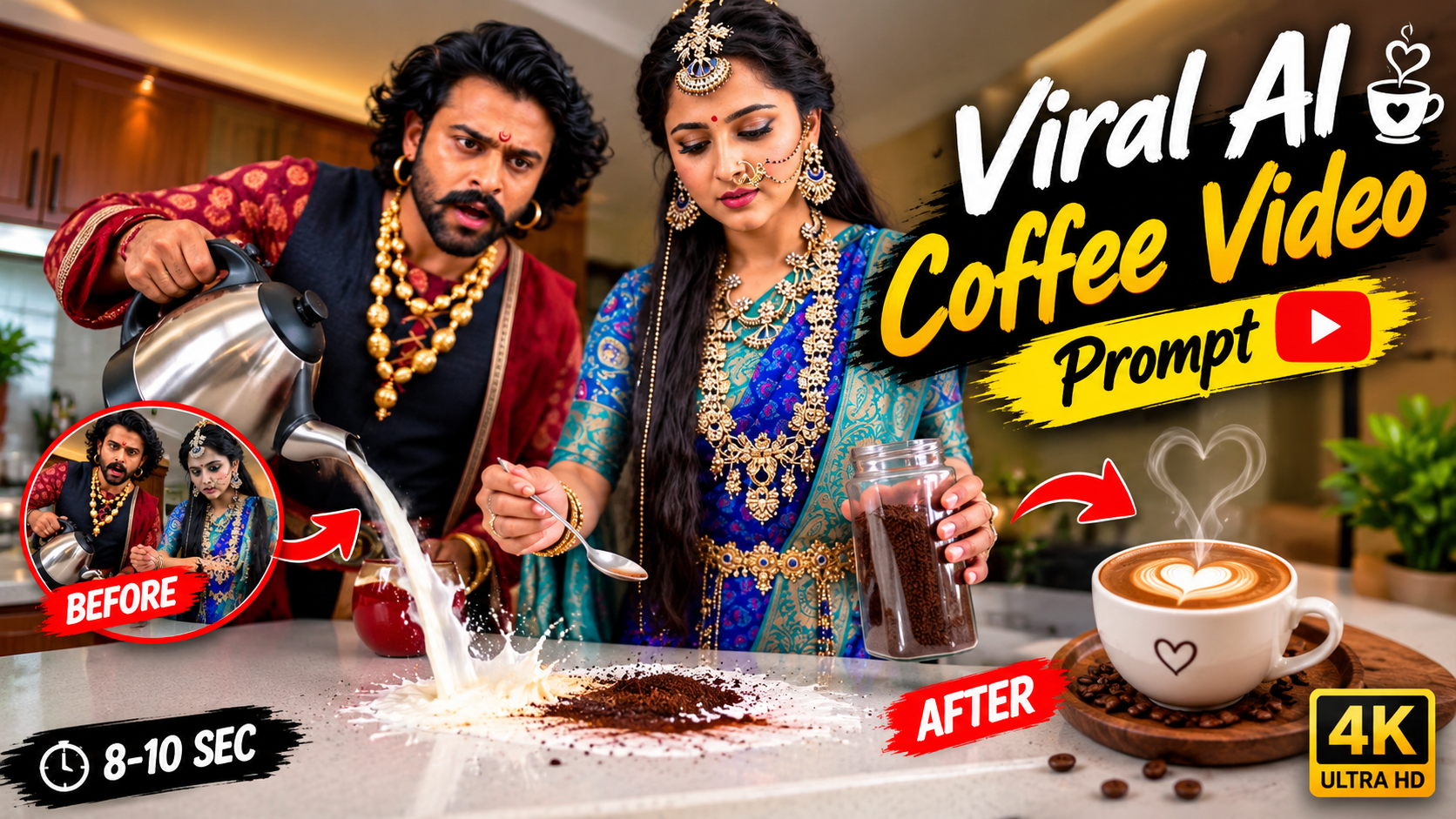
A ready-to-use prompt to generate a dramatic, comedic video inspired by this scene: > Prompt: A comedic cinematic scene in a modern luxury kitchen featuring an Indian couple dressed in elaborate ancient royal dynasty attire. The woman wears a royal blue and gold silk saree adorned with ornate temple jewelry, a maang tikka, layered gold necklaces, and a traditional nose ring. The man wears a regal maroon brocade warrior vest, heavy gold chains, earrings, and a styled mustache. Standing across a polished white countertop with a red mug between them, they lock eyes in an intense, slow-motion romantic stare. Completely distracted, the woman repeatedly spoons dark coffee powder from a glass jar directly onto the counter instead of into the mug. Lost in her gaze, the man lifts a pitcher and pours white milk directly onto the countertop, splashing over the coffee grounds. High-drama expressions, theatrical romance clashing with modern morning routine, bright interior lighting, photorealistic 4K. > Compact Prompt (For Kling, Runway, or Luma) > A couple dressed in royal ancient Indian palace attire prepares coffee in a modern kitchen. An Indian woman in a royal blue saree and heavy gold jewelry stares romantically at an Indian man in warrior regalia. Lost in dramatic eye contact, she repeatedly drops coffee powder onto the white counter next to a red mug. The man, still gazing at her, pours a jug of milk directly onto the countertop, creating a mess. Slow-motion Bollywood romance, cinematic lighting, photorealistic. > Key Prompt Parameters & Attributes * Subject & Wardrobe: * South Asian woman in a royal blue and emerald silk Kanjeevaram saree, heavy temple gold jewelry, waist belt, and nose chain. * South Asian man with wavy hair, mustache, maroon brocade royal vest, and layered gold ornaments. * Setting: Contemporary kitchen with white quartz countertops, wooden cabinetry, and modern appliances. * Core Action: A comedic contrast of romantic melodrama with clumsy kitchen accidents—scooping coffee powder onto the counter and pouring milk directly onto the island. * Camera Movement: Static medium-close two-shot, maintaining depth of field across the kitchen island. * Aspect Ratio: 9:16 (vertical video format). Are you targeting a specific AI video generator (such as Kling, Sora, Runway Gen-3, or Haiper) that requires tailored camera motion or bracket parameters?
Flow AI se render hone wali standard video clips web playback ke liye optimised hoti hain, lekin agar aap unhe big screens ya 4K displays par launch karna chahte hain, toh ek professional workflow hack bohot kaam aata hai.
- VN Sharpness Boost: Final export se pehle VN Video Editor ke Adjust panel mein jakar Sharpening slider ko +15 se +25 badhayein aur Highlights ko halka sa roll-off (-10) karein. Isse 3D character ke fine textures (baal, kapdon ke dhaage aur aankhon ka shine) screen par extremely crisp nazar aate hain.
- 60FPS Frame Interpolation: 3D animation tabhi smooth lagti hai jab frame rate stable ho. Apne editing software mein export settings ko standard 24fps ya 30fps ke bajaye 60 FPS par set karke export karein taaki 3D models ka movement buttery smooth render ho sake.
Conclusion
Flow AI ne 3D animation generation ko studio setups se nikaal kar har passionate creator ke fingertips par la kar khada kar diya hai. Ab visual storytelling kisi heavy hardware ya technical degree par depend nahi karti, balki aapki creative visualisation, structured prompt engineering aur right post-production polish par depend karti hai. Is guide mein bataye gaye system requirements, 3D rendering keywords, camera controls aur consistent seed workflows ko apne agle project par implement karein, aur regular practice ke sath professional 3D visual content deliver karein.