Mera naam MD Maqsood hai. Video editing aur digital content creation ki field me mujhe pichhle 7 saal se zyada ka working experience hai. Apne real-world workflows aur creative techniques ko main apne YouTube channel m4editorofficial (13.6K community) aur Instagram profile m4_editor_official (145K+ active followers) ke through showcase karta rehta hoon. Is platform ke zariye mera focus yahi rehta hai ki beginners aur aspiring creators ko advanced tools, trending social media strategies aur authentic editing skills bina kisi paid course ke bilkul aasan zubaan me sikhaye ja sakein.
AI Se Instagram Growth Kaise Kare: Beginners Ke Liye Complete Step-by-Step Guide M4 125
Social media ka landscape pichhle kuch saalon me poori tarah badal chuka hai. Pehle Instagram par grow karne ke liye sirf regular posting ya basic editing kaafi hoti thi, lekin aaj algorithm content ki quality, watch time aur visual delivery par sabse zyada focus karta hai. Naye creators ke paas aksar na toh badi production team hoti hai aur na hi ghanton tak baithkar script likhne ya manual editing karne ka time hota hai.
Yahi par Artificial Intelligence (AI) ek game-changer tool bankar ubharta hai. Agar aapko sahi AI workflows ka istemaal karna aa jaye, toh aap apna 80% waqt bacha sakte hain aur bache hue 20% waqt me premium, high-retention content create kar sakte hain. Is comprehensive guide me hum practical tareeqe se samjhenge ki AI se Instagram growth kaise kare, content creation ko streamline kaise karein aur algorithm ke mutabiq consistent reach kaise haasil karein.
Instagram Growth Me AI Ka Asli Role Kya Hai?
Bahut se creators samajhte hain ki AI ka matlab sirf copy-paste ya robotic awaz me video banana hota hai. Lekin reality bilkul alag hai. Instagram ka algorithm un videos ko promote karta hai jo viewers ko screen par rokk kar rakhein. AI ka kaam aapko replace karna nahi, balki aapke ideation, scripting aur visual presentation ko double speed par boost karna hai.
- Idea Research: Ghanton tak scrolling karne ke bajaye trending problems aur high-interest hooks 2 minute me find karna.
- Smart Scripting: Boring paragraphs ke bajaye aise structured scripts generate karna jo pehle 3 seconds me audience ko hook kar lein.
- Auto Enhancements: Video ki sound clear karna, cinematic b-rolls add karna aur captions sync karna jisme pehle aadha din lagta tha.
Step 1: AI Tools Se Viral Reels Ideas Aur Content Pillars Kaise Nikalein
Kisi bhi profile ki reach tab tak nahi badhti jab tak aapki video kisi specific audience ki problem solve na kare ya unhe entertain na kare. Random post dalne se engagement dead ho jata hai.
AI Se Content Ideation Nikalne Ka Tarika
- ChatGPT ya Claude open karein aur generic sawal puchne ke bajaye detailed prompt enter karein.
- Prompt example: “Main [Apni Niche, jaise: Video Editing/Finance/Fitness] par Instagram account chala raha hoon. Mujhe beginners ke liye 10 aise pain points batayein jin par 30-second ki actionable reels ban sakti hain.”
- AI aapko real common queries nikaal kar dega.
- Har topic ko check karein ki kya ispar pehle 3 second ka powerful visual question ban sakta hai.
Content Pillars Ko Balance Karein
Ek successful theme build karne ke liye apne monthly content ko 3 hisson me baantein:
- Educational (50%): How-to guides, quick hacks aur step-by-step tutorials jo saves aur shares generate karein.
- Relatable / Entertaining (30%): Common creator problems ya industry myths jo comments me conversation start karein.
- Authority / Results (20%): Apne live proofs, behind-the-scenes ya before-after transformations jo trust build karein.
Step 2: High-Retention Scripts Aur Viral Hooks Generate Karna
Reels me sabse zaroori element hota hai Hook. Agar shuru ke 3 seconds me viewer stop nahi hua, toh aage ki video kitni bhi achhi ho, algorithm use dead declare kar deta hai.
The 3-Part AI Script Formula
AI se script likhwate waqt hamesha 3 parts demand karein:
- The Hook (0–3 Seconds): Ek aisa shocking line ya problem jo seedha viewer ki attention grab kare (Example: “Yeh ek mistake aapki video quality poori tarah ruin kar rahi hai”).
- The Meat / Core Value (4–25 Seconds): Bina kisi faltu baat ke point-to-point solution ya 3 quick steps.
- The CTA (26–30 Seconds): Clear call to action (Example: “Is setting ko bhool na jao, isliye reel ko abhi save kar lo”).
- Aap AI ko bol sakte hain: “Write a 30-second conversational Hindi-English reel script on this topic with timestamps and exact visual cues for each sentence.”
Step 3: AI Video Editing Hacks Jo Visual Retention Double Kardein
Manually har word sunkar text type karna ya background noise hatana sabse boring kaam hota hai. Yahan smart AI tools aapki video ki overall production quality ko pro level bana dete hain.
Dynamic Auto-Captions Ka Istemal
Zyada tar users audio off karke reels browse karte hain. Agar video par animated text nahi hoga, toh wo scroll kar denge.
- Auto-Caption Tools: Caption apps (jaise AutoCap ya native auto-caption engines) ka use karein.
- Style: Bold sans-serif fonts select karein, text ko screen ke lower-middle hisse me rakhein aur active word par contrasting yellow ya neon green highlight rakhein.
- Accuracy: AI speech-to-text me jo 5% spelling mistakes aati hain, unhe manually review karke theek zaroor karein.
AI Voice Clean-Up
Kharab audio se viewer turant swipe kar deta hai, chahe camera kitna bhi mehnga ho.
- Mobile se record kiye gaye raw voiceover ko Adobe Podcast AI (Enhance Speech) jaise free tool me drag karein.
- Yeh background ka fan noise, traffic aur room echo poori tarah filter karke basic earphone mic ko bhi studio quality condenser mic jaisa bana deta hai.
Step 4: AI Se Catchy Carousel Posts Aur Infographics Design Karna
Reels reach deti hain, lekin Carousels account par active followers aur deep engagement lekar aate hain. Carousel slides se user profile par zyada der rukta hai, jo Instagram ko strong positive signal deta hai.
Quick Carousel Workflow


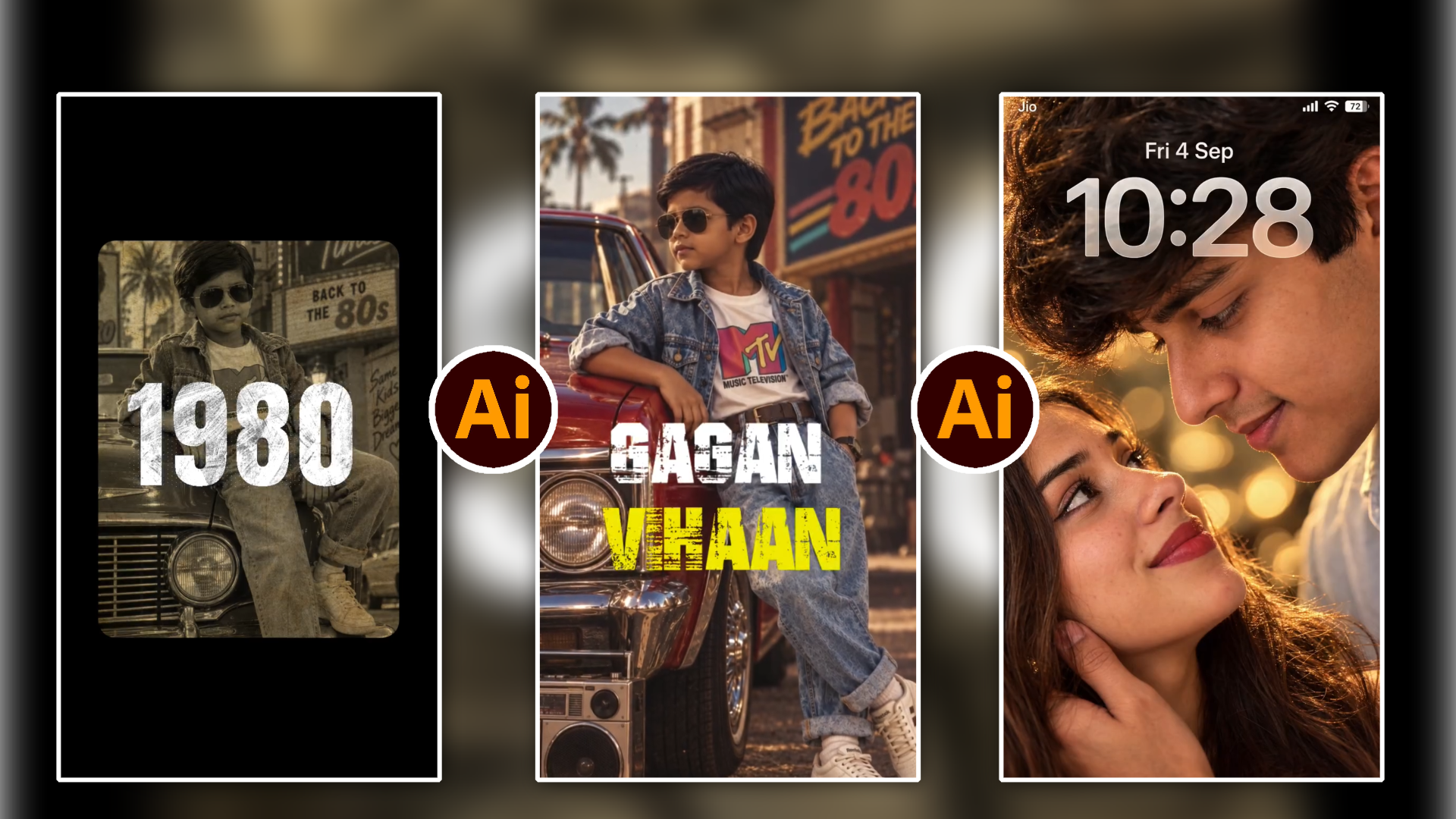
Photo Prompt 👇
A full-body retro fashion portrait of a stylish 7-year-old South Asian boy leaning casually against the front fender of a vintage red classic car. He is wearing classic aviator sunglasses, an oversized acid-wash denim jacket over a tucked-in white t-shirt with a colorful retro MTV logo, a brown leather belt, and high-waisted acid-wash jeans with rolled-up cuffs. On his feet are vintage white streetwear sneakers and white crew socks.
Beside the front tire on the pavement sits a large vintage 1980s silver dual-cassette boombox. In the blurred background, a neon/marquee street sign reads “BACK TO THE 80s” under warm afternoon golden hour sunlight with soft palm tree silhouettes. Shot on 35mm film, retro aesthetic, warm nostalgic color grading, subtle film grain, natural rim lighting, sharp focus, 80s editorial street photography.
Key Modifiers for Customization:
Subject: Young boy, confident relaxed pose, aviator sunglasses, styled dark hair.
Outfit: Acid-wash denim-on-denim (Canadian tuxedo), rolled cuffs, vintage graphic tee, white retro sneakers.
Key Props: Classic 1970s/1980s red muscle car with chrome trim, vintage silver boombox on the asphalt.
Lighting & Mood: Golden hour, warm cinematic glow, nostalgic 1980s Americana street vibe.
Aspect Ratio: –ar 9:16 (if using Midjourney).
- ChatGPT se kisi complicated topic ka “5-Slide Micro Breakdown” generate karwayein.
- Har slide par 20 se zyada words nahi hone chahiye; focus short bullet points aur icons par hona chahiye.
- Canva ke Magic Switch ya template automation ka istemaal karke consistent visual layout set karein.
- First slide par hamesha ek curiosity create karne wala title rakhein aur aakhri slide par dedicated save reminder lagayein.
Step 5: Post Publishing Optimisation Aur Smart Metadata
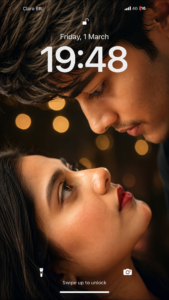
Prompt
Create an ultra-realistic, highly detailed vertical 9:16 romantic close-up portrait of a young adult couple, inspired by the reference image. Show only an extreme close-up of their faces in opposite orientations, with their eyes meeting intimately in the center of the frame. The man is positioned above and the woman below, both faces tilted naturally toward each other. Capture their eyes, eyelashes, eyebrows, skin texture, and subtle facial details with exceptional realism. Use warm cinematic skin tones, soft natural lighting, shallow depth of field, and beautiful golden bokeh lights in the background. The composition should feel intimate, emotional, elegant, dreamy, and romantic. Keep the framing tight and artistic, with the eyes as the main focal point. Natural skin texture, realistic pores, detailed eyelashes, authentic facial proportions, soft highlights, cinematic color grading, professional photography, 85mm macro-lens look, ultra sharp eye details, soft dark background blur, IMAX-level realism, high dynamic range, 8K quality. No text, no watermark, no distortion, no extra facial features, no artificial-looking skin. Vertical smartphone wallpaper composition, 9:16 aspect ratio. Use the uploaded reference photos to preserve both individuals’ exact facial identity, facial features, skin tone, hairstyle, and natural appearance. Do not change or beautify their faces.Make them strictly face-to-face, with their eyes directly meeting each other in the center
Sirf video bana lena kaafi nahi hota; upload karte waqt algorithm ko right signals dena zaroori hai taaki wo content ko right audience tak deliver kare.
SEO-Friendly Captions
Instagram ab ek visual search engine ban chuka hai. Caption me keyword rich text hona behad zaroori hai.
- AI se kahein: “Generate a 3-line Instagram caption explaining this video naturally, targeting the keyword: video editing tips.”
- Caption ke shuru me hi primary topic clear ho jana chahiye.
Hashtags Ka Sahi Selection
- 30 irrelevant hashtags paste karne ke bajaye sirf 5 se 8 hyper-targeted hashtags use karein.
- 3 hashtags broad category ke (e.g., #VideoEditing), 3 specific topic ke (e.g., #VNEditorTutorial) aur 1 personal branding ka.
AI Insights Se Analytics Read Karna Aur Strategy Pivot Karna

Instagram Insights ka raw data kai baar beginners ko confuse kar deta hai. Yahan AI ek analytical consultant ki tarah help kar sakta hai.
- Har hafte ke end par apni top 3 performing videos aur bottom 3 performing videos ke metrics (Watch time, Shares, Saves) note karein.
- Is data ko simple text me AI ko provide karein aur puchein: “Mere paas yeh numbers hain. Kis type ke content me retention drop ho raha hai aur mujhe next week kya double down karna chahiye?”
- AI aapko patterns detect karke dega—jaise agar Shares zyada hain toh save-oriented utility content banana jari rakhein, aur agar swipe-away rate high hai toh initial hooks par rework karein.
Bonus Tip: AI B-Roll Integration Hack
Visual boredom khatam karne ke liye talking-head videos me har 3 se 4 second par B-roll cut aana chahiye. Agar aapke paas shoot kiye huye cinematic b-rolls nahi hain, toh:
- Apni script ke main keywords mark karein (jaise: ‘Frustrated Editor’, ‘Growth Graph’, ‘Neon Lighting’).
- AI image generators (jaise Midjourney ya free alternatives) se specific vertical images (9:16 aspect ratio) generate karwayein.
- Un stills ko editing timeline me add karein aur unpar slow Scale / Zoom In animation apply karein.
- Yeh static visuals ko cinematic motion graphics me convert kar deta hai, jisse audience ka retention rate 40% tak badh jata hai.
Conclusion
AI koi shortcut button nahi hai jo raat-o-raat fake followers generate kar dega; yeh ek powerful creative amplifier hai jo aapki consistency aur video quality ko professional standard par le aata hai. Asli Instagram growth tab milti hai jab aap AI ki speed ko apne personal experience aur real storytelling ke sath combine karte hain. Roz naye tools explore karein, unhe apni raw editing me test karein aur discipline ke sath apna quality content publish karte rahein.