Trend Ai Prompt 👇
Hello doston! Main ek professional video editor hoon aur is creative industry mein mujhe pichle 7 saal se bhi zyada ka experience hai. Main apne YouTube channel “m4editorofficial” (13.6K subscribers) aur Instagram page “m4_editor_official” (145K followers) par apni daily editing journey, advanced hacks, aur trending tricks share karta hoon. Mera vision hamesha se yahi raha hai ki main beginners ke liye is website par genuine editing techniques aur practical guidance bilkul free mein provide karun. Mera manna hai ki agar sahi knowledge aur asaan bhasha mile, toh koi bhi ek successful creator ban sakta hai. Chaliye aaj ke is valuable topic par aage badhte hain!
Instagram Trending AI Photo Prompts ChatGPT Se Kaise Banaye: Complete Guide 2026
Aaj ke digital daur mein, Instagram aur dusre social media platforms par har roz naye trends aate rehte hain. In dino sabse zyada trend mein jo chiz chal rahi hai, wo hai—3D AI Social Media Images. Aapne apni feed mein aisi kai reels aur photos dekhi hongi jahan log apne naam wali, 3D avatar wali, ya kisi cool gaming setup wali images share karke raaton-raat viral ho rahe hain. Ye visuals itne aakarshak hote hain ki log inhe share karne aur save karne se khud ko rok nahi paate. Lekin ek aisi eye-catching image banane ke peeche ka sabse bada raaz hai ek perfect aur detailed “AI Prompt”.
Agar aap bhi chahte hain ki aapki reels aur posts Instagram par trend karein aur aapki engagement double ho jaye, toh aapko ChatGPT ka sahi istemal aana chahiye. Is article mein hum detail mein seekhenge ki kaise ChatGPT ki madad se professional level ke AI prompts likhe jate hain aur unhe use karke ek viral 3D video kaise edit ki jati hai. Ye ek complete “One-Stop” guide hai, jise padhne ke baad aapko is topic se judi kisi aur article ya video ko dekhne ki bilkul bhi zarurat nahi padegi. Ye content 100% genuine aur practical knowledge par aadharit hai.
AI Prompt Kya Hota Hai aur ChatGPT Kyun Zaruri Hai?
AI Prompt darasal ek tarah ka instruction ya command hota hai, jo hum AI tools (jaise Bing Image Creator, Midjourney, ya Leonardo AI) ko dete hain taaki wo hamari soch ko ek picture me badal sake. AI ko nahi pata ki aapke dimaag me kya chal raha hai, isliye jitna detail mein aur clear aapka prompt hoga, AI utni hi behtareen aur accurate image generate karega.
ChatGPT ka real role kya hai: Zyadatar log basic aur simple prompts likhte hain jaise “A boy sitting on a chair with neon lights”. Isse image toh ban jati hai, lekin wo “viral quality” wali nahi hoti. Wahin par ChatGPT hamare inhi simple ideas ko ‘Cinematic’ aur ‘Hyper-Realistic’ prompts mein convert kar deta hai. Ye aapke idea mein lighting, shadows, camera angles, 8K resolution, aur character ki aisi details add karta hai jo ek normal human mind ke liye har baar instantly sochna mushkil hota hai.
ChatGPT Ko Professional Prompt Generator Kaise Banaye?
Directly ChatGPT se prompt mangne ke bajaye, agar aap use ek specific “System Command” (Role) dete hain, toh wo aapko hazar guna behtar results deta hai. Is trick ko Prompt Engineering kehte hain.
ChatGPT mein ye Master Command Type karein:
“Act as a professional AI Prompt Engineer for Midjourney and Bing Image Creator. I will provide a simple concept, and you must generate 3 different versions of high-quality, highly descriptive, and trending prompts. Focus heavily on cinematic lighting, 8K resolution, depth of field, realistic textures, and specific character outfit details.”
Jab aap ye command dete hain, toh ChatGPT samajh jata hai ki aapko ek beginner level ka nahi, balki ek highly professional level ka output chahiye.
Trending AI Prompt Categories (Ready-to-Use Examples)
Hamare readers ki asani ke liye niche humne kuch aisi categories di hain jo Instagram par sabse zyada viral ho rahi hain. Aap in concepts ko directly ChatGPT mein daal kar apne liye unique prompts generate karwa sakte hain.
1. 3D Social Media Profile Name Prompt
Ye concept sabse zyada trending hai jahan ek 3D character kisi social media logo (jaise Instagram ya YouTube) ke upar stylish tarike se baitha hota hai.
- Basic Concept: “A 3D boy sitting on top of the Instagram logo, wearing a hoodie with the name ‘YourName’ on the back.”
- ChatGPT Refined Version: “A highly realistic 3D illustration of a stylish 22-year-old boy sitting casually on a giant, glowing neon Instagram 3D logo. He is wearing a modern black streetwear hoodie with the name ‘ALEX’ written in bold, glowing golden 3D typography on the back. The background is a soft-focus studio wall with cinematic purple and pink ambient lighting and floating 3D hearts. 8k resolution, Unreal Engine 5 render, masterpiece.”
2. Gaming Setup & Cyberpunk Vibe
Basic Concept: “Boy in a gaming room with neon lights.”
- Basic Concept: “Boy in a gaming room with neon lights.”
- ChatGPT Refined Version: “A hyper-detailed 3D render of a teenager in a futuristic, high-tech gaming room. The character is wearing professional RGB gaming headphones, sitting on an ergonomic gaming chair. Behind him, multiple curved monitors display intense gaming stats. The room is filled with vibrant blue and magenta neon glow, volumetric fog, and high-tech gadgets on the desk. Highly cinematic, ray-tracing, masterwork quality.”
3. Traditional / Festive AI Images
- Basic Concept: “A couple celebrating Diwali in 3D AI style.”
- ChatGPT Refined Version: “A charming and heartwarming 3D animation style image of a cute couple standing in front of a beautifully decorated house during Diwali. The boy is wearing a designer Silk Kurta, and the girl is in a gorgeous, heavily embroidered Saree. They are happily holding glowing sparklers. The background is completely filled with glowing traditional diyas, marigold flowers, and colourful fairy lights. Warm golden lighting, joyful expressions, 8k resolution.”
Alight Motion Se 3D Video Editing Kaise Kare? (Step-by-Step)
Sirf ek achi AI image generate karna kaafi nahi hai. Use ek moving 3D video reel mein convert karna hi real magic hai jo audience ko rok kar rakhta hai. Alight Motion (AM) mobile par aisi professional editing ke liye sabse powerful application hai.
Step 1: Image Layers Ko Alag Karna
Sabse pehle, apni AI image ka background remove karein (Aap PhotoRoom, Remove.bg ya kisi bhi online AI tool ka use kar sakte hain). Ab Alight Motion application open karein. Apni original AI image ko ‘Background’ layer ke roop mein aur jis image ka background remove kiya hai use ‘Foreground’ (Character) layer ke roop mein import karein.
Step 2: 3D Camera Setup And Parallax Effect
- Hack: Alight Motion mein niche diye gaye ‘+’ icon par click karein aur ‘Object’ me jaakar ‘Camera’ add karein.
- Apni dono layers (Background aur Character) ko select karein aur unki ‘3D’ setting ko on karein.
- Z-Position (Depth) tool ka use karke Character layer ko Camera ke thoda paas layein aur Background layer ko thoda peeche ki taraf dhakelein. Isse video mein ek Real 3D Parallax Effect create hoga.
Step 3: Smooth Keyframe Animation Ka Use
Ab animation dene ke liye Keyframes ka use karein. Video ke start me ek keyframe lagayein aur end me ek keyframe lagakar camera ko dheere-dheere ‘Zoom-in’ ya ‘Pan’ karein.
- Pro Tip: Movement ko natural dikhane ke liye dono keyframes ke beech Graph settings mein jaakar ‘S-Curve’ (Ease-in, Ease-out) select karein taaki aapki movement robotic ya jerky na lage.
Step 4: Adding Particles, Overlays Aur Glow
Apni video ko bilkul professional touch dene ke liye effects add karein.
- Effect: ‘Particles’ ya ‘Dust’ overlay video ke upar lagayein jisse background me motion feel ho.
- Glow: Character wali layer par jaakar ‘Glow Scan’ ya ‘Edge Glow’ effect apply karein. Isse AI image me bani hui neon lights real-time me glow karti hui dikhengi.
Google AdSense Approval Ke Liye Content Quality Tips
Agar aap ek blogger hain aur is tarah ke content se Google AdSense ka approval chahte hain, toh ye golden tips hamesha dhyan rakhein:
- 100% Originality: Kabhi bhi dusre blogs se prompts ya text copy-paste na karein. ChatGPT se hamesha apne ideas ka ‘Unique’ version mangein, jisse aapka content plagiarism-free aur valuable rahe.
- Proper Formatting: User experience (UX) ko behtar banane ke liye headings, bullet points, tables, aur bold text ka sahi istemal karein taaki user ko padhne mein asani ho.
- High User Value: Sirf keyword stuff karne ke bajaye user ko solution dein. Jaise is article mein humne prompt banane se lekar editing tak ki end-to-end guidance di hai. Google aisi “Helpful Content” ko bohot jaldi rank karta hai.
Comparison Table: Top AI Image Generators
Aapki suvidha ke liye yahan top AI tools ka ek quick comparison diya gaya hai, taaki aap apne budget aur requirement ke hisaab se sahi tool chun sakein:
AI Tool Ka Naam. Sabse Best Kisliye Hai?
Bing Image Creator 3D Text, Social Media Logos, Avatars
Common Mistakes Beginners Should Avoid
Editing aur AI generation seekhte waqt beginners aksar ye galtiyan karte hain, jinhe aapko bilkul avoid karna chahiye:
- Aspect Ratio Ko Ignore Karna: Instagram Reels ya YouTube Shorts ke liye hamesha 9:16 aspect ratio ka hi use karein. Square (1:1) images reels me achi nahi lagti.
- Low Resolution Image Export: AI image ko download karte waqt hamesha ‘HD’ ya AI Upscaler tool ka use karke uski quality badha lein. Pixilated ya blur images kabhi viral nahi hoti.
- Music Beat Sync Na Karna: Alight Motion mein jab aap camera movement (Zoom in/out) dete hain, toh wo background music ki ‘Beat’ (Bass drop) ke sath match honi chahiye. Bina audio sync ki gai editing bohot un-professional lagti hai.
Bonus Tip: Viral Hone Ka Secret Formula
Sirf achi editing karke video post kar dene se views nahi aate. Instagram par viral hone ka sabse bada secret hai “Trending Audio” ka use karna. Instagram reels section mein jis audio ke aage chhota sa “Arrow (↗)” ka nishan ho, us audio par apni 3D AI video upload karein. Jab aapki video ki visual quality high hogi aur music trending hoga, toh Instagram ka algorithm automatically aapki reel ko naye logo tak (Explore Page par) push karega.
Conclusion
Doston, aaj ke samay me Instagram trending AI images aur 3D reels banana pehle se kahin zyada asan ho gaya hai. ChatGPT ki advanced capabilities ki madad se ab aap aise highly detailed aur perfect prompts likh sakte hain jo pehle sirf professional prompt engineers hi kar paate the. In AI-generated images ko Alight Motion mein 3D layers aur camera tricks ke sath edit karke aap ek top-notch, high-quality viral reel taiyar kar sakte hain.
Bas ek baat hamesha yaad rakhein—content creation mein ‘Consistency’ hi sab kuch hai. Naye-naye concepts aur prompts ke sath daily experiment karte rahein, trending audios ko track karein aur apni video editing skills ko har roz thoda behtar banayein. Ab deri kis baat ki? Aaj hi ChatGPT open kijiye, apni imagination ko type karein aur apni pehli viral AI image generate karke internet par chha jayiye!
Prompt👇
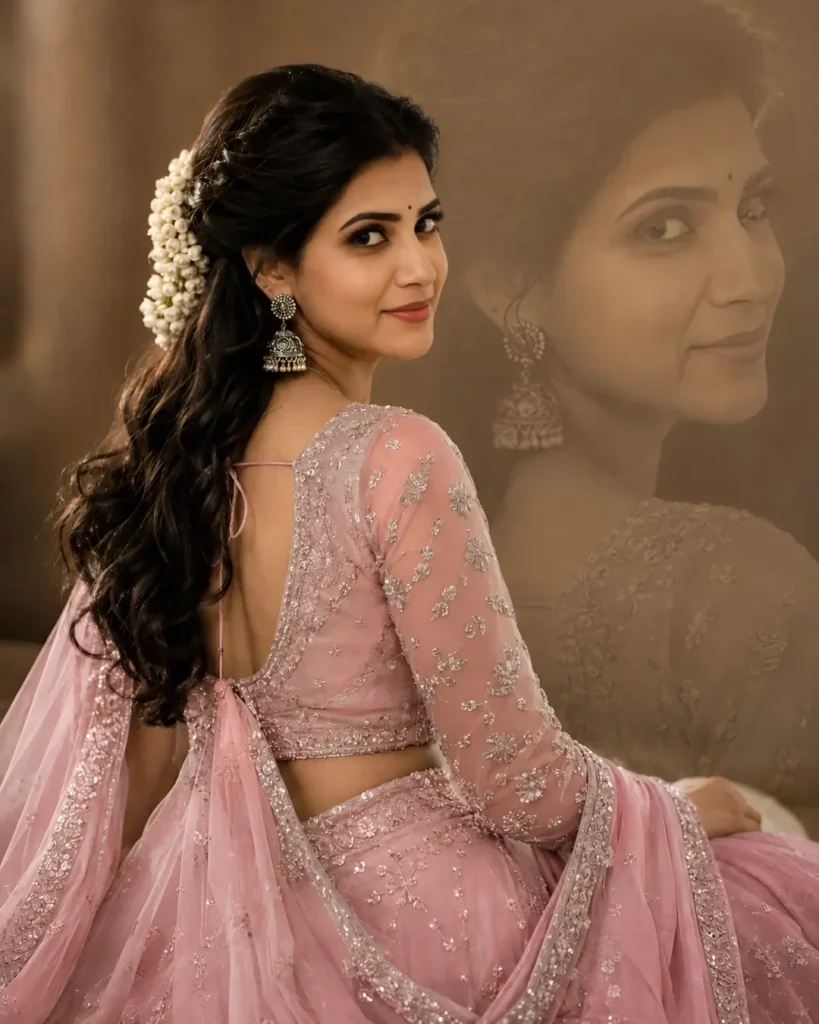
beautiful young Indian girl in a pastel mint-green lehenga choli with heavy silver embroidery and delicate sequin work, sitting gracefully while looking back over her shoulder at the camera. She has long, wavy black hair styled half-up with white jasmine flowers (gajra) attached at the back. Wearing traditional jhumka earrings and soft glam
makeup with natural pink lips and glowing skin.
The blouse has a deep back design with sheer embroidered sleeves, paired with a flowing net dupatta draped elegantly. Warm cinematic studio lighting, soft brown-beige dreamy background with a large faded monochrome portrait overlay of the same girl in the background. Ethereal, royal, elegant Indian festive portrait photography, shallow depth of field, ultra realistic, high detail, soft focus, DSLR quality, 85mm lens, bokeh effect, premium wedding photoshoot aesthetic.
Negative Prompt (optional):
low quality, blurry face, extra fingers, bad anatomy, harsh shadows, overexposed, cartoon, distorted eyes, d
Prompt👇
PromptPrompt
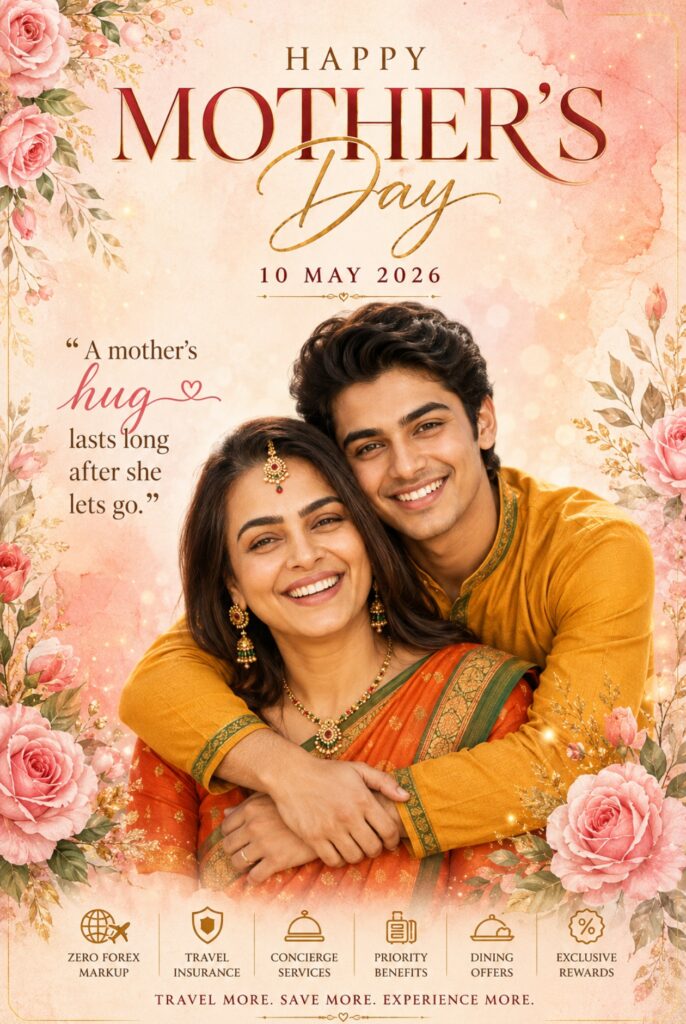
A Uploaded image create An emotionalMother’s Day poster featuring two beautiful Indian women smiling warmly while hugging each other, centered portrait composition, younger daughter standing behind her mother with affectionate embrace, traditional Indian styling, mustard yellow kurti with green sleeve borders, orange-red saree with subtle green detailing, elegant gold jewelry, maang tikka, earrings, soft natural makeup, warm skin tones, joyful facial expressions.Background designed with pastel peach and blush pink watercolor textures, luxurious floral arrangements with blooming pink roses on corners, delicate botanical leaves, floating golden spark particles, dreamy cinematic bokeh glow, soft romantic atmosphere. Premium typography design displaying “HAPPY MOTHER’S DAY” in large luxury serif font with golden handwritten calligraphy for “Day”, elegant centered date text “10 MAY 2026”, stylish quote typography reading“A mother’s hug lasts long after she lets go.”, layered artistic text composition, luxury greeting poster aesthetic, high-end editorial design, watercolor paper texture, soft cinematic lighting, ultra detailed, photorealistic, 8K.
a card with low or zero forex markup can save a substantial amount for users who travel abroad frequently or shop internationally, and travel insurance is another valuable benefit included with many travel credit cards, covering situations such as flight cancellation, lost baggage, delayed baggage, medical emergencies, and accidental coverage, providing financial protection and peace of mind during trips, and some premium cards also include concierge services, priority check-in, hotel privileges, and dining offers,
making them ideal for business travelers and luxury users who value convenience and exclusive experiences, and annual fee structure should also be considered carefully because some travel credit cards charge premium fees while offering extensive benefits, whereas others provide lifetime free or low annual fee options with moderate rewards, and choosing the right card depends on travel frequency and spending volume to ensure that benefits outweigh the cost, and eligibility criteria usually depend on income, employment type, and credit score, and individuals with strong credit profiles are more likely to receive premium cards with higher limits and exclusive travel features, while entry-level travel cards are also available for beginners who want to start earning travel rewards and build credit history gradually, and maintaining a good credit score by paying bills on time and keeping low credit utilization is essential for getting better offers and higher limits, and the application process has become highly digital, allowing users to compare cards, check eligibility, upload documents, and receive instant approval online without visiting branches,
improving convenience and accessibility, and many travel cards now provide virtual card activation immediately after approval, enabling online bookings and transactions instantly, and EMI conversion is another useful feature because large travel expenses such as international vacations or flight bookings can be converted into manageable monthly installments, reducing financial pressure while maintaining
flexibility, and timely payment of credit card dues remains one of the most important habits for maximizing benefits because carrying forward balances can attract high interest charges that reduce the overall value of rewards and savings, so setting auto-debit or reminders helps maintain financial discipline and protect credit score, and digital banking apps allow users to track rewards, monitor spending, redeem points, and manage transactions in real time, improving financial control and making it easier to optimize card usage, and security features such as OTP verification, international transaction control, fraud monitoring, and instant alerts ensure safe and secure transactions during domestic and international travel,
PROMPT
Copy Prompt
PromptPrompt
A Uploaded image create An emotionalMother’s Day poster featuring two beautiful Indian man smiling warmly while hugging each other, centered portrait composition, younger son same dress standing behind her mother with affectionate embrace, same dress jewelry, maang tikka, earrings, soft natural makeup, warm skin tones, joyful facial expressions. Background designed with pastel peach and blush pink watercolor textures, luxurious floral arrangements with blooming pink roses on corners, delicate botanical leaves, floating golden spark particles, dreamy cinematic bokeh glow, soft romantic atmosphere. Premium typography design displaying “HAPPY MOTHER’S DAY” in large luxury serif font with golden handwritten calligraphy for “Day”, elegant centered date text “10 MAY 2026”, stylish quote typography reading “A mother’s hug lasts long after she lets go.”, layered artistic text composition, luxury greeting poster aesthetic, high-end editorial design, watercolor paper texture, soft cinematic lighting,ultra detailed, photorealistic, 8K.
reducing risks associated with digital payments, and promotional offers on hotel bookings, travel websites, cab services, and dining further increase savings and make travel more affordable, and in today’s rapidly growing travel economy, having the right travel credit card provides not only convenience but also long-term financial value by reducing expenses and enhancing travel experiences, and by comparing travel credit cards, selecting features that align with spending habits, maintaining disciplined usage, and maximizing rewards and benefits strategically, individuals can turn regular travel expenses into valuable savings and premium experiences, making travel credit cards one of the smartest and most rewarding financial tools available in India today for frequent travelers and lifestyle-focused users.
Prompt👇
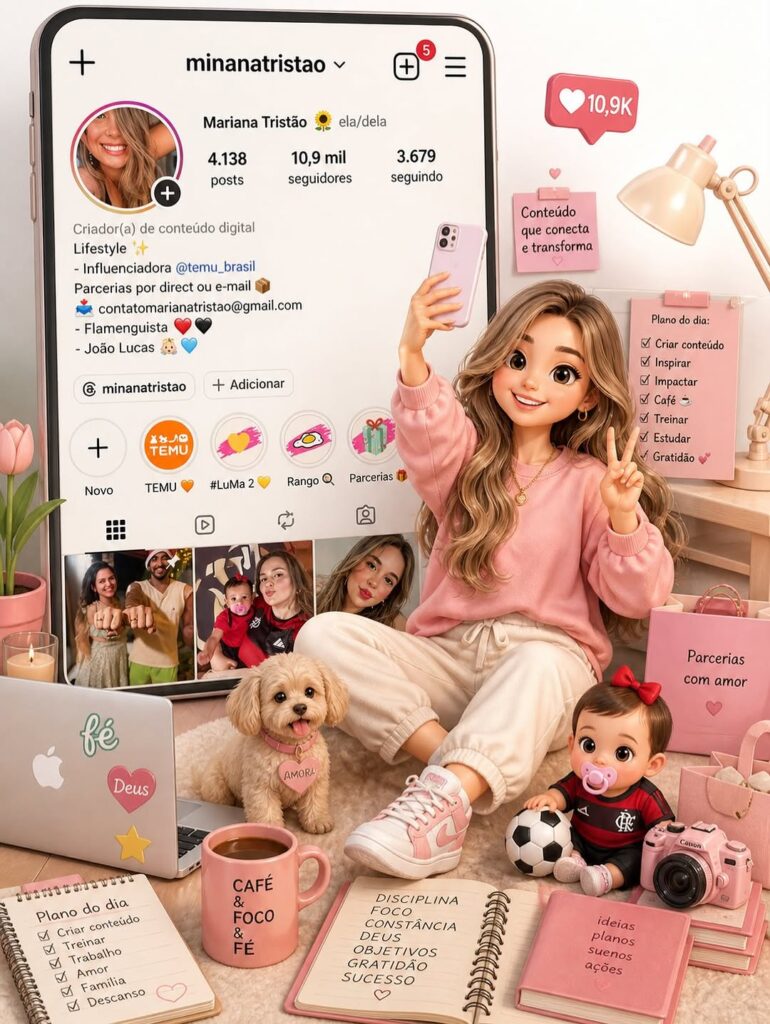
Everything is perfect. Create a miniature directory as if it is coming out of the profile folder.
I want all the elements that describe the book.
Buatlah gambar 3D. 99
Prompt👇
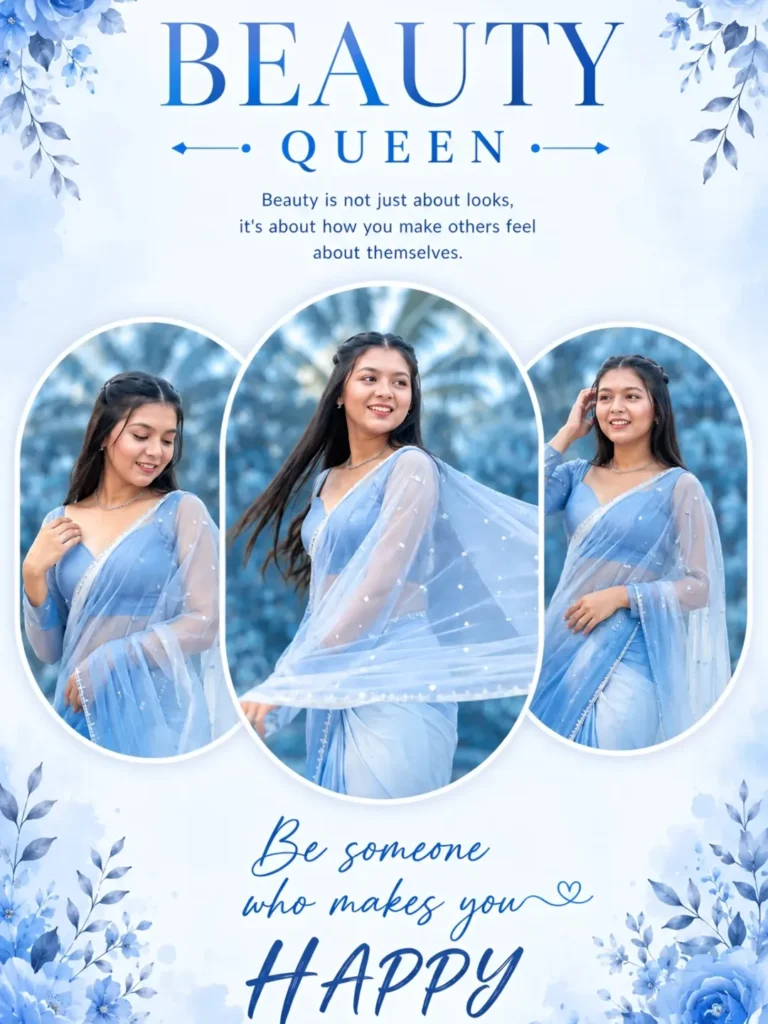
A beautiful young Indian woman wearing a stylish purple and pink gradient saree with a sheer net dupatta, posing gracefully outdoors. She has long straight dark brown hair, soft glowing skin, and a gentle smiling expression. The background shows a blurred natural setting with green palm trees and bright daylight, creating a soft dreamy aesthetic.
The composition is a collage layout with three circular frames:
Left circle: the girl looking down with a shy smile, holding her saree pallu elegantly
Center circle: the girl spinning slightly, showing motion in the flowing dupatta with a joyful expression
Right circle: the girl standing confidently, one hand touching her hair and the other resting near her waist Top text says: “BEAUTY QUEEN” in stylish modern typography, with a small inspirational quote below it.
Bottom text says: “Be someone who makes you HAPPY” in aesthetic handwritten font.
Soft lighting, high brightness, pastel tones, smooth skin texture, shallow depth of field, Instagram
Prompt👇🎁
PROMPT
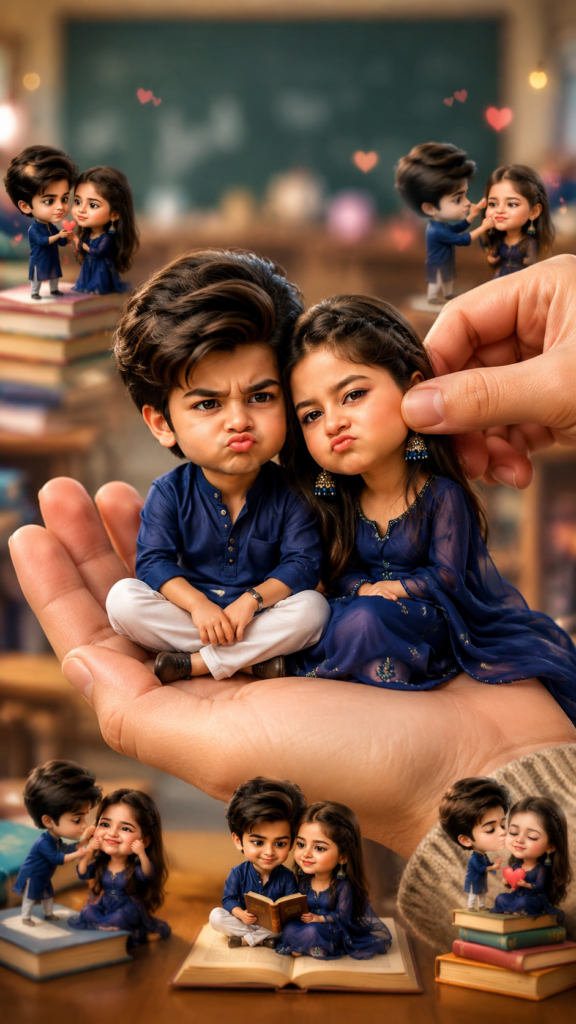
Create a stylized big-head miniature portrait of a young couple. They appear as tiny chibi-style characters with slightly enlarged heads and small bodies, sitting together inside a large woman’s hand. Pose: the couple sitting close together in a cute romantic pose — one seated cross-legged while the other leans slightly on the partner’s shoulder, both looking at the camera. Expressions: slightly pouty, mock-angry but adorable and playful. Add a second hand gently pinching or adjusting one partner’s cheek for a fun, teasing effect.Environment: blurred school classroom background with dreamy bokeh lights. Add multiple tiny 3D mini chibi versions of the couple around them doing funny and romantic activities (pulling cheeks, fighting playfully, holding hearts, sitting on books, etc.). make imageOutfits: exactly same as the reference images, maintaining accurate clothing details and colors.Style: ultra-detailed, ultra-realistic miniature art, soft cinematic lighting, shallow depth of field, clean focus, rea
Thank you