Namaste dosto! Mera naam MD Maqsood hai aur main ek professional video editor hoon jise editing industry mein 7+ saalon ka ground experience hai. Meri social media family ke taur par YouTube par m4editorofficial channel ke sath 13.6K+ subscribers aur Instagram par m4_editor_official par 145K+ followers jude hue hain. Mera maksad hamesha yahi rehta hai ki is platform ke zariye har ek beginner creator ko genuine editing skills, real workflow tricks aur trending AI techniques bilkul free mein sikhayi ja sakein taaki aap bina kisi pareshani ke high-level content create kar sakein.
Happy Raksha Bandhan Motu Patlu AI Text Name Video Editing M4 118
Social media platforms jaise Instagram Reels aur YouTube Shorts par har festival ke dauran customised AI 3D character videos bahut tezi se viral hoti hain. Raksha Bandhan aane wala hai aur is festive season mein Happy Raksha Bandhan Motu Patlu AI Text Name Video Editing ka craze sabse zyada dekha ja raha hai. Log apne bhai-behen ke personalised naam aur dialogue-based 3D animations ke sath reels banakar millions mein views cross kar rahe hain.
Agar aap bhi aisi cinematic 3D visual aur realistic lip-sync voice-over wali reels banana chahte hain, toh yeh complete step-by-step masterclass aapke liye design ki gayi hai. Yahan hum premium prompt copy karne se lekar ChatGPT mein high-definition image generate karne aur phir use animation video mein badalne ka realistic workflow explain karenge.
Festival Season Mein Motu Patlu AI Video Editing Kyun Trend Kar Rahi Hai? m4
Motu aur Patlu Indian audience ke sabse beloved cartoon characters hain. Festive atmosphere jaise Raksha Bandhan par jab yeh characters custom kurtas pehan kar ghar sajate hue nazar aate hain aur user ka personal naam roof board par glowing lighting ke sath dikhta hai, toh viewers instantly relate karte hain.
Aisi videos high engagement generate karti hain kyunki audience comments mein apne naam ki video banane ki request karti hai, jisse algorithm aapki reel ko organic reach boost deta hai. Sahi tools aur clean prompts ke sath aap bina kisi heavy computer software ke sirf apne smartphone se aisi video bana sakte hain.
Phase 1: Photo Prompt Copy Karna Aur Image Create Karna
Sabse pehla step ek detailed 3D Pixar-style realistic image generate karna hota hai jismein proper lighting, festival background aur custom name text shamil ho.
Step 1: M4 Editor Website Se Photo Prompt Copy Karein
- Apne mobile browser mein Google open karein aur search bar mein type karein m4editor.com.
- First search result par click karke website ke homepage par visit karein.
- Website ke search option mein jakar specific post code search karein jo is editing ke liye mention hai (e.g., M4 118).
- Article open hone ke baad niche scroll karein aur Photo Prompt section mein jayein.
- Diye gaye complete text prompt ko select karke copy kar lein.
Original Photo Prompt Reference:
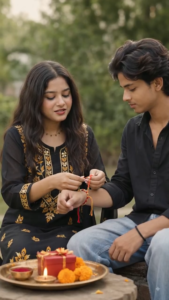
Photo Prompt 👇
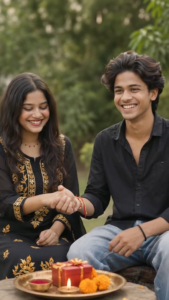
Ultra-realistic cinematic Indian Raksha Bandhan celebration photo of a young Indian brother and sister sitting together at home. Use the uploaded reference images for both people and preserve both faces exactly with strict identity lock. Do not alter facial identity, facial features, face shape, hairstyle, skin tone, age, body proportions, or natural appearance.
The brother is wearing an elegant deep royal blue embroidered kurta with white pajama, slightly curly textured black hair, neatly groomed beard, and a small red tilak on his forehead. The sister is wearing a beautiful pastel lavender traditional salwar suit with delicate golden embroidery, matching sheer dupatta, traditional jhumka earrings, bangles, and a small red bindi.
Show the sister lovingly tying a decorative red-and-gold Rakhi on her brother’s wrist while both look down at the Rakhi with warm, genuine smiles and a natural sibling bond. Keep the pose realistic and emotionally natural.
Place a traditional puja thali in the foreground on a woo
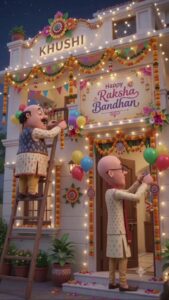
Photo Prompt 👇
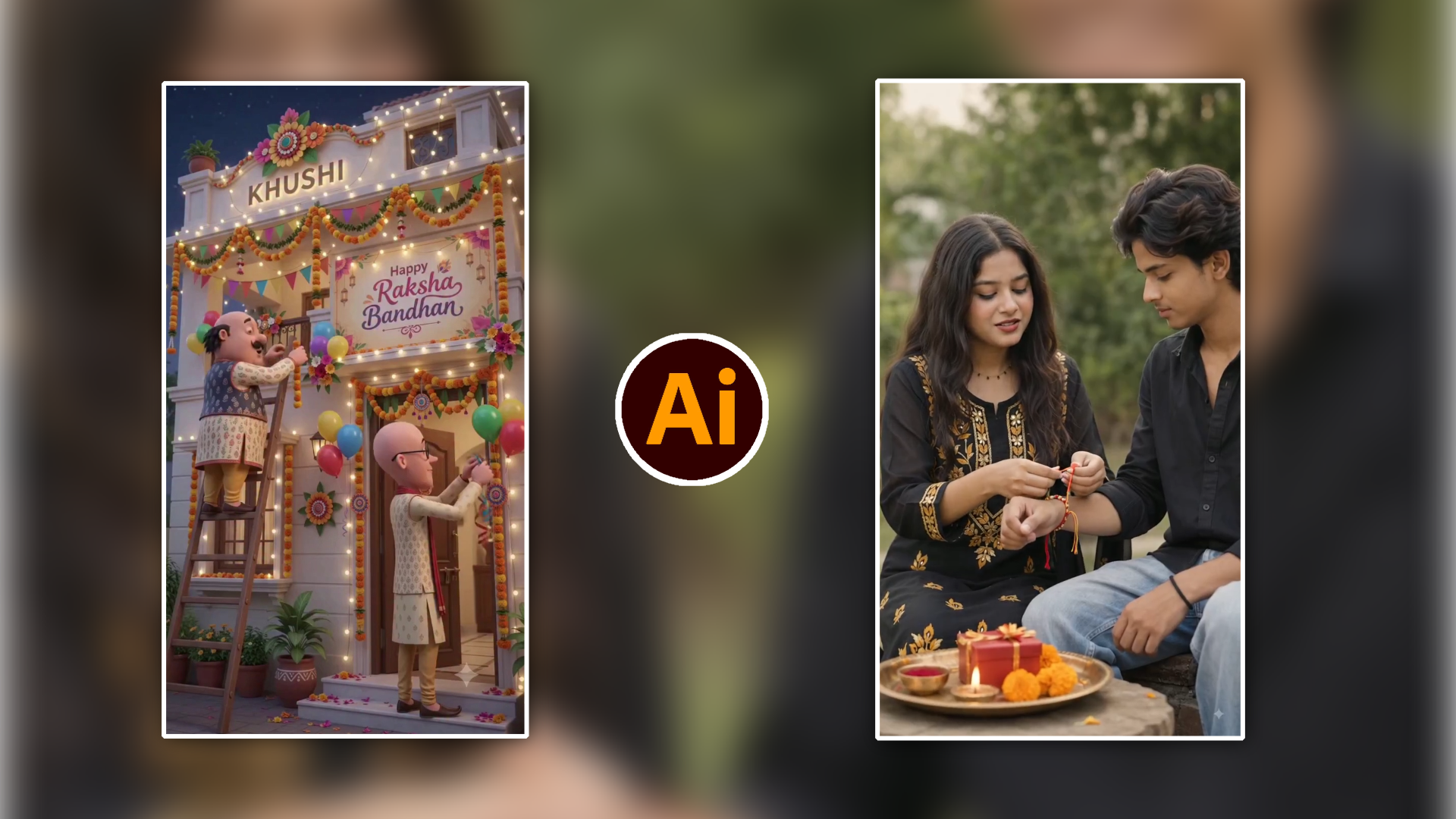
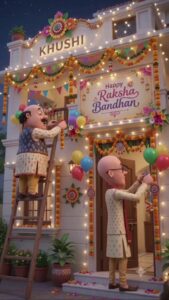
A vibrant 3D animation-style scene of two cartoon characters, resembling Motu and Patlu, decorating the exterior front entrance of an Indian house for the Raksha Bandhan festival in the evening.
Characters & Action:
On the left, a chubby cartoon man with a prominent moustache, wearing a patterned cream kurta, a navy blue embroidered vest, and yellow churidar trousers, stands on a tall wooden ladder hanging orange and yellow marigold garlands.
On the right, a tall, slender bald cartoon man wearing round spectacles, a beige patterned kurta, and a red scarf draped over his shoulder stands on the porch steps, tying festive balloons and hanging ribbons by the front door.
Decorations & Setting:
The house is decorated with glowing warm fairy lights, colourful triangular bunting flags, and marigold toran garlands framing the doors and windows.
A prominent illuminated banner on the wall reads “Happy Raksha Bandhan” in elegant calligraphy with floral artwork.
At the top of the porch facade, a glowing warm 3D sign displays the name “KHUSHI” beneath a large decorative floral crest.
The ground features terracotta flower pots, glowing warm diyas, and scattered flower petals on the porch steps.
Style & Lighting: 3D Pixar/Disney animation render, ultra-detailed textures, warm festive golden lighting, cinematic dusk atmosphere, sharp focus, 8k resolution, vertical 9:16 aspect ratio.
Step 2: ChatGPT Mein Photo Generate Aur Download Karein
- Apne smartphone mein ChatGPT App ko launch karein.
- Message chatbox mein copy kiya gaya Photo Prompt paste karein.
- Agar aapko koi customized name add karna hai, toh prompt ke andar jahan “KHUSHI” likha hai, uski jagah apna ya jiske liye video bana rahe hain uska name replace karein.
- Generate button (Arrow icon) par tap karein.
- AI kuch hi seconds mein vertical 9:16 aspect ratio mein ultra-realistic 3D Raksha Bandhan image taiyar karke de dega.
- Generated image par tap karke use full resolution mein Download/Save kar lein.
Phase 2: Video Prompt Copy Karna Aur AI Video Generate Karna
Photo generate karne ke baad dusra main task visual ko dynamic motion aur personalised character dialogues mein convert karna hota hai.
Step 1: Website Se Video Prompt Copy Karein
- Phir se m4editor.com wale article tab par wapas jayein.
- Scroll down karke Video Prompt heading par jayein.
- Yahan par Motu aur Patlu ke script dialogues diye gaye hain, inhe copy karein.
Original Video Prompt Script Reference:
Video Prompt 👇
- Sister: Bhaiya, mujhe mehnga gift nahi chahiye.
- Brother: To kya chahiye?
- Sister: Bas aap hamesha mere saath rehna.
Video Prompt 👇
Patlu: “Hello Khushi ji! Aapko aur aapke poore parivaar ko Raksha Bandhan ki advance mein bahut-bahut badhai!”
Motu: “Khushi ji, aapki nayi reel to trending mein number one chal rahi hai! 2 million views cross ho gaye hain, ab to jashn hona chahiye!“
Step 2: Photo Se Video Convert Karne Ka Complete Process
- Apne phone mein YouTube App open karein.
- Niche centre mein diye gaye Plus (+) icon par tap karein aur Create a Short choose karein.
- Bottom-left side mein gallery icon par tap karke Add your photo / Generate Video option ko select karein.
- Interface open hote hi text prompt box mein copy kiya gaya Video Prompt paste karein.
- Script ke andar jahan “Khushi ji” likha hai, wahan apna required name update kar dein taaki character wahi audio voice-over deliver karein.
- Add Image button par tap karein aur pehle download ki gayi 3D photo ko upload karein.
- Niche diye gaye Generate button par click karein.
- Process 100% complete hone tak wait karein. Characters automatically hand gestures, natural eye blinks aur accurate lip-syncing ke sath bohot clean video generate kar denge.
- Final rendering ke baad video ko apne device storage mein export/save kar lein.
3D Festive Output Ko Optimise Karne Ka Smart Method
Har AI-generated visual social media upload ke dauran thoda compress hota hai. Isliye video export karne ke baad kuch important optimisation steps zaroor follow karein:
- Aspect Ratio Integrity: Prompt mein hamesha vertical 9:16 format maintain rakhein taaki frame Instagram Reels aur Shorts feed mein properly fit baithe bina cut hue.
- Text Contrast Check: AI photo generate karte waqt check karein ki building facade par likha gaya Nameplate text properly visible ho aur marigold background se mix na ho raha ho.
- Audio-Video Balancing: Video ban jane ke baad aap kisi mobile video editor (jaise VN Editor ya CapCut) mein halka sa traditional festive background music (sitar ya flute instrumental) low volume (-25dB) par blend kar sakte hain jisse dialogue delivery clear sunayi de.
Bonus Tip
Agar generated video mein character ke facial features halki si dynamic movement ke waqt blur lag rahe hon, toh VN Video Editor ya CapCut app mein project open karke video par Sharpen (15%) aur Clarity (10%) adjust karein. Iske sath Warm Golden Filter apply karke saturation +5 badha dein. Yeh simple visual enhancement festive lights ko zyada bright aur vibrant bana deta hai, jisse content screen par professional studio animation jaisa pop hota hai.
Conclusion
Raksha Bandhan festival par personalised 3D animated character reels banana ab bilkul aasan ho chuka hai. Bas sahi prompt aur structured pipeline ko follow karke aap easily viral-worthy videos bana sakte hain. Aaj hi prompts copy karein aur apni personalised festive reel create karke practice start karein!