Author Profile: Main MD Maqsood, ek professional video editor hoon jise video editing aur visual storytelling industry mein 7+ saal se zyada ka real-world experience hai. Main apne official YouTube channel “m4editorofficial” (13.6K subscribers) aur Instagram page “m4_editor_official” (145K followers) par editing ke real workflows, trending tools aur technical guidance bina kisi charge ke share karta hoon. Mera maqsad yahi hai ki har beginner creator authentic visual techniques ko asani se seekh kar studio-quality content create kar sake.
Chhath Puja AI Video Editing Prompt 2026 | Trending AI Video Prompt M4 152
Chhath Mahaparv shradha, pavitrata aur adbhut sanskriti ka sabse bada utsav hai. Har saal is festive season mein social media feeds par devotional reels, Ganga ghat ke manmohak drishya aur Surya upasana ke visuals ki behad zyada demand rehti hai. Pehle jahan ek high-end cinematic festival video taiyar karne ke liye dher saare camera equipment, physical lighting gear aur ghanto editing timeline par bitane padte the, wahin ab generative artificial intelligence ne is visual creation ko sabhi ke liye asan aur accessible bana diya hai.
Lekin AI video generation mein sabse bada challenge hota hai natural physics aur cultural authenticity maintain karna. Bahut se log generic prompts use karte hain, jisse unka final output animated ya cartoonish ban jata hai. Is comprehensive beginner guide mein hum detail mein baat karenge ki kaise aap Chhath Puja AI Video Editing Prompt 2026 ka use karke Google AI flow ke madhyam se hyper-realistic, photorealistic aur natural devotional video generate kar sakte hain.
Chhath Puja AI Video Trend 2026 Kya Hai Aur Yeh Kyun Viral Ho Raha Hai?
Digital video creation ki duniya mein 2026 ka sabse trending topic hai Image-to-Video AI Diffusion. Is technology ke zariye creators apni normal traditional photo ko ek high-end cinematic short video mein convert kar rahe hain, jismein subject ke dynamic movements aur surrounding environment bilkul real footage jaise dikhte hain.
Is trend ke viral hone ke piche teen mukhya visual factors kaam karte hain:
- Authentic Cultural Detail: Nadi ke pavitra jal mein natural tarangein, traditional baans ka soop, thekua, nariyal aur arghya samagri ka authentic texture.
- Golden Hour Lighting: Subah ke suraj ki laal-sunhari kiranein jo pani aur traditional attire par natural rim reflection banati hain.
- Pure Physical Realism: Cartoon ya 3D animation ke bajaye bilkul organic human motion aur exact facial expressions.
Jab audience aisi high-fidelity devotional content reels ya shorts par dekhti hai, toh watch-time aur retention naturally badh jata hai, jisse platforms aisi videos ko lakhon logon tak recommend karte hain.
Chhath Puja AI Video Banane Ke Liye Zaroori Requirements
Video generation shuru karne se pehle ye basic cheezein arrange karke rakh lein taaki process ke dauran koi dikkat na aaye:
- Clear Portrait Photo: Ek aisi photo jismein aapka chehra samne ki taraf ho aur lighting bilkul natural ho. Agar photo mein traditional festive getup (jaise saree, maang mein lamba sindoor ya traditional kurta) ho toh video output double realistic banta hai.
- Fast Internet Connection: AI model cloud server par high-resolution video render karta hai, isliye stable network connectivity zaroori hai.
- Verified Master Prompt: Ek properly calibrated natural language prompt jo AI engine ko exact camera movement, lighting aur character identity ka instruction deta hai.
- Google AI Flow Account: Google AI flow ke official portal ka access jahan Image-to-Video workspace smoothly available ho.
- Mobile Editing App: VN Editor ya CapCut jaisi simple application taaki export ke baad audio sync aur visual polish kiya ja sake.
The Master Prompt: Ghat & Arghya Cinematic Setup
Neeche diya gaya structured prompt Google AI flow ke rendering architecture ke hisab se fully calibrate kiya gaya hai:
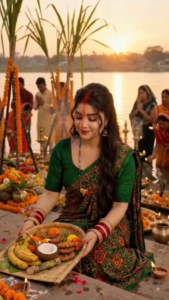
Chhat Puja Ai Video prompt 👇
पानी: कमर तक, यानी लगभग आधा शरीर पानी में।
हाथ में: पारंपरिक बाँस का सूप, जिसमें फल, फूल, ठेकुआ, नारियल, गन्ना, केला, चावल और पूजा सामग्री हैं।
आसपास: बहुत बड़ी संख्या में श्रद्धालु, सभी Chhath Puja करते हुए।
पीछे: विशाल गंगा नदी + बड़ा घाट + रोशनी + पूजा की सजावट।
Action: सूप को दोनों हाथों से उठाकर सूर्य को अर्घ्य देना।
Face: आपकी reference photo जैसा exact identity preservation।
Dress: reference photo वाली same dress, same colour और same jewellery।
Style: पूरी तरह realistic cinematic, fake/AI जैसा नहीं।
Website Se Prompt Lekar Google AI Flow Par Video Banane Ka Step-by-Step Guide
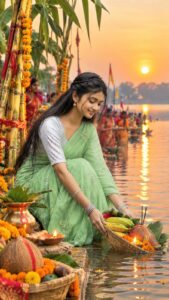
Chhat Puja Ai Photo Prompt 👇
छठ पूजा फोटो एडिट Prompt — 9:16
Ultra-realistic cinematic Chhath Puja portrait, vertical 9:16. Use the uploaded woman as the exact subject and preserve her facial identity completely — STRICT IDENTITY PRESERVATION, same face shape, eyes, eyebrows, nose, lips, skin tone, natural skin texture, hairstyle and age. No face swap, no beautification, no facial modification.
Show her sitting respectfully at a beautiful riverside Chhath Puja ghat during sunset, performing Chhath Puja and offering arghya to the setting sun. She is wearing an elegant light pastel green traditional saree with a white embroidered blouse, delicate earrings and multiple silver bangles. Her long black hair is naturally styled with a neat braided crown.
In front of her, place a traditional bamboo soop/daliya filled with bananas, coconut, fruits and other Chhath Puja offerings, with small glowing diyas. Decorate the ghat with sugarcane stalks, orange marigold garlands, brass kalash and traditional पूजा सामग्री. In the background, show devotees performing Chhath Puja near the river, softly blurred for cinematic depth.
Beautiful golden-orange sunset, glowing sun near the horizon, warm reflections on the river water, realistic diya flames, soft atmospheric haze, natural shadows, detailed saree fabric, authentic Indian festive atmosphere, DSLR photography, shallow depth of field, cinematic composition, photorealistic, 4K, HDR, highly detailed, natural skin texture.
Agar aap bilkul beginner hain aur pehli baar AI festival video bana rahe hain, toh in aasan steps ko sequential order mein follow karein:
Step 1: Official Website Se Prompt Copy Karein
Sabse pehle apne mobile ya computer browser mein official website m4editor.com par jayein. Website ke search option mein Chhath Puja AI Video Editing Prompt 2026 open karein aur wahan diye gaye verified master prompt ko clipboard par copy kar lein.
Step 2: Google AI Flow Par Jayein
Prompt copy karne ke turant baad Google AI Flow ki official website open karein aur apne account se sign-in karke dashboard par aayein. Wahan se Image-to-Video generation tool select karein.
Step 3: Apni Chhath Puja Getup Wali Photo Upload Karein
Workspace ke andar Upload Image button par tap karein aur apni gallery se Chhath Puja getup wali clear photo ko upload karein. Dhyan rahe ki photo mein chehre par koi filter ya heavy shadow na ho.
Step 4: Copy Kiya Hua Prompt Paste Karein
Photo upload hone ke baad text input box mein m4editor.com se copy kiya gaya master prompt paste kar dein. Prompt ke keywords jaise “exact identity preservation” aur “same dress same colour” ko bina badle waise hi rehne dein.
Step 5: Video Render Shuru Karein
Video framing ko reels format ke liye 9:16 vertical aspect ratio par select karein aur Generate button par tap kar dein. Kuch hi der mein cloud processing complete hone ke baad aapki high-quality Chhath Puja video banna shuru ho jayegi aur screen par download ke liye ready ho jayegi.
Step 6: After Editing Touch (Final Polish)
Video download hone ke baad aap uski after-editing zaroor karein. Clip ko VN Editor ya CapCut mein open karein, background mein trending traditional Chhath geet sync karein aur paani ke flow ka sound effect add karke final HD export lein.
Visual Consistency Aur Realism Ke Key Factors
AI video ko visually appealing aur natural dikhane ke liye in core technical baaton par dhyan dena zaroori hai:
- Hydraulic Water Ripples: Video mein nadi ka paani static image ki tarah nahi dikhna chahiye; subject ke movement ke sath paani ki waves naturally travel karni chahiye.
- Warm Golden Hour Sunlight: Surya arghya ke samay ki subah wali soft sunlight chehre aur kapdon par realistic lighting banati hai, jisse digital artefacts chhup jate hain.
- Facial Texture Rigidity: Motion ke dauran character ki aankh aur naak ke features stretch nahi hone chahiye taaki original look 100% preserve rahe.
Bonus Tip: Pro-Level Post-Production Workflow
Sirf AI tool se export karke clip upload karne ke bajaye usme 2 minute ka smart editing touch add karein:
Video ko VN Editor ya CapCut app mein open karein. Video par ek halka Warm/Golden LUT apply karein ya manual color correction mein jakar Temperature ko +5 aur Vibrance ko +4 karein. Iske baad video ke background mein traditional Chhath Puja ka devotional audio (jaise Sharda Sinha ji ke classic geet) sync karein. Saath hi ek halka river water sound effect (volume 10-15% par) layer karein. Ye audio-visual balance video ko completely professional aur viral-ready banata hai.
Conclusion
Chhath Puja jaise pavitra parv par apni devotional identity ko cinematic video mein badalna ab behad aasan ho chuka hai. Bas m4editor.com se verified prompt copy karein, Google AI flow mein apni festive photo upload karke render lagayein aur aakhiri mein halki after-editing se video ko complete studio look dein. Upar bataye gaye step-by-step guidance ko follow karein aur is festive season apni unique AI devotional videos create karke social media par viral hon.