About the Author: Hi friends, main hoon MD Maqsood, ek professional video editor jise video production aur post-production industry mein 7+ years ka practical experience hai. Main YouTube par m4editorofficial channel run karta hoon jahan 13.6K se zyada passionate creators judey hain, aur mere Instagram handle m4_editor_official par 145K creators ki family mere real-world editing breakdowns follow karti hai. Mera maksad hamesha practical workflow share karna hota hai taaki beginners bina kisi mehnge hardware ke bhi international standard visual content create kar sakein.
Gemini AI Se AI Video Kaise Banaye: Complete Step-by-Step Beginner Guide M4 149
Digital video production ka daur itni tezi se badal chuka hai ki ab studio-level cinematic videos banane ke liye lakhon ke camera setups ya heavy visual effects team ki bilkul zaroorat nahi hai. Artificial Intelligence ne har creator ko direct command de di hai jisse wo apne room mein baith kar high-definition storytelling videos generate kar sake. Aaj internet par har ambitious creator ka ek hi sawal hai: Gemini AI se AI video kaise banaye aur is technical workflow ko simple tarike se kaise master karein.
Google ka Gemini AI ek powerful aur advanced visual engine brain ki tarah act karta hai. Yeh natural text commands ko standard scripts se lekar professional cinematography shot-prompts tak instantly convert kar sakta hai. Agar aap ek naye creator hain aur bilkul zero experience ke saath high-retention videos banana chahte hain, toh yeh complete guide aapko structured aur practical step-by-step roadmap provide karegi.
Gemini AI Video Pipeline Kaise Kaam Karti Hai
Bahut se beginners ko lagta hai ki Gemini AI ek click mein ready-to-upload video file download karwa deta hai. Lekin real production pipeline thodi different aur systematic hoti hai. High quality visual content create karne ke liye ek smart do-stage workflow follow kiya jata hai.
Is process mein Gemini AI aapka Creative Director, Lead Scriptwriter aur Cinematography Designer banta hai. Aapka basic idea kitna bhi rough kyun na ho, Gemini us idea ko frame-by-frame breakdown, camera directions, lighting specifics aur hyper-realistic visual prompts mein split karta hai. Uske baad in rich visual instructions ko generative video rendering systems mein execute karke ready video clips hasil ki jaati hain.
Yeh complete pipeline teen main pillars par depend karti hai:
- Story Planning Aur Narrative Hook: Video ke pehle 3 seconds mein audience ka dhyan grab karna.
- Cinematic Visual Prompts: Camera lens, depth of field aur subject movement ko accurately detail karna.
- Timeline Stitching Aur Audio Production: Clips ko order mein lagana, background ambience set karna aur human voiceover sync karna.
Step 1: Retention-Focused Script Aur Visual Hooks Ready Karein
Ek successful video ka heart hamesha uski script hoti hai. Agar aapka content script-wise boring hoga, toh visually sundar hone ke baad bhi log use swipe kar denge. Isliye sabse pehla kaam hai Gemini AI se ek high-energy aur hook-based script taiyar karwana.
Aapko Gemini ko ek clear professional brief dena hota hai. Jaise: “Act as a professional short-form video director. Write an engaging 30-second script for YouTube Shorts on the topic ‘The Future of AI Cities in 2050’. Divide this script into 5 visual scenes with exact camera angles and powerful voiceover lines.”
Is command ke baad Gemini aapko exact structured breakdown dega:
- Scene 1 (0 to 3 sec): Ultra-fast drone shot zooming into a futuristic neon skyline, jo audience ko scroll stop karne par majboor karega.
- Scene 2 (4 to 10 sec): Flying electric pods gliding through vertical garden skyscrapers.
- Scene 3 (11 to 18 sec): AI robots managing autonomous solar energy grids.
- Scene 4 (19 to 25 sec): Holographic displays interacting with humans in transparent parks.
- Scene 5 (26 to 30 sec): High-energy closing line aur natural call to action.
Step 2: High-Definition Cinematic Prompts Generate Karein
Script ready hone ke baad beginners sabse aam galti karte hain: wo generator mein sirf ek chhota sa sentence likh dete hain jaise “a city in the future”. Is generic prompt se AI hamesha cartoonish ya fake looking video create karta hai. Realistic look pane ke liye aapko technical photography tags use karne padte hain.
Aap Gemini AI ko prompt expand karne ke liye bolein: “Convert each of the 5 scenes above into realistic text-to-video generation prompts. Include specific camera focal length, volumetric cinematic lighting, cinematic texture details, and accurate camera motion.”
Gemini aapko standard output ke bajaye detailed prompt dega: “Cinematic wide-angle tracking shot of a vertical green futuristic city at twilight, soft volumetric golden hour lighting, hyper-realistic reflections on glass architectures, smooth gimbal camera motion, 35mm lens depth of field, photorealistic 8K render.”
Jab aap itni clear detailing provide karte hain, tab video generation engine bilkul glitch-free aur consistent output render karta hai.
Step 3: Text Prompts Ko Real Video Clips Mein Render Karein
Prompts finalize hone ke baad unhe actual moving video clips mein translate karne ka time aata hai. Yahan aap Gemini ke generated detailed prompts ko video generation ecosystem mein transfer karte hain.
Agar aap Google ke native generative video tools (jaise Google Veo ecosystem) ke connected interface par hain, toh aap direct text command se ultra-smooth camera moves wali clips render kar sakte hain. Wahi doosri taraf, aap in prompts ko dedicated AI video platforms jaise Runway Gen-3, Luma Dream Machine, Kling AI ya Pika ke input field mein paste kar sakte hain.
Clips render karte waqt do basic settings ka dhyan rakhein:
- Aspect Ratio Selection: Reels aur YouTube Shorts ke liye hamesha 9:16 vertical ratio select karein, jabki regular YouTube videos ke liye 16:9 landscape ratio choose karein.
- Motion Intensity: Camera motion setting ko hamesha medium rakhein taaki frame ke andar character ya object stretch hokar distort na ho.
Step 4: AI Voiceover Aur Realistic Sound Design Sync Karein
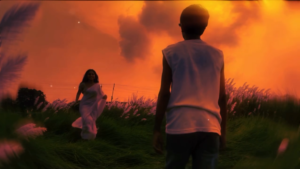
Photo Prompt 👇
Here is a detailed AI image generation prompt based on the provided picture:
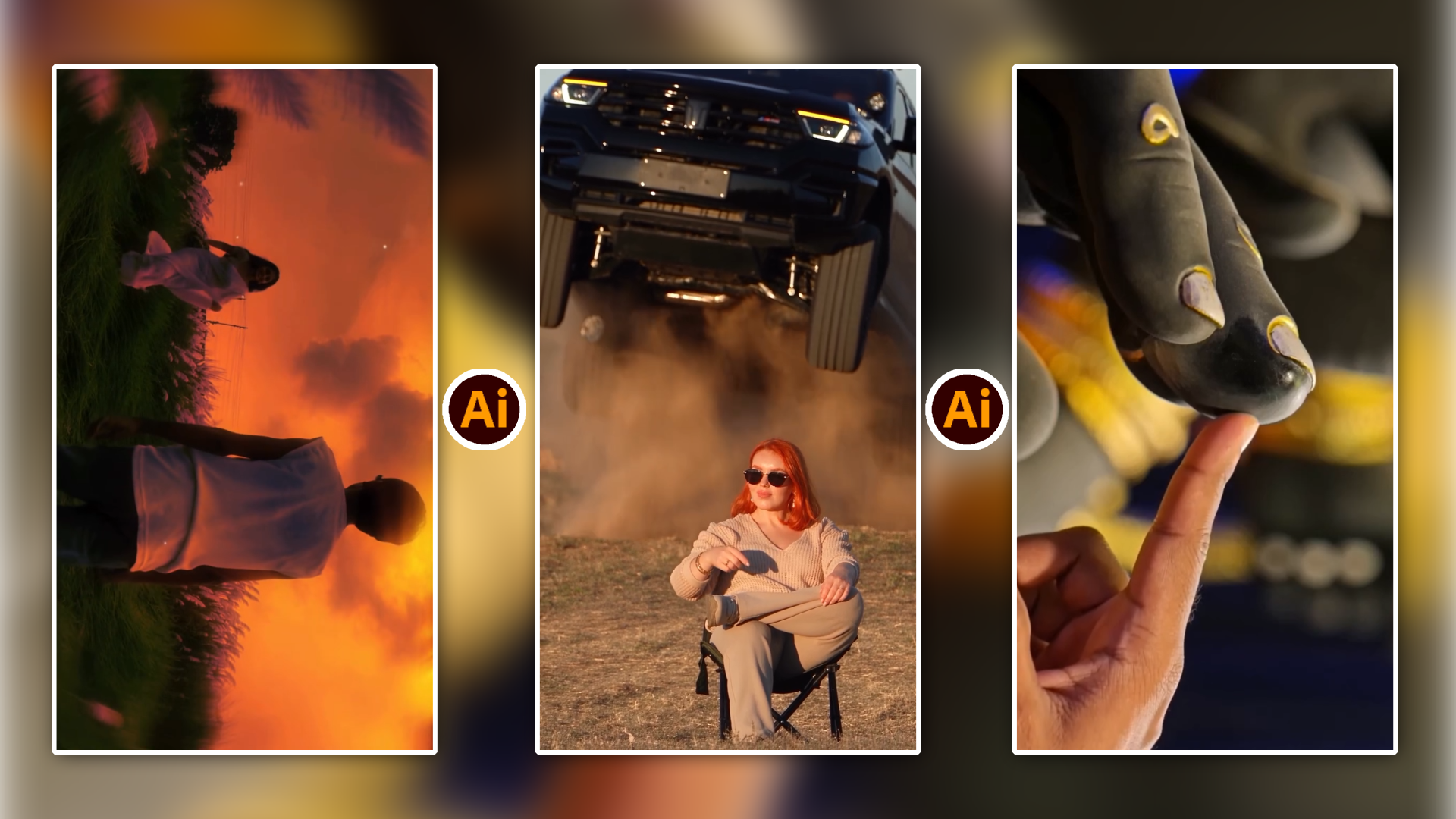
Subject & Composition: A cinematic shot featuring a person seen from behind in the foreground, wearing a white sleeveless tank top and dark trousers. In the distance, a woman wearing a flowing white saree is walking through the field.
Environment: A lush, vibrant green meadow filled with tall white grass plumes.
Sky & Lighting: A dramatic, fiery sunset or sunrise sky ablaze with intense orange and red hues and moody dark clouds.
Style & Mood: A nostalgic, dreamy, and romantic film still with soft-focus elements framing the foreground.
Ai Video prompt 👇
Here is a detailed AI image generation prompt based on the provided picture:
* Subject & Composition: A cinematic shot featuring a person seen from behind in the foreground, wearing a white sleeveless tank top and dark trousers. In the distance, a woman wearing a flowing white saree is walking through the field.
* Environment: A lush, vibrant green meadow filled with tall white grass plumes.
* Sky & Lighting: A dramatic, fiery sunset or sunrise sky ablaze with intense orange and red hues and moody dark clouds.
* Style & Mood: A nostalgic, dreamy, and romantic film still with soft-focus elements framing the foreground.
Audio kisi bhi video content ka 50 percent retention decide karta hai. Ek high quality AI video tab tak complete nahi maani ja sakti jab tak uska sound design rich aur natural na ho.
- Natural Voice Narration: Gemini se finalized voiceover lines ko kisi reliable neural text-to-speech platform mein paste karke realistic deep tone voice audio download karein.
- Ambient Sound Foley: Gemini se specific sound effects ki list maangein. Futuristic city ke liye Gemini aapko suggest karega: smooth magnetic engine sound, subtle wind hum aur distant digital chime.
- Background Score: Light, non-distracting background score hamesha voiceover ke volume se 18 se 20 dB kam rakhein taaki har word bilkul saaf sunai de.
Step 5: Timeline Assembly Aur Beginner Editing Tricks
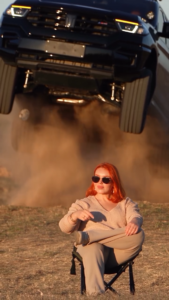
Ai Video Prompt 👇
Here is a breakdown of what happens in the video:
* Opening Scene: A woman with red hair and sunglasses sits calmly in a camping chair outdoors in a hilly field.
* The Action: Suddenly, a large black truck launches into the air, jumping over the area behind her and kicking up a massive cloud of dust.
* Conclusion: The vehicle lands and moves past her while she remains completely seated, maintaining a cool and composed demeanor.
Download kiye hue clips ko ek saath timeline par combine karne ke liye aap CapCut, VN Editor, ya Premiere Pro jaisa koi bhi beginner-friendly software use kar sakte hain.
WordPress ya social media platforms par upload karne se pehle apni editing ko professional polish dene ke aasaan tareeqe yeh hain:
- Pacing Aur Cuts: Har AI clip ko 3 se 4 seconds se lamba na rakhein. Visual pacing fast hone se audience ka attention span barkarar rehta hai.
- Audio Overlap Technique: Next clip ke aane se lagbhag aadha second pehle hi uska sound effect play karna shuru kar dein. Isse do scenes ke beech ka cut bahut natural feel hota hai.
- Dynamic On-Screen Text: Pure sentence ke bajaye 2 se 3 impactful words ke bold dynamic captions screen ke center-lower area mein set karein taaki screen reading effortless ho sake.
High Growth Content Categories For AI Videos
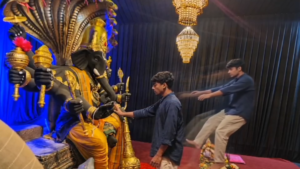
Ai Video Prompt 👇
Here is a description of the video:
* Setting: A young man stands in a decorated indoor space facing a large, ornate, dark-skinned statue of Lord Ganesha seated with a multi-headed cobra canopy overhead. Crystal chandeliers hang from the ceiling, and the floor is covered with a red carpet.
* Actions:
* The man stands in front of the idol, looking up at it.
* The camera switches to a perspective looking past the statue toward the man as he points forward.
* A close-up shot shows a finger touching the foot of the statue.
* The man reaches out to touch the statue’s hand, while simultaneously, a comical ghost-like or spectral clone of the man appears to jump back in shock or fear from a small altar arrangement on the floor.
What would you like to know or do regarding this video?
Agar aap AI video creation se audience build karna chahte hain, toh shuruat mein in evergreen categories par focus karein:
- Ancient History Aur Civilization Secrets: Historical buildings, ancient kings aur lost cities ke dramatic visual reconstructions.
- Space Science Aur Astronomical Facts: Black holes, Mars colonies aur solar system ke deep educational visuals.
- Self-Improvement Aur Mindset Stories: Atmospheric lighting wale human portraits aur inspiring visual allegories.
- Nature Wonders Aur Microscopic Life: Deep sea creatures aur micro-level natural phenomena jo real camera se capture karna mushkil hota hai.
Smart Character Consistency Hacks
Beginners ko sabse zyada mushkil yeh lagti hai ki har naye scene mein unka main character badal jata hai. Is problem ko tackle karne ke liye ek simple rule follow karein:
Gemini se character design karate waqt ek static aur clear physical description freeze kar lein. Example ke liye: “A 25-year-old explorer wearing an olive green tactical jacket, black round glasses, and a blue backpack.”
Jab bhi aap agli clip ka prompt Gemini se generate karwayein, toh is exact character description ko prompt ke start mein hamesha include karein. Is continuous visual anchoring se har clip mein aapka character visually match karega aur video ek complete film jaisi dikhegi.
Conclusion
Gemini AI video creation ko complex technical skills ke daayre se nikal kar creative ideas ke playground mein le aaya hai. Jab aap ek focused script, accurate camera prompts aur clean audio pacing ko ek systematic pipeline mein integrate karte hain, toh outcome hamesha professional nikalta hai. Is complete workflow ko aaj hi practical testing mein laayein aur consistently naye ideas create karte rahein.