Hello dosto! Is website par aapka swagat hai. Main pichle 7+ years se editing industry mein ek professional video editor aur content creator ke roop mein active hoon. Apne is lambe safar mein maine digital art aur high-end editing ke har naye trend ko bohot kareeb se analyse kiya hai. Aaj main apne YouTube channel m4editorofficial (jahan 13.6K subscribers ki family hai) aur Instagram page m4_editor_official (jahan 145K followers ka pyaar mila hai) ke zariye trending editing content aur tips share karta hoon. Is platform ko banane ka mera sabse bada maksad yahi hai ki jo practical knowledge aur premium skills maine saalo ki mehnat se seekhi hain, wo aap sabhi beginners ko bilkul free aur genuine tarike se seekhne ko milein taaki aap bhi ek successful digital creator ban sakein.
Master the Art: How to Create Stunning AI Digital Art from Photos. M4 78
Aaj kal social media par har jagah ek alag hi craze dekhne ko mil raha hai—wo hai AI Digital Art from Photos. Agar aap Instagram, Facebook, ya Pinterest scroll karte hain, toh aapne aisi viral images zaroor dekhne ko milti hain jo dikhne mein toh ek normal photo jaisi hoti hain, lekin unka look kisi futuristic anime, 3D Pixar character, ya fir classic oil painting jaisa lagta hai.
Pehle ke time par agar kisi normal photo ko digital art mein convert karna hota था, toh Photoshop ya Illustrator par ghanto ki manually mehnat lagti thi. Lekin aaj, AI (Artificial Intelligence) tools ki madad se aap sirf ek click mein apni simple gallery photo ko ek masterpiece mein badal sakte hain. Is detailed guide mein, main aapko apna personal industry experience aur wo saari secret techniques bataunga jisse aap professional quality AI digital art from photos create kar sakein, bina kisi advanced technical programming ke.
Why AI Digital Art is the Next Big Thing for Creators
Ek creator aur experienced editor ke point of view se agar dekha jaye, toh AI digital art sirf ek temporary trend nahi hai, balki yeh visual storytelling ka future hai. Iske peeche kuch bade aur genuine reasons hain:
- High Engagement Rate: Agar aap apne social media handles par normal portraits ki jagah AI-crafted artistic photo art upload karte hain, toh uspar engagement aur reach 2x tak badh jati hai.
- Professional Personal Branding: Aaj kal bade-bade creators are using this technique to create unique profile pictures (PFPs), YouTube high-quality thumbnails, and channel art design kar rahe hain jo unke brand ko solid look deta hai.
- Passive Income Source: Log aaj kal freelance platforms (jaise Fiverr ya Upwork) par logo ke liye unki simple photos se premium AI art generate karke acchi earning kar rahe hain.
Chaliye ab baat karte hain us proper step-by-step workflow ki jise use karke aap bilkul flawless output nikal sakte hain.
Step-by-Step Guide: How to Generate Stunning AI Digital Art from Photos
Aisa nahi hai ki aapne koi bhi random app download kiya, photo upload ki aur direct perfect art mil gaya. Ek perfect aur professional output paane ke liye aapko ek proper step-by-step workflow follow karna padta hai. Agar aap niche diye gaye steps ko sahi order mein follow karenge, toh aapka final image bilkul professional aur real dikhega.
Step 1: Sahi AI Tool Ka Selection Karein
Sabse pehle, aapko apne device aur requirements ke hisaaye se ek right platform chunna hoga. Sahi tool hi aapke final art ki visual quality aur details decide karta hai.
- Desktop Users Ke Liye: Agar aapke paas PC hai aur aap next-level high resolution output chahte hain, toh Midjourney (v6) ya Stable Diffusion sabse best options hain. In me aapko advanced Image-to-Image (Img2Img) ka feature bohot strong milta hai.
- Mobile Users Ke Liye: Agar aap mobile par fast editing karte hain, toh Adobe Firefly (Web version), Lensa, ya Remini apps aapke liye sabse behtareen aur aasan option hain jahan fast output milta hai.
Step 2: Base Photo Ki Quality Ko Optimise Karein
AI tool tabhi acche se kaam karega jab aapki input image clean aur detailed hoti hai. Agar aapki photo blurry ya low-resolution hogi, toh AI face ke main features ko distort (kharab) kar dega.
- Proper Studio Lighting: Koshish karein ki photo mein face par achi light ho (jaise natural daylight ya ring light). Face par dark shadows kam se kam honi chahiye.
- Perfect Portrait Angle: Ek straight face-on portrait ya clear side-profile photo AI algorithms ke liye sabse best aur accurate recognition results deti hai.
- Clean Background Area: Background-colour jitna simple ya plain hoga, AI aapke main subject (yaani aapke face) par utna hi acche se focus kar payega.
Step 3: Image Weight Settings Ko Configure Karein
Jab aap advanced AI tools mein photo upload karte hain, toh wahan ek setting hoti hai jise Image Weight ($IW$) kehte hain. Yeh ek bohot hi important parameter setting hai jo aksar beginners miss kar dete hain.
- High Image Weight Directive: Agar aap chahte hain ki final output bilkul aapke face jaisa hi copy dikhe aur sirf background ya clothing badle, toh image weight ko hamesha high (jaise Midjourney me –iw 2.0) set rakhein.
- Low Image Weight Directive: Agar aap sirf apne face ka ek halka sa reference dekar poori tarah ek naya structural look chahte hain (jaise ek futuristic cyberpunk robot ya portrait canvas), toh weight value ko kam set karein.
Step 4: Descriptive Text Prompt Input Karein
Sirf photo upload karne se perfect art nahi banta, uske saath ek accha aur detailed text prompt dena zaroor hai. AI engine ko jitna clear instruction milega, art utna hi clean aur khoobsurat banega.
- SEO-Friendly Prompt Technique: Sirf “make me an anime” ya “make digital art” likhne ki jagah clear aur specific details add karein jo user intent ko satisfy karein.
- Example Prompt Style: “Convert this photo into a 4k high-quality Makoto Shinkai anime style, vibrant colours, soft cinematic lighting, detailed facial expressions.”
4 Smart Text Prompts for Enhancing AI Art
Aapke kaam ko aur aasan banane ke liye main yahan 4 trending prompt templates share kar raha hoon jise aap direct copy karke apne tools mein use kar sakte hain:
1. Hyper-Realistic Anime Style
“Convert this photo into a 4k high-quality Makoto Shinkai anime style, vibrant colours, beautiful sky background, soft cinematic lighting, detailed facial expressions.”
2. Cyberpunk & Futuristic Look
“Transform this portrait into a cyberpunk warrior, neon glow, futuristic background, holographic elements, detailed metallic armour, cinematic shot, 8k resolution.”
3. Classic Oil Painting Masterpiece
“A professional oil painting style digital art of this person, Rembrandt lighting, textured canvas texture, rich oil colours, classical art vibe, masterpiece, highly detailed.”
4. 3D Pixar Animation Style
“Cute 3D Pixar character style digital art from this photo, big expressive eyes, soft clay texture, cinematic studio lighting, bright playful colours, high rendering.”
Bonus Tip: The “Dual-Layer” Editing Trick for Flawless Results
Kai baar AI art generate karte waqt face thoda badal jata hai ya facial identity thodi low ho jati hai. Isko professional tarike se theek karne ka sabse best tareeka hai mera personal Hybrid Editing Workflow:
- Sabse pehle apna AI digital art from photos kisi bhi acche AI web tool se generate kar lein.
- Ab apne mobile mein PicsArt ya Photoshop Mobile app open karein.
- Bottom layer par apni original photo ko import karein aur top layer par AI-generated art ko rakhein.
- Top AI layer ki opacity ko 80% karein aur original photo ke features (jaise lips, eyes, nose structure) ke saath perfectly align karein.
- Soft eraser tool ka use karke AI image ke un edges ko halke se blend karein, jahan face mesh accurate na lag raha ho.
- Last mein ek professional Lightroom Mobile Preset apply karein (jaise Dark Cinematic ya Moody Tone) taaki poori image ke colours aur dynamic range aapas mein perfectly match ho jayein.
How to Monetise Your AI Photo Art Skills
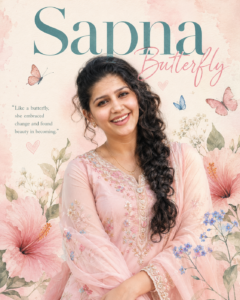
Prompt
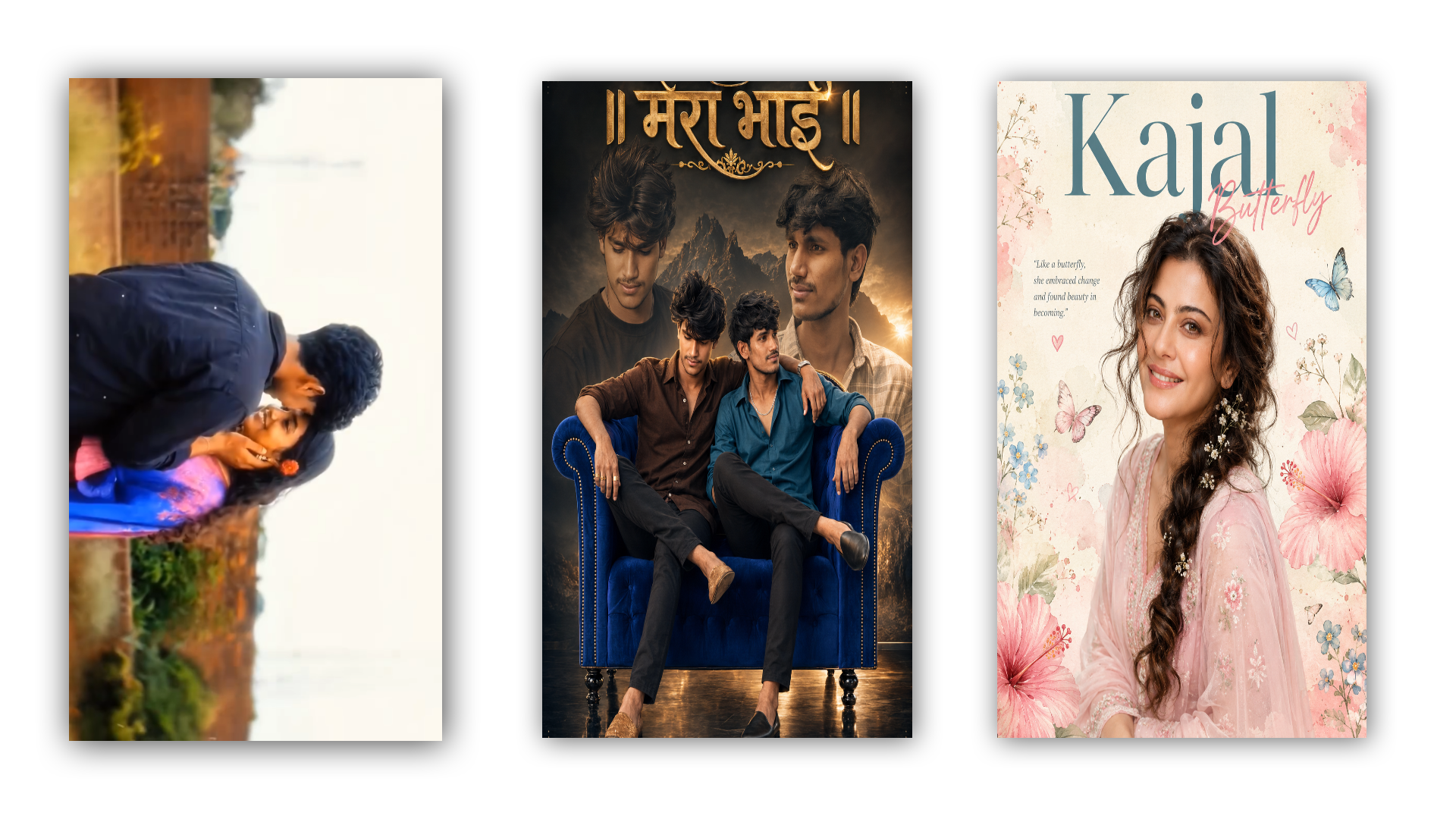
Create a dreamy, ultra-realistic editorial portrait poster of a beautiful young Indian woman smiling naturally while looking directly at the camera. She has long, naturally curly black hair styled into a loose side braid, soft glowing skin, expressive brown eyes, and minimal elegant makeup. She is wearing a pastel pink embroidered salwar kameez with delicate floral threadwork and a matching sheer dupatta draped gracefully around her arms.
Design a soft ivory watercolor paper background with subtle blush-pink watercolor splashes. Surround her with elegant botanical elements including large pink hibiscus flowers, delicate blue forget-me-not flowers, baby’s breath, soft green leaves, tiny hand-drawn hearts, butterflies, and subtle watercolor floral illustrations.
Add a large elegant serif title at the top reading “Kajal” in muted teal. Place the handwritten script word “Butterfly” in soft pastel pink overlapping the title. Include a small inspirational quote on the left:
“Like a butterfly, she embraced change and found beauty in becoming.”
Add tiny butterflies flying around the composition, soft pastel doodles, light paper texture, watercolor stains, and delicate artistic details. Use warm natural daylight, soft diffused lighting, creamy skin tones, shallow depth of field, premium magazine-cover composition, pastel aesthetic, feminine elegance, luxury editorial style, ultra-clean typography, high-end graphic design, 8K UHD, photorealistic, highly detailed, soft color grading, Instagram aesthetic, premium poster design. Ratio 4:5. No watermark, no logo.
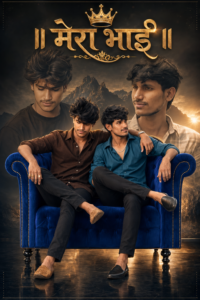
Prompt 👇
No smile Ultra HD 8k cinematic brotherhood poster, vertical 4:6. Foreground: Two young Indian men sitting together on premium royal blue tufted armchair, both genuinely, one with arm around the other’s shoulder. Left man: brown shirt, black pants, mojari, gold rings. Right man: teal shirt, black pants, mojari, silver chain. Both looking confident and happy. Background: Dark moody cinematic tone with mountain silhouette. Large faded portraits of both men behind them for double exposure effect.Floor reflection below chair. Typography top center: Golden Marathi text ” ।। मेरा भाई II” in royal calligraphy font with crown icon and decorative elements, golden glow. Lighting: Warm golden rim light, dramatic spotlight on subjects, premium studio lighting, cinematic contrast, 4k detail. Style: Brotherhood poster, royal blue + gold theme, friendship goals, dosti attitude, viral Instagram post, Marathi bhaigiri vibe
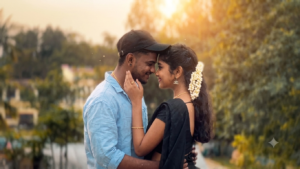
VIDEO Prompt
The camera performs a slow, smooth 180-degree cinematic orbital movement around the couple in a continuous arc from behind the boy’s left shoulder to behind his right shoulder. The movement is steady, natural, and perfectly stabilized with realistic parallax. Keep the distance between camera and subjects constant. No zoom, no push-in, no pull-out, no tilt, no sudden pan, and no abrupt angle changes. Throughout the movement, the boy gently holds the girl’s cheek while their foreheads remain touching. They maintain soft romantic eye contact with subtle breathing, natural blinking, slight head movement, and gentle emotional expressions. Hair and saree
pallu move naturally in the breeze. Preserve the exact rooftop location, brick wall, plants, telecom tower, sky, lighting, framing, and atmosphere. Ultra-realistic South Indian cinematic romance. Seamless frame-to-frame interpolation, smooth motion, perfect identity preservation, high facial fidelity, realistic cloth physics, natural skin details, cinematic depth of field. Negative Prompt: No face morphing, no identity drift, no outfit change, no background change, no hand deformation, no extra fingers, no extra people, no body distortion, no Al flicker, no jitter, no camera shake, no teleportation, no sudden speed changes, no zoom, no crop, no lighting changes, no unrealistic motion, no frame inconsistency.


Agar aap is creative skill ko acche se seekh lete hain, toh aap isse part-time income bhi generate kar sakte hain. Aaj kal digital portraits aur custom visual graphics ka market bohot tezi se grow kar raha hai.
Platform
Service You Can Offer
Instagram Page
Personalised AI Avatars for Creators
Fiverr / Upwork
Custom Concept Art from Real Photos
Local Print Market
Printed AI Canvas Paintings for Gifting
Aapko bas apna ek chota sa portfolio set karna hai, jise aap apne social media handles par share karke direct global clients ko attract kar sakte hain.
Conclusion
Dosto, AI digital art from photos banana aaj ke digital era mein bohot hi aasan aur effective ho chuka hai. Lekin hamesha yaad rakhein, AI sirf ek system tool hai; asli impact is baat se aata hai ki aap usmein apna personal editing touch kaise mix karte hain. Alag-alag specific prompts aur modern filters ke saath experiment karte rahiye. Jese-jese aap iski regular practice karenge, aapka output utna hi crisp aur high-quality nikal kar aayega. Keep editing, keep learning!