All Prompt 👇
Mera naam ek professional content creator aur video editor ke roop mein pichle 7+ saalon se digital media industry se juda hua hai. Is pure safar mein maine Instagram ke badalte algorithms aur automated AI tools ke trends ko bohot kareeb se dekha hai. Aaj main apne YouTube channel “m4editorofficial” (13.6K+ Subscribers) aur Instagram page “m4_editor_official” (145K+ Followers) ke jariye lakhon logon ko digital creation ke genuine aur viral hacks sikhata hoon. Is website par mera ek hi maksad hai—beginners tak bina kisi hidden charge ke real AI prompting methods, secret strategies aur practical guidance pahunchana takia aap sabhi genuine skills seekh kar grow kar sakein.
How to use ChatGPT AI for an Instagram viral prompt? Complete Step-by-Step Guide M4 53
2026 mein Instagram par organic reach haasil karne ke liye AI tools ka sahi use karna aana bohot zaroorat ban chuka hai. Aaj kal har dusra creator basic content dal raha hai, lekin jo log ChatGPT AI ka advanced tarike se use kar rahe hain, unka content instantly millions mein views la raha hai. Agar aapko apni profile boost karni hai, toh aapko sahi text framing aur structure seekhna hoga.
Is detailed article mein hum poori tarah focus karenge ki how to use ChatGPT AI for Instagram viral prompt aur iske jariye aap kaise viral AI image/video prompts, engaging scripts, aur eye-catching content strategies generate kar sakte hain jo user ke retention ko top par le jaye.
Internet Par Trending AI Prompts Kaise Find Karein?
Kisi bhi platform par viral hone ka sabse aasan tarika hai—Trend Riding. Agar aapko pata chal jaye ki is hafte market mein kis tarah ke visuals sabse zyada chal rahe hain, toh aapka kaam adha asaan ho jata hai.
- Instagram Explore Aur Reels Page: Apne niche ke 10 bade creators ko follow karein aur unke static posts ya reels ko analyse karein. Agar koi 3D avatar ya unique neon text style baar-baar dikh raha hai, toh samajh lijiye wo trend mein hai.
- AI Tool Ki Public Galleries: Midjourney, Leonardo AI aur Lexica.art jaise platforms ke Community Feed ya Trending section ko daily check karein. Wahan par logon ke viral graphics ke sath unka exact prompt text bhi likha hota hai, jise dekh kar aap trending styles ka idea le sakte hain.
- ChatGPT Ko Trend Analytics Banana: Aap ChatGPT se khud pooch sakte hain. Use this prompt edin: “What are the current top 5 visual aesthetics ruling Instagram for short-form content creators right now? List the styles with short descriptions.”
Step 1: Instagram Ke Liye Viral AI Prompt Kaise Banayein?
ChatGPT se ek ordinary response nikalne aur ek viral-worthy prompt generate karwane mein bohot bada farq hota hai. Agar aap AI ko sahi tareeqe se instruct nahi karenge, toh wo aapko wahi purana aur boring content dega jo har jagah available hai. Ek perfect viral prompt banane ka ek fixed formula hota hai.
Prompt Framing Ka Master Formula
Kisi bhi viral niche ke liye prompt taiyar karte waqt aapko hamesha 4 main elements ko dhyan mein rakhna hoga: Role + Context + Specific Style + Output Goal.
- Role (AI Ka Character): AI ko batayein ki wo ek normal bot nahi hai. Use kahein: “Act as an expert Instagram visual engineer and growth hacker.”
- Context (Aapka Niche): Apne content ka background set karein: “I want to create a 3D animated scene for the tech/crypto niche.”
- Specific Style (Aesthetics): Visuals ka look kaisa hona chahiye: “Use hyper-realistic 8K details, cyberpunk aesthetics, extreme colour contrast, and dramatic studio lighting.”
- Output Goal (Final Result): Aapko aakhir mein kya chahiye: “Give me a highly descriptive prompt for Midjourney/Leonardo AI that instantly grabs attention in the first 2 seconds of scrolling.”
Live Demo: ChatGPT Se Banaya Gaya Ek Real Viral Prompt
Aapki behtar samajh ke liye, niche maine ek Live Example diya hai jo aap directly kisi bhi AI art generator (jaise Midjourney ya Leonardo AI) mein use kar sakte hain:
Example Prompt for Copy:
“A hyper-realistic 3D render of a young Indian male creator sitting in a premium futuristic gaming setup, wearing modern streetwear and headphones. In the background, there is a giant neon glowing sign on a dark textured wall that reads ‘STOP SCROLLING’ in capital letters. Moody atmospheric lighting with deep cyber-punk purple and electric blue tones, dramatic depth-of-field blur, cinematic look, ultra-detailed 8K resolution, aspect ratio 9:16.”
Step 2: ChatGPT Prompts Ko Customise Kaise Karein?
Smjhein ki jab ChatGPT aapko ek standard prompt bana kar de deta hai, toh agla bada step hota hai use apni branding aur audience ke hisab se customise karna. Ek hi prompt sabhi par fit nahi baithta, isliye customisation seekhna bohot zaroori hai.
1. Emotional Trigger Aur Hooks Add Karna
Instagram par wahi chiz viral hoti hai jo user ke andar koi emotion trigger kare. Apne prompt ko customise karte waqt usme core emotional hooks jodein.
- Customisation Method: ChatGPT se kahein: “Now rewrite this prompt and embed a curiosity hook into the main text graphic element. The text should say something bold like ‘99% of people miss this shadow rule.”
2. Colour Palette and Atmospheric Changes
Aapka content short-form formats mein tabhi stand out karega jab uski colour psychology strong hogi. Aap ChatGPT ke generated prompt mein custom colours inject kar sakte hain.
- Customisation Method: AI ko target settings dein: “Change the lighting from standard daylight to a deep moody midnight setup with bright neon electric blue and hot pink highlights to match Gen-Z design trends.”
3. Subject Mood Aur Camera Angles Adjust Karein
Aapko decide karna hoga ki video ya image ka angle kaisa ho. ChatGPT se customise karwate waqt cinematic terms ka use karein.
- Customisation Method: Prompt mein command add karein: “Modify the subject’s expression to look confident yet mysterious, and change the camera perspective to a dramatic low-angle close-up shot with a heavy depth-of-field blur.”
Step 3: Customised Prompts Ko Effectively Use Karne Ka Process
Ab jab aapka customised viral prompt ready ho chuka hai, toh use sahi jagah aur sahi process ke sath execute karna hi aapko real results dilaega. Ise use karne ka ek system hota hai:
1. Right AI Art Generators Par Run Karein
ChatGPT se mile descriptive visual prompt ko copy karke top-tier image/video generation AI tools (jaise Midjourney, Leonardo AI, ya Runway Gen-3) mein paste karein.
- Execution Hint: Agar aapne aspect ratio prompt mein pehle se customise kiya hua hai (jaise –ar 9:16), toh yeh directly vertical mobile-friendly output generate karega.
2. A/B Testing Ke Liye Variations Nikalein
Anubhav se batara hoon, kabhi bhi pehle attempt mein mile output par satisfy na hon. Sahi process yeh hai ki aap ek hi prompt se kam se kam 3 se 4 alag-alag variations generate karein.
- Execution Hint: Alalag variations mein se jis image ya video clip ka contrast aur text clarity sabse zyada sharp ho, use hi final content asset ke roop mein select karein.
ChatGPT Se Instagram Ke Liye Viral Caption Aur Hashtags Kaise Banayein?
Bohot se log sirf visual par dhyan dete hain aur text metadata ko chhod dete hain. Lekin jab aap how to use ChatGPT AI for Instagram viral prompt seekh rahe hain, toh aapko caption strategy bhi pata honi chahiye.
- SEO-Friendly Captions: ChatGPT ka use karke aise captions likhein jisme primary aur secondary keywords naturally integrated hon. Yeh Instagram search (SEO) mein video ko rank karwane mein madad karta hai.
- The Caption Prompt Pattern: “Write an Instagram caption for this visual post. Include a catchy first line (Hook), 3 bullet points with high value, and a Call-to-Action to share the post. Keep the tone friendly and native Hinglish.”
- Hidden Hashtag Strategy: AI ko commands dein ki wo aapke niche ke high-volume, medium-volume aur low-volume hashtags ka ek perfect mix (total 10-12 hashtags) generate kare, jo post ko balanced push de sake.
Bonus Tip: Workflow Speed Optimisation Trick
ChatGPT se viral prompts nikalne aur unhe customise karne ke process ko aur fast karne ke liye ek smart hack ka use karein. ChatGPT par ek permanent “Custom Instruction” ya master template save karke rakh lein.
Isme AI ko pehle se hi feed kar dein ki aapka Instagram handle kis niche par hai, aapka target audience kaun hai, aur aapko kis aspect ratio mein outputs chahiye. Isse aapko har baar lamba text type nahi karna padega. Aap sirf apna raw topic likhenge aur ChatGPT seconds mein aapke workflow ke hisab se exact custom layout design karke de dega. Isse aapka content production time 50% tak bacha ja sakta hai.
Common Mistakes Beginners Should Avoid
Agar aap is tech-driven field mein sahi tarike se grow karna chahte hain, toh in basic galtiyon se hamesha bachein:
- Direct Copy-Pasting Without Tweaking: ChatGPT ke pehle output ko direct use mat karein. Usme hamesha thoda human element, casual words aur local slangs zaroor add karein.
- Ignoring Visual Contrast: Prompts generate karte waqt log aise rang chun lete hain jo screen par ek sath acche nahi lagte. Hamesha high-contrast colour palettes ka use karein taaki text easily readable ho.
- Over-Complicated Text Prompts: AI ko ek sath bohot saari mushkil commands dene se output muddled aur kharab ho jata hai. Hamesha clean, systematic aur step-by-step descriptive prompt hi use karein.
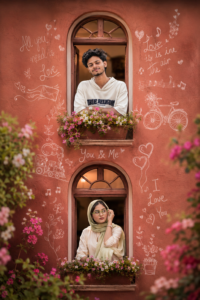
Prompt👇
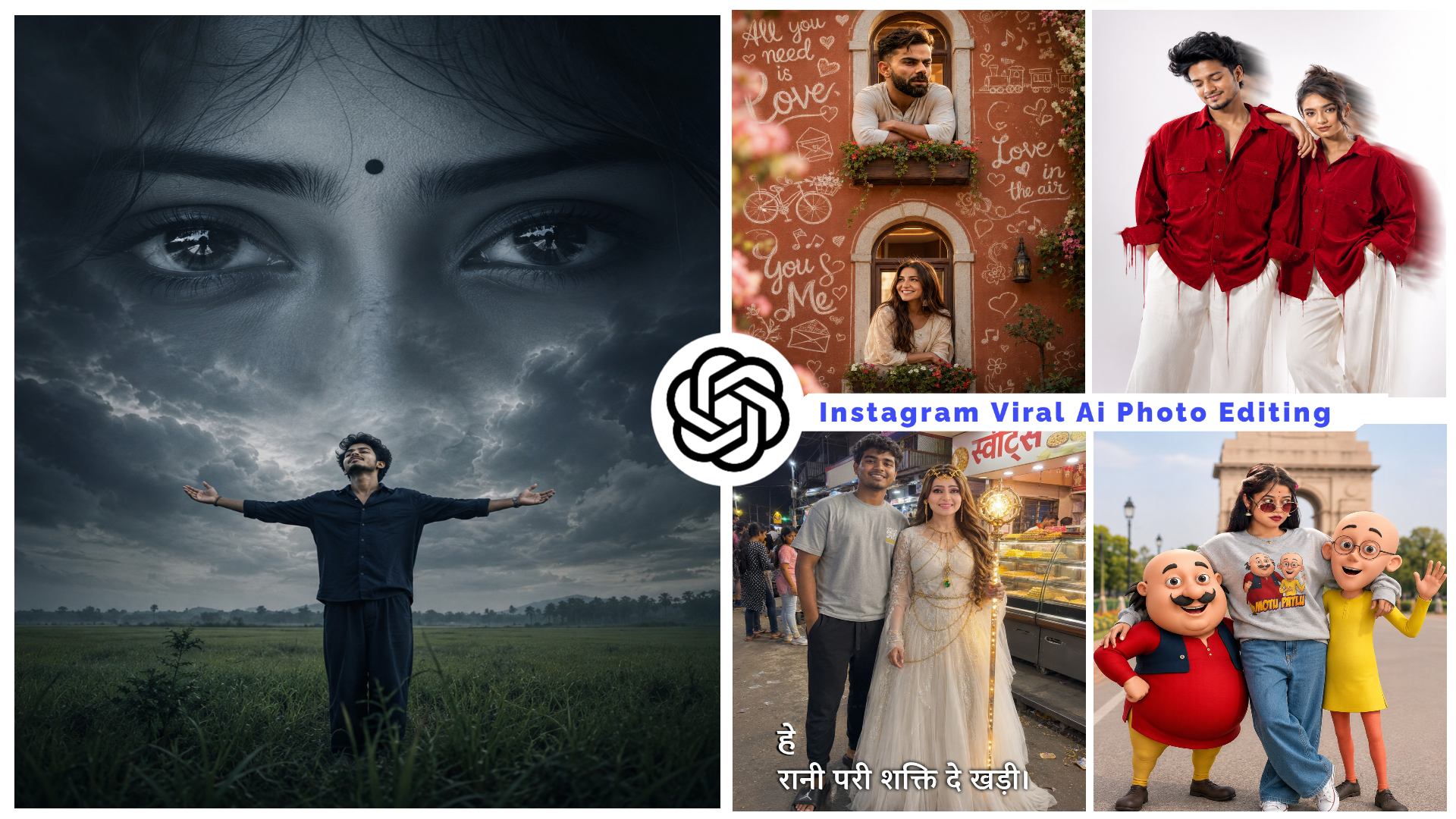
Romantic cinematic couple portrait shot through two vertically aligned vintage windows on a warm terracotta-colored wall. A handsome young man with a stylish mustache leans out from the upper window, resting his arms on the flower box and gazing affectionately into the distance. A beautiful young woman in an elegant cream traditional outfit leans from the lower window, looking upward with a soft smile. The wall is decorated with hand-drawn white chalk-style doodles including hearts, flowers, bicycles, music notes, love letters, a small train sketch, and romantic handwritten quotes such as “All you need is love,” “Love is in the air,” and “You & Me.” Blooming flowers frame the foreground with dreamy bokeh, creating depth and romance. Warm natural light, shallow depth of field, ultra-realistic DSLR photography, cinematic composition, vibrant colors, highly detailed faces, soft romantic mood, premium Instagram aesthetic, 85mm lens, f/1.8, photorealistic, 8K quality.
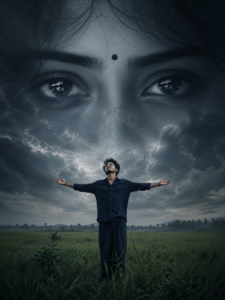
Prompt👇
A surreal cinematic digital artwork featuring a lone young man standing in the middle of a vast green grass field under a dramatic overcast sky. He wears a dark navy shirt and loose dark pants, standing with arms fully outstretched and head tilted upward, expressing freedom, longing, and emotional surrender. Behind him, dominating the entire sky, is an enormous monochrome female face blended seamlessly into the clouds. The composition focuses on her ultra-detailed expressive eyes, rendered at colossal scale, staring directly forward with deep emotion and melancholy. A small black bindi sits between her eyebrows. Her eyelashes, eyebrows, skin texture, and eye reflections are highly detailed and realistic. The giant face appears ethereal, dreamlike, and ghostly, emerging from storm clouds with soft atmospheric blending. Moody cinematic lighting, dark blue-gray color grading, emotional fantasy atmosphere, dramatic depth, volumetric clouds, subtle fog, ultra-realistic textures. 3:4.
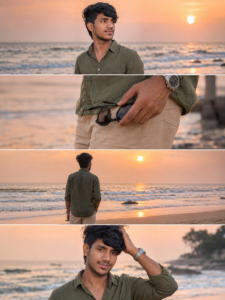
Prompt👇
Ultra-realistic DSLR cinematic beach photoshoot collage featuring the SAME girl from the uploaded reference image (100% face match). Use the uploaded image as the facial identity reference and preserve face identity exactly — same facial structure, hairstyle, jawline, skin texture, expression style, body proportions, and natural appearance. Do NOT modify, beautify, age-change, or stylize the face. Maintain the original realistic Indian female look with authentic features and exact face resemblance.
Create an Instagram portrait 3:4 ratio collage (1080×1440) consisting of 4 vertically stacked photos, designed like a premium cinematic Instagram reel cover. Keep the same collage layout, framing style, spacing, and thin white dividers between photos.
Scene: golden sunset beach with pastel orange-pink sky, soft ocean waves, wet reflective sand, dreamy tropical atmosphere, warm cinematic sunlight, shallow depth of field, realistic DSLR photography, highly detailed skin texture, natural color grading.
Outfit: elegant olive green linen shirt with rolled sleeves, beige beach shorts, silver wrist watch, holding black round sunglasses.
Photo 1: medium side-profile portrait looking towards the horizon, calm expression, ocean waves behind.
Photo 2: close-up shot of hand holding black sunglasses near shorts pocket, cinematic focus blur background.
Photo 3: back pose standing near shoreline facing the ocean during sunset, relaxed posture, soft ocean breeze moving hair naturally.
Photo 4: candid pose touching hair while smiling slightly, warm sunlight illuminating the face, dreamy beach atmosphere.
Composition: exact vertical stacked collage, 3:4 Instagram portrait ratio (1080×1440), aesthetic reel-cover style, smooth warm tones, balanced spacing, realistic shadows and lighting, professional travel photography look.
Camera: DSLR, 85mm lens, f/1.8 aperture, HDR, ultra realistic, natural skin texture, cinematic travel photography style, 4K details.
Face Match Priority: uploaded reference image face, 100% face match, identical facial features, identical hairstyle, identical skin tone, identical face proportions, identical facial identity, exact realistic likeness.
Negative Prompt: face change, different person, AI-generated face, beautified face, cartoon, anime, illustration, blurry face, distorted body, extra fingers, bad anatomy, duplicate person, unrealistic skin, low quality, overexposed lighting, watermark, text, logo, face enhancement, face swap errors.
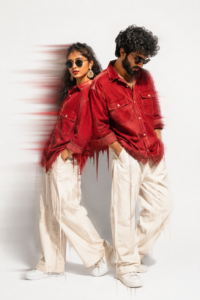
Prompt👇
A Uploaded image create Fashion editorial
portrait of stylish adults standing a clean light-gray studio background, red denim shirts with large front pockets and loose off-white wide-leg trousers. The man has textured curly hair, a full beard, and is looking down in a
relaxed pose pockets. High-fashion streetwear
aesthetic, coordinated couple styling, minimal backdrop, soft studio lighting, sharp details, realistic skin tones, premium magazine photoshoot, dynamic motion-blur streaks behind them, modern urban fashion campaign,
ultra-realistic, high resolution, 85mm lens,
professional photography. Upload image face matching
minimal aesthetic fashion, solid bright white background, dramatic lighting, motion blur dripping effect around the body, glitch smear effect, soft shadows, high contrast, cinematic look, ultra realistic, 4K, sharp details, editorial
fashion photography style
Prompt👇
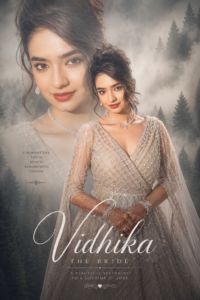
Ultra-realistic bridal portrait collage, beautiful Indian bride in silver lehenga gown, elegant diamond jewelry, red lipstick, curly hairstyle, mehndi hands, double exposure composition, soft fog forest background, cinematic lighting, dreamy aesthetic poster, stylish “Vidhika” typography, high detail, 8k 4:6 ratio.
Prompt👇
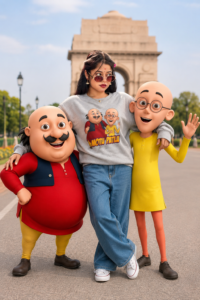
USE THE UPLOADED PHOTO AS THE ONLY FACE REFERENCE. PRESERVE THE PERSON’S IDENTITY WITH AN EXACT FACE MATCH, INCLUDING FACIAL STRUCTURE, JAWLINE, SKIN TONE, HAIRSTYLE, BEARD DETAILS, EYES, NOSE, LIPS, EXPRESSION, AND OVERALL LIKENESS. MAINTAIN PERFECT IDENTITY CONSISTENCY FROM THE REFERENCE IMAGE. DO NOT ALTER, RECREATE, STYLIZE, OR REPLACE THE FACE IN ANY WAY.
CREATE AN ULTRA-REALISTIC FULL-BODY OUTDOOR PORTRAIT OF THE SAME PERSON STANDING CONFIDENTLY IN A RELAXED, STYLISH POSE. HE IS WEARING A COZY LIGHT GREY SWEATSHIRT FEATURING A COLORFUL MOTU PATLU CARTOON PRINT, OVERSIZED BAGGY BLUE JEANS, AND CLEAN WHITE CONVERSE SNEAKERS. HIS EXPRESSION IS CHEERFUL, FRIENDLY, AND NATURAL.
STANDING BESIDE HIM ARE LIFE-SIZE 3D CARTOON CHARACTERS MOTU AND PATLU, DESIGNED EXACTLY LIKE THEIR ANIMATED APPEARANCE, WITH REALISTIC LIGHTING AND DETAILED TEXTURES WHILE MAINTAINING THEIR RECOGNIZABLE CARTOON STYLE. MOTU STANDS ON ONE SIDE WITH A HAPPY SMILE AND PLAYFUL POSE, WHILE PATLU STANDS ON THE OTHER SIDE LOOKING EXCITED AND FRIENDLY. THE CHARACTERS INTERACT NATURALLY WITH THE PERSON AS IF THEY ARE CLOSE FRIENDS POSING TOGETHER FOR A PHOTOGRAPH.
ULTRA-REALISTIC PHOTOGRAPHY, FULL-BODY COMPOSITION, NATURAL DAYLIGHT, CINEMATIC DEPTH OF FIELD, HIGHLY DETAILED SKIN TEXTURE, REALISTIC CLOTHING FABRIC, PROFESSIONAL DSLR QUALITY, SHARP FOCUS ON THE SUBJECT, SOFT BACKGROUND BLUR, VIBRANT COLORS, REALISTIC SHADOWS, OUTDOOR PARK OR CITY LANDMARK ENVIRONMENT, PREMIUM PORTRAIT PHOTOGRAPHY, PHOTOREALISTIC RENDERING.
203
6
…
75
100% FACE MATCH, EXACT IDENTITY PRESERVATION, NO FACE ALTERATION, NO FACIAL DISTORTION, NO AI-GENERATED FACE REPLACEMENT, SAME PERSON AS UPLOADED REFERENCE IMAGE.
Prompt👇
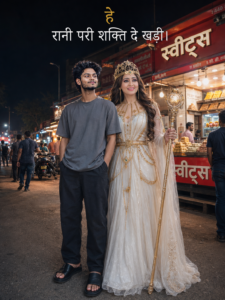
Night street-market photv, Rani Pari-style fairy queen in white gown with golden chains, crown and glowing staff standing beside a young man in grey t-shirt, dark pants and black slides. Use exact faces from reference images. Hindi sweets shop (“स्वीट्स”) in background, realistic smartphone candid shot, natural night lighting. Text: “हे
रानी परी शक्ति दे खड़ी।
Conclusion
Instagram par content create karna aur how to use ChatGPT AI for Instagram viral prompt ka sahi tarika samajhna aapke creation process ko bohot fast aur impactful bana deta hai. AI aur advanced prompting techniques ka yeh combination aapko baki normal creators se havesha aage rakhega. Rozana naye formats ko design karein, unhe properly customise karein, aur apni execution par regular practice karte rahein kyuki consistency hi growth ki sabse badi chabi hai!