About the Author
Mera naam MD Maqsood hai aur main pichhle 7+ years se creative video editing aur visual storytelling industry mein fully active hoon. Apne digital platforms—YouTube par m4editorofficial (13.6K+ subscribers) aur Instagram par m4_editor_official (145K+ community) ke through main rozana cutting-edge editing methods, AI visual workflows aur practical production techniques showcase karta hoon. Mera main focus yahi rehta hai ki har naya creator AI tools aur manual editing ke perfect balance ko samajh sake aur bina kisi unnecessary confusion ke genuine technical skills develop kare.
Flow AI Best Settings for Viral Videos: Complete Setup & Prompt Workflow Guide
Aaj ke high-speed digital content landscape mein AI video generation aur automation tools ne content creation game ko completely revolutionise kar diya hai. Chahe aap Instagram Reels, TikTok, ya YouTube Shorts create kar rahe hon, traditional manual production ke mukable viewers ka attention span ab microseconds par shift ho chuka hai. Lekin reality yeh hai ki har doosra creator generic AI clips generate karke post kar raha hai, jisse unki videos feed mein blend ho jati hain aur reach freeze ho jati hai.
Agar aap chahte hain ki aapka visual content algorithm ko beat kare aur viewer retention peak par rahe, toh aapko AI engine ke deep configuration parameters ko master karna hoga. Is comprehensive guide mein hum detail mein cover karenge Flow AI best settings for viral videos, jahan hum prompt coherence, motion vectors, camera trajectory controls aur final export enhancement ke wo hidden parameters reveal karenge jo top-performing viral creators secretly use karte hain.
AI Generation Ka Core Logic: Flow AI Video Synthesis Kaise Kaam Karta Hai?
Generic prompt likhne par Flow AI aksar unpredictable ya over-distorted footage return karta hai. Iska reason yeh hai ki AI diffusion model frame-by-frame pixels ko predict karta hai. Agar aapne engine ko specific physical parameters nahi diye, toh model har frame par subject ki geometry change kar deta hai—jise technical bhasha mein temporal inconsistency ya visual hallucination kehte hain.
Jab aap right frame rate, visual weights aur motion parameters set karte hain, tab Flow AI ek consistent physical space create karta hai. Viral videos ke liye aapko teen cheezon ka perfect balance chahiye:
- Frame-to-Frame Temporal Stability: Subject ke body proportions aur facial features morph na hon.
- Dynamic Motion Weighting: Movement artificial ya plastic na lage, balki real physics ko follow kare.
- Optical Focal Sharpness: Background blur (bokeh) aur foreground subject ke beech natural cinematic depth ho.
The Core Blueprint: Flow AI Best Settings for Viral Videos
Chaliye step-by-step Flow AI ke dashboard ke andar chalte hain aur un core setting values ko calibrate karte hain jo directly video ki visual quality aur engagement ko multiply karti hain.
Step 1: Canvas Resolution Aur Optimal Aspect Ratio Selection
Flow AI project open karte hi pehla selection canvas geometry ka hota hai:
- Vertical Virality (Shorts/Reels): Hamesha 9:16 vertical ratio select karein.
- Base Generation Resolution: Shuruat mein canvas ko native 1080×1920 (FHD) par set karein. Direct 4K mode select karne se diffusion model over-stress hota hai aur complex human limbs distort hone ke chances double ho jaate hain. Pehle standard resolution par generate karein, fir AI upscaling engine use karein.
Step 2: Sampling Steps Aur Denoising Strength Configuration
Flow AI ke parameter panel mein do sabse critical sliders hote hain:
- Sampling Steps: Is value ko standard 20 ke bajaye 28 se 35 ke beech lock karein. Higher steps model ko image details refine karne ka time dete hain, jisse textures crisp aate hain. (40 se upar mat jayein, warna footage over-sharpened aur unnatural ban jayegi).
- Denoising Strength (For Image-to-Video Mode): Agar aap reference image se video generate kar rahe hain, toh is slider ko 0.55 se 0.65 ke strict bracket mein rakhein. 0.50 se kam rakhne par camera move nahi karega; 0.70 se zyada karne par aapka original subject completely change ho jayega.
4 Deep Tuning Parameters Jo AI Videos Ko Cinematic Banate Hain
Viral short-form clips mein boring stillness bilkul nahi chalti. Visual dynamics maintain karne ke liye Flow AI ke advanced controls ko is tarah set karein:
Hack 1: Motion Strength (Motion Bucket) Tuning
Motion slider AI engine ko batata hai ki frames ke beech kitna visual displacement allow karna hai.
Detailed Setup:
- Flow AI ke motion parameters mein jayein aur default 127/255 value ko observe karein.
- Fast cinematic shots (sports, racing, dance) ke liye Motion Strength ko 140 se 155 par set karein.
- Cinematic talking heads, atmospheric travel shots ya product showcases ke liye is value ko 90 se 110 par lock karein.
Beginner-Friendly Practical Tip:
Kabhi bhi motion slider ko maximum 200+ par push mat kijiye. Excessive motion AI video mein melting hands aur floating eyes create karta hai. Subtle motion hamesha heavy chaotic motion se zyada professional aur organic lagti hai.
Hack 2: Virtual Camera Trajectory (Dynamic Pan & Push)
Static camera angles viewer ko 2 second mein bore kar dete hain. Flow AI ke camera settings panel mein aap manual camera pathways define kar sakte hain:
Detailed Setup:
- Pan / Orbit Controls: Camera mode mein jakar Slow Right-to-Left Pan ya Arc Orbit (+1.5) choose karein.
- Z-Axis Zoom (Push-In): Viral reels ke opening hook ke liye Zoom-In slider ko +2.0 par set karein. Yeh subtle dolly-in effect subject ki taraf focus pull karta hai aur scrolling audience ka thumb instantly stop kar deta hai.
Beginner-Friendly Practical Tip:
Ek single generation prompt mein ek saath Pan, Tilt, aur Zoom sab mat enable kijiye. Model confuse ho jata hai. Hamesha ek dominant axis select karein—jaise sirf Subtle Dolly In ya sirf Horizontal Track.
Hack 3: Negative Prompt Filtering (Unwanted Artefacts Remove Karna)
Flow AI mein jo cheez aap generate karna chahte hain usse zyada important yeh hai ki aap AI ko batayein ki kya build nahi karna hai. Viral content clean and sharp dikhna mandatory hai.
Detailed Setup:
Flow AI ke “Negative Prompt” field mein in universal quality-blockers ko paste karke permanently save karein:
blurry, low resolution, extra limbs, mutated anatomy, deformed fingers, plastic skin, oversaturated, flicker, low FPS, watermarks, text overlay, bad lighting, cartoonish rendering, unnatural warping
Beginner-Friendly Practical Tip:
Har project mein negative prompts manually type karne ke bajaye unhe Flow AI ke Default Preset mein save kar dein taaki har naya render automatically in artefacts ko suppress kar sake.
Hack 4: Temporal Consistency Engine Toggle (Anti-Flicker)
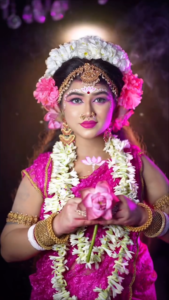
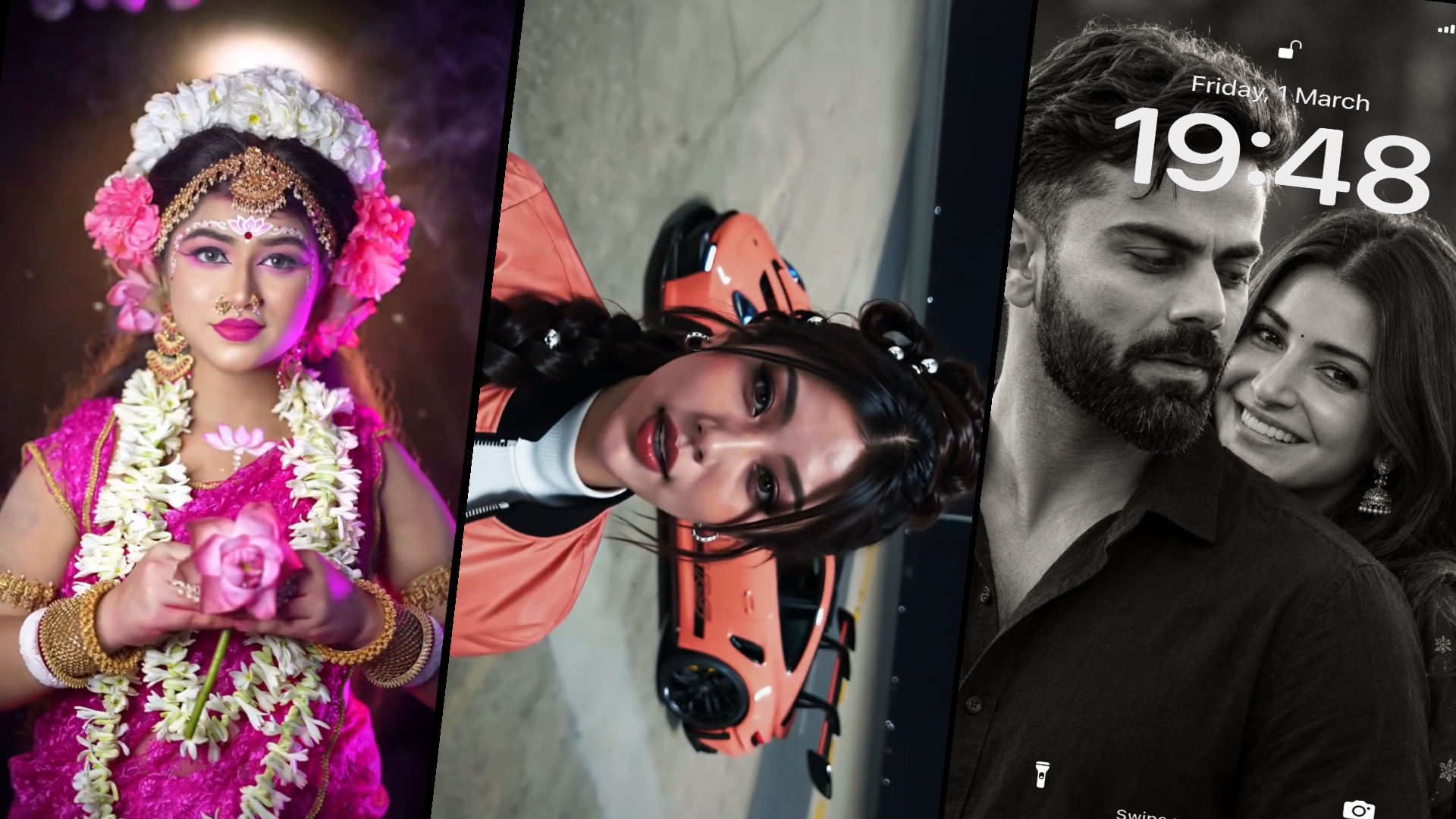
Shot 1: Devotee Intro (00:00–00:06) Prompt: Medium portrait of a young Indian woman wearing a white sheer dupatta and red sindoor along her hairline, holding a closed pink lotus bud against a dark studio background. She speaks expressively to the camera and joins her hands in a namaste gesture. Cinematic rim lighting, shallow depth of field, 9:16 vertical aspect ratio, photorealistic. Shot 2: Maa Shailputri Avatar (00:07–00:11) Prompt: Divine transformation into Goddess Shailputri. A young Indian woman in an ornate magenta-pink silk saree, heavy temple gold jewelry, nose ring (nath), and an elaborate white and pink floral headpiece. Intricate forehead bindi artwork, red alta on hands, holding a blooming pink lotus and raising her hand in an Abhaya mudra blessing. Ethereal warm glow, particles, soft background bokeh, 9:16 vertical. Shot 3: Maa Brahmacharini Avatar (00:12–00:15) Prompt: Devotional portrayal of Goddess Brahmacharini. A serene Indian woman in pure white attire, draped with rudraksha garlands and white floral malas. High ascetic topknot hair, white Tripundra tilak with red bindi on forehead, red alta-stained hands. Holding a brass kamandalu (water pot) and rudraksha japa mala, showing a blessing hand gesture. Moody dark studio rim lighting, 9:16 vertical. Recommended Settings * Aspect Ratio: 9:16 * Motion Strength / Camera: Low motion (3–4), stationary eye-level medium close-up * Style: Cinematic studio portrait, hyper-realistic, dramatic backlighting
AI videos ka sabse bada giveaway flickering lighting aur jumping textures hote hain, jisse audience ko video fake aur irritating lagti hai.
Detailed Setup:
- Flow AI ke advanced settings tab mein scroll karein aur “Temporal Smoothing” ya “Frame Interpolation” engine ko switch on karein.
- Is setting ko “Balanced” ya “High Consistency” par toggle karein.
- Isse Flow AI consecutive frames ke colour palette aur illumination sources ko match karta hai, jisse harsh strobing effect 90% eliminate ho jata hai.
Beginner-Friendly Practical Tip:
Temporal smoothing enable karne par rendering speed thodi slow ho sakti hai, lekin final result direct social-media-ready smooth filmic footage jaisa aata hai jise dekhkar viewers scroll karna bhool jaate hain.
Viral AI Prompt Formulation Framework
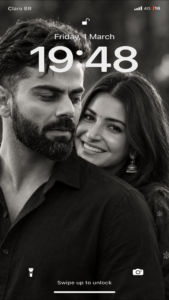
Create Uploaded image ultra-realistic black-and-white cinematic portrait of a romantic Indian couple in an intimate, candid moment. A handsome man in the foreground with voluminous, swept-back dark hair, a thick, perfectly styled curled mustache, light stubble, and a black shirt. A beautiful woman stands closely behind him, resting her face near his shoulder, gazing softly toward the camera with expressive eyes, long flowing dark hair, a tiny black bindi, and traditional jhumka earrings. The man’s head is slightly tilted downward with a subtle, affectionate smile, while the woman peeks over his shoulder, creating a tender and protective romantic atmosphere. Tight close-up composition, natural facial features, realistic skin texture, soft directional lighting, deep shadows, rich grayscale tones, shallow depth of field, elegant film-grain texture, high contrast, moody background, professional portrait photography, timeless Indian romantic film aesthetic, 4K detail, vertical 9:16 aspect ratio. Preserve natural proportions and authentic expressions. No color, no text, no watermark.
Settings chahe kitni bhi perfect hon, agar input prompt weak hai toh output lifeless aayega. Cinematic AI clips ke liye industry standard 4-pillar prompt framework use karein:
| Prompt Pillar | Example Input | Role |
| 1. The Subject | A 28-year-old futuristic cyberpunk nomad | Clear character identity define karta hai |
| 2. Dynamic Action | walking briskly down a neon-lit, rain-soaked alley | Motion vector aur environment interaction deta hai |
| 3. Lighting & Mood | cinematic anamorphic lens flare, moody volumetric mist | Depth aur atmospheric visual contrast add karta hai |
| 4. Technical Direction | Shot on 35mm Arri Alexa, photorealistic 8k, shallow depth of field | Sensor look, bokeh aur film grain texture lock karta hai |
Production Pipeline: Flow AI Setup & Render Blueprint
AI clips ki efficiency track karne ke liye is baseline table ko follow karein:
| Content Format | Aspect Ratio | Motion Value | Sampling Steps | Best Camera Movement |
| Talking Head / Avatar | 9:16 Vertical | 85 – 10030 | 30 Steps | Slow Centre Dolly-In |
| Street & Travel B-Roll | 9:16 Vertical | 130 – 145 | 35 Steps | Smooth Right Tracking |
| High-Action Fantasy | 9:16 Vertical | 150 – 165 | 32 Steps | Fast Arc Tilt & Push |
| Product / Aesthetic | 1:1 or 9:16 | 75 – 90 | 35 Steps | Slow 360 Turntable Orbit |
Post-Processing Workflow: Mobile Editing Integration
AI generator se video nikal kar directly social media par upload kar dena beginners ki sabse badi mistake hoti hai. True virality post-processing polish se aati hai:
- Upscale & Sharpen: Flow AI render ko VN Editor ya kisi standard video upscaler mein import karein. AI output naturally thoda soft hota hai, isliye Sharpen filter ko +12 se +15 adjust karein taaki eyes aur fabric textures pop karein.
- Organic Colour Grade: AI-generated footage aksar digital aur fake lagti hai. Isko authentic film look dene ke liye Highlights ko -10, Shadows ko +8, aur slight film grain texture overlay karein.
- Sound Engineering (SFX Stacking): AI video silent generate hoti hai. Ek single visual step ke sath realistic foley sound match karein—jaise footsteps, rain ambience, cybernetic hum, ya cloth rustle. Jab visuals authentic sound effects ke sath lock hote hain, tab conversion aur retention rates skyrockets ho jate hain.
Bonus Tip: Custom Seed Preservation Se Consistent Character Series Banana
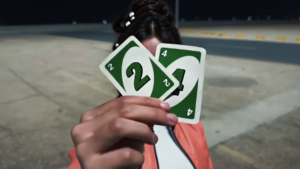
Create an ultra-realistic cinematic video using my uploaded personal photo as the exact identity and appearance reference, and the uploaded reference video as the guide for scene sequence, actions, timing, and composition. MY IDENTITY AND CLOTHING — HIGHEST PRIORITY: Replace the person in the reference video with me, using my uploaded personal photo. Preserve my exact face, facial features, hairstyle, hair texture, skin tone, body proportions, and natural appearance. My uploaded photo must be the ONLY source for my clothing and outfit. Reproduce exactly the same shirt, T-shirt, trousers, accessories, footwear, and other visible clothing items that I am wearing in my uploaded photo, wherever applicable. Do not copy any clothing from the original reference character. Do not invent a new outfit, change clothing colors, add accessories, or alter my hairstyle. Keep my appearance consistent throughout the entire video. SCENE SEQUENCE: Follow the uploaded reference video as closely as possible. 1. Recreate the opening outdoor sunset parking scene, matching the original character’s position, camera perspective, and natural movements. 2. I turn toward the camera and raise my hand, holding two realistic playing cards displaying the numbers 2 and 4. 3. I lower the cards, and a realistic dark burgundy-red Porsche 911 GT3 RS-style sports car is revealed behind me in the same parking area. 4. I look toward the car and naturally gesture toward it, following the reference video’s movements. 5. I raise the two playing cards again, recreating the ending action from the reference video. Maintain the same general background, sunset lighting, scene order, and character positioning as the reference video. Synchronize the car reveal with the downward movement of the cards. REALISM AND CONTINUITY: Photorealistic live-action footage, realistic hands and fingers, accurate playing-card shapes, natural body movements, realistic car details, and consistent lighting. Keep my face, hair, clothing, and identity unchanged in every frame. Do not introduce unrelated scenes, additional characters, or extra props. AUDIO: Completely silent. No talking, dialogue, music, or sound effects. FINAL INSTRUCTION: The reference video determines the scene and actions. My uploaded photo determines my identity, hairstyle, and exact clothing. Recreate the same type of video with me replacing the original character.
Agar aap ek continuous storyline ya multi-part viral series create kar rahe hain jahan same character har clip mein chahiye:
- Jab aapko koi frame perfect character look provide kare, toh us generation ke “Seed Number” ko note kar lein (e.g., Seed: 489201948).
- Flow AI ke seed settings mein jakar “Random Seed (-1)” toggle off karein aur wahan apna saved specific numeric seed enter karein.
- Ab prompt mein sirf background aur camera angle change karein. Flow AI aapke main character ki facial identity, hair style aur cloth design ko maintain rakhega bina har frame par face morph kiye.
Professional Export Engine Settings
Visual asset generate aur post-process hone ke baad correct compression profile follow karein taaki social media upload par bitrate squash na ho:
- Resolution Format: 1080p (1080×1920) resolution lock karein. Direct 4K uploads par Instagram ka internal encoder video ko heavily crush kar deta hai.
- Frame Rate (FPS): AI native generate 24 FPS karta hai. Export panel mein ise 30 FPS ya smooth 60 FPS (with optical flow frame blending) export karein.
- Target Bitrate: Hamesha manual bitrate select karke slider ko 18 Mbps se 22 Mbps par balance karein. Isse dark shadows aur fast lighting changes ke dauran video pixelate nahi hogi.
Conclusion
Flow AI se truly viral content create karna blind prompt experiments par nahi, balki controlled motion values, rigid temporal stability aur authentic post-production audio design par depend karta hai. Flow AI best settings for viral videos ke in systematic parameters ko regular practice aur experimentation ke sath apply karein. Consistent testing aur iterative refinement hi aapko AI content creation space mein algorithm-dominating results provide karegi.