Author About: Main MD Maqsood hoon. Ek professional video editor ke roop mein, mujhe visual storytelling, creative pipelines aur post-production industry mein kaam karte hue 7+ saal se zyada ka samay ho chuka hai. Apne YouTube channel m4editorofficial (13.6K+ subscribers) aur Instagram community m4_editor_official (145K+ creators) par main regular basis par dynamic workflows, trending production aesthetics aur real-world editing insights share karta hoon. Mera core mission yahi rehta hai ki jo technology aur modern AI tools pehle sirf massive creative agencies ke paas the, unhe har aspiring creator aur beginner ke liye simplified aur completely accessible banaya jaye.
Google Flow AI Free Mein Kaise Use Kare: Complete Step-by-Step Practical Guide
Artificial Intelligence ne video creation, graphics designing aur daily digital workflows ko ek nayi disha de di hai. Aaj ke samay mein creative production itni fast-paced ho chuki hai ki manual tasks par ghanton spend karne ke bajaye smart automation aur generative AI workflows ka use karna ek necessity ban chuka hai. Google ke ecosystem mein alag-alag AI models aur prompt-based creation tools creators ke liye naye darwaze khol rahe hain. Aise mein har creative user ka sabse bada sawaal yahi rehta hai: Google Flow AI free mein kaise use kare aur bina heavy subscription fees pay kiye apne creative vision ko realistic results mein kaise translate karein.
Chahe aap visual prompts generate karna chahte hon, dynamic animations ya video b-rolls plan kar rahe hon, ya phir apne creative workflow ko automated flow mein set karna chahte hon, Google ke cutting-edge experimental platforms aapko free tier aur sandbox access provide karte hain. Is comprehensive, step-by-step master guide mein hum A to Z cover karenge ki aap is futuristic AI engine ko bina kisi technical complication ke bilkul free mein kaise operate kar sakte hain.
Step 1: Platform Architecture Aur Google Account Setup
Kisi bhi advanced AI flow engine ko access karne se pehle uska fundamental base samajhna zaroori hai. Google ke AI tools browser-based web applications aur dedicated developer sandboxes ke through accessible hote hain.
Free Access Ke Liye Initial Onboarding
- Apne web browser mein ek fresh Google Account se login karein jismein koi regional restriction na ho.
- Google Labs ya AI Test Kitchen ke active portal par navigate karein jahan experimental generative flow features free preview mode mein roll out kiye jaate hain.
- Agar tool initial waitlist ya limited preview tier par ho, toh apna primary active Gmail ID enter karke Join Waitlist / Early Access toggle par opt-in karein.
- Apne account ki profile security verify karein taaki platform access grant karte waqt automated bot verification issues face na karne padein.
Step 2: Workspace Dashboard Aur Interface Navigation
Jab aap workspace mein enter karte hain, toh visual interface beginners ko thoda complex lag sakta hai, lekin iska logical structure samajhna behad aasan hai.
Canvas Controls Aur Node Setup
- Dashboard ke centre mein aapko ek interactive visual canvas dikhega jahan inputs aur outputs connect kiye jaate hain.
- Input Node: Yahan aap apna raw text prompt, image reference ya concept data feed karte hain.
- Processing Flow: Yeh engine ka backend layer hai jo user ke prompt intent ko context-aware visual language mein translate karta hai.
- Output Panel: Right-hand side par aapko high-resolution render window milti hai jahan preview real-time generate hota hai.
- Beginners ko shuruat mein standard presets choose karne chahiye taaki canvas layout simple aur clutter-free bana rahe.
Step 3: Natural Language Prompt Engineering For Precision
Generative AI models mein final quality 80% is baat par depend karti hai ki aapne command kitni structured aur specific likhi hai. Vague aur short prompts se results washed out aur confused aate hain.
High-Fidelity Prompt Crafting
- General terms jaise “good looking visual” likhne ke bajaye descriptive context add karein, jaise ki subject, lighting source, colour palette aur camera perspective.
- Camera angles define karein: Isometric view, cinematic low-angle shot, ya macro close-up specify karne se AI output naturally detailed banta hai.
- Lighting references add karein: Soft rim lighting, golden hour volumetric rays, ya cyberpunk neon ambient bounce mention karne se contrast pop karta hai.
- Negative inputs define karein: Tool ke exclusion parameters mein blurry textures, low-res artefacts aur oversaturated colour bleed ko strictly exclude karein.
Step 4: Asset Conditioning Aur Reference Layering
Zero se visual create karne ke bajaye jab aap ek base image ya rough visual outline provide karte hain, toh AI ka flow precision double ho jaata hai.
Reference Upload Aur Strength Balancing
- Canvas par Add Reference option choose karein aur apne smartphone se capture kiya gaya raw sketch ya clean photo upload karein.
- Influence Slider (Weight): Is slider ko 0.4 se 0.65 ke darmiyan balance karein. Agar weight 0.8 se upar chala jaye toh AI creativity restrict ho jaati hai, aur agar 0.3 se niche ho toh original subject ka structure lose ho jata hai.
- Is balanced conditioning se output aapke desired shape aur perspective ko retain karte hue realistic textures add karta hai.
Step 5: Multi-Iteration Refinement Aur Node Tuning
Pehla render aksar perfect nahi hota. Quality achieve karne ke liye step-by-step tweaking aur iterative rendering mandatory process hai.
Iterative Polish Execution
- Initial visual generate hone ke baad direct regenerate button par click na karein; specific area par Inpaint Brush use karein.
- Agar subject ke facial features ya edges thode soft hain, toh localised mask banakar specific prompt fire karein: “enhance high-resolution micro skin textures and sharp eye reflection”.
- Contrast aur dynamic range ko enhance karne ke liye output node par post-processing filter apply karein taaki shadows deep hon aur highlights over-expose na hon.
Step 6: Motion Dynamics Aur Video Export Optimisation
Agar aap Flow AI ke dynamic visual-to-video features use kar rahe hain, toh motion coherence sabse bada challenge hota hai jise calibrate karna zaroori hai.
Smooth Frame Transitions Set Karna
- Motion control settings mein jakar Motion Vector Strength ko moderate scale par lock karein taaki sudden warping ya ghosting artefacts na banein.
- Frame interpolation settings mein Consistent Temporal Flow toggle enable karein. Isse sequential frames ke beech flickering zero ho jaati hai.
- Preview render ko 24fps cinema cadence par test karein taaki movement natural aur human eye ke liye organic lage.
Step 7: Zero-Cost Cloud Rendering Aur Download Protocol
Free tier user limit ko efficiently manage karna hi expert creator ki pehchan hoti hai. Cloud processing credits ko waste kiye bina maximum output kaise extract karein:
Resolution Export Strategy
- Render button hit karne se pehle check karein ki canvas container format 1080p Full HD ya Native Aspect Ratio (9:16 / 16:9) par set ho.
- Hamesha uncompressed container ya maximum permissible bitrate select karein taaki downstream editing apps mein footage degrade na ho.
- Render complete hone ke baad file ko local device par download karein aur metadata preserve karein taaki standard post-processing timelines par colour shifting na aaye.
Pro Strategy: Free Tier Limits Aur Daily Quota Management
Google ke free experimental tools par task queues aur computing limits naturally apply hoti hain. In limits ke andar rehte hue unlimited creative experimentation carry out karne ki smart strategy:
Smart Credit Allocation Workflow
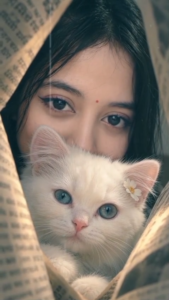
Ai Video Prompt ⬇️
🎬 Image-to-Video Prompt
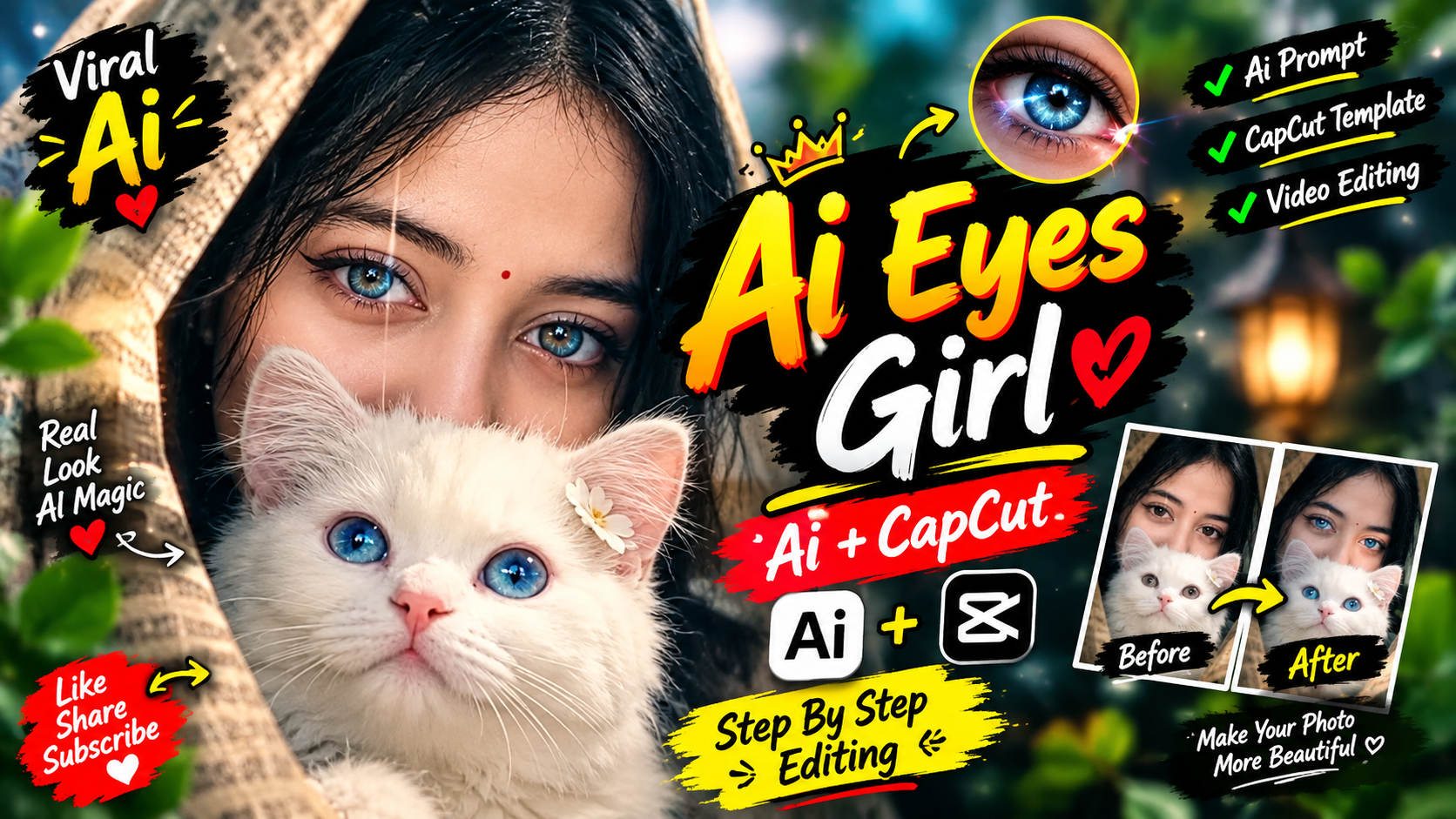
Use the uploaded image as the exact reference. Create a 5–7 second ultra-realistic cinematic vertical 9:16 video. Preserve the girl’s facial features, eyes, hairstyle, skin tone, expression, and the white kitten exactly as shown.
The girl and the fluffy white kitten remain nestled together between the soft white curtains. The girl slowly blinks once and gently moves her eyes toward the camera, while the kitten makes a tiny natural blink and subtle nose/ear movement. The small white flower on the kitten’s fur moves slightly with a soft breeze. The curtains gently sway naturally from both sides.
Add a very slow cinematic camera push-in, with realistic depth of field and delicate soft lighting. Keep the dreamy pale-white aesthetic, natural skin and fur texture, realistic eye reflections, subtle breathing motion, and smooth lifelike movements.
Style: photorealistic, dreamy, soft cinematic lighting, 4K, smooth motion, shallow depth of field, natural micro-expressions, premium camera quality.
Negative prompt: no face distortion, no identity change, no extra fingers, no extra animals, no morphing, no exaggerated movement, no changing clothes, no changing kitten color, no text, no watermark, no flickering..9.16
Ai Photo Prompt ⬇️
Ultra-realistic cinematic portrait, vertical 9:16. A fluffy white kitten is wrapped comfortably in soft white fabric, positioned in the foreground with its adorable face, fluffy ears, glossy expressive eyes, and tiny pink nose clearly visible. A young woman is positioned closely behind the kitten, partially covered by a soft white/black draped veil, with only her beautiful eyes and upper face visible above the kitten.
STRICT IDENTITY PRESERVATION: preserve the woman’s exact facial features from the reference image, including eye shape, eyebrows, forehead, natural skin tone, facial proportions, and natural skin texture. No face swap, no facial modification, no beautification, no age change.
Add a tiny delicate white flower near the kitten’s ear. Soft diffused studio lighting, dreamy pastel atmosphere, realistic fur texture, detailed eyes, natural shadows, shallow depth of field, subtle cinematic glow, professional DSLR photography, photorealistic, high detail, 4K quality. Keep the composition centered and intimate, optimized for a 9:16 vertical social-media frame.
- Har small experiment ke liye heavy cloud processing fire na karein; pehle lowest preview resolution par draft composition finalise karein.
- Ek session mein multiple heavy rendering tasks queue karne ke bajaye unhe off-peak digital hours mein execute karein, jisse processing server instant response deta hai.
- Agar daily quota exhaust ho jaye, toh multi-workspace profiles maintain karein jisse pipeline mein koi visual break na aaye aur creation non-stop chalti rahe.
Bonus Tip: Professional Colour Grade Integration With VN & Premiere Pro

Gemini Ai Video prompt 👇
The video segment spanning from timestamp 00:00 to 00:05 captures a fantastical and emotionally resonant nocturnal encounter.
* Character and Interaction: A man, viewed primarily from behind and dressed in a light-colored checkered button-down shirt, extends his arm upward to firmly clasp hands with a glowing ethereal entity.
* The Luminous Entity: Floating gracefully above the ground is a female figure bathed in a radiant, supernatural blue light. She features long, dark hair, a soft facial expression, a flowing translucent gown, and a pair of large, detailed butterfly wings that emit a luminous glow.
* Atmospheric Details: The setting unfolds in a dark nighttime environment, with the silhouette of an urban structure or communication tower visible in the background.
* Visual Effects: Enhancing the magical atmosphere, numerous glowing blue butterflies and radiant light particles drift and flutter through the air surrounding the figures, maintaining this enchanted aesthetic consistently across the video sequence.
Visual asset generate hone ke baad uski overall visual quality ko 10x amplify karne ke liye ek smart post-production trick use karein.
- AI-generated asset ko direct final project mein use karne ke bajaye kisi standard editing timeline (jaise VN ya Premiere Pro) par import karein.
- Video layer par subtle Analogue Film Grain (intensity 4% to 8%) overlay karein. AI footage aksar unnaturally smooth dikhti hai; film grain add karne se artificial plastic texture dissolve ho jata hai aur realistic organic texture build hota hai.
- Frame par halka sa Vignette (-6%) aur Custom Cyan-Orange Split Tone apply karein. Is step se standard AI output instantly premium cinema camera capture jaisa visual authority gain kar leta hai.
Conclusion
Generative creation ki duniya mein consistency aur creative clarity sabse powerful skill hai. Google Flow AI free mein kaise use kare ka solution tool ke complex parameters ko samajhne, structured natural language prompts likhne aur smart iteration workflows follow karne mein chhupa hai. AI aapke creative ideas ko replace karne ke liye nahi, balki aapki speed aur visual imagination ko multiply karne ke liye design kiya gaya hai. In structured steps ko implement karein, visual nodes ke sath experiment karein, aur continuous practice ke through apne digital workflow ko aane wale kal ke liye fully upgrade karein.