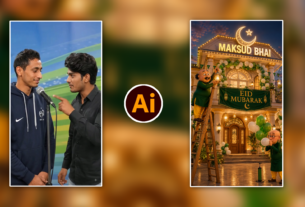
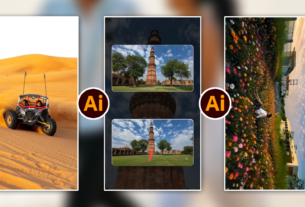
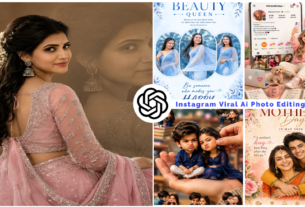
About the Author: Main hoon MD Maqsood, ek professional video editor jise editing industry mein kaam karte hue ab 7 saal se zyada ka waqt ho chuka hai. Apne YouTube channel m4editorofficial (13.6K+ subscribers) aur Instagram page m4_editor_official (145K+ creators community) ke through main rozana practical editing workflows aur trending breakdowns share karta hoon. Mera maqsad beginners ko raw theoretical baaton se bahar nikaal kar ground-level ki practical skills sikhana hai taaki har creator genuine visual storytelling seekh sake.
2026 Mein AI Photo And Video Editing Se Viral Content Kaise Banaye? M4 154
Social media algorithms ka nature pichle kuch saalon mein poori tarah badal chuka hai. Ab na toh sirf basic cuts chalte hain, aur na hi generic filters. Agar aap 2026 mein Instagram Reels, YouTube Shorts ya high-retention visuals par kaam kar rahe hain, toh ek baat clear samajh lijiye: Audience ka attention span ab microseconds mein measure hota hai.
Is high-competition space mein creators ke paas do options hain—ya toh purane slow manual workflows par ghanton barbaad karein, ya phir smart algorithms ka sahi use seekhein. 2026 mein AI photo and video editing se viral content kaise banaye, yeh sawaal sirf software seekhne tak seemit nahi hai; yeh ek structured creative strategy ka hissa hai.
Is in-depth guide mein main apna 7+ saal ka practical post-production experience share kar raha hoon, taaki aap pure automated toolkit aur human storytelling ke combination se high-impact, engaging content deliver kar sakein.
1. 2026 Ka Algorithmic Shift: Content Viral Kaise Hota Hai?
Kisi bhi software par jump karne se pehle yeh samajhna zaroori hai ki platforms actually kya promote kar rahe hain. 2026 mein Instagram, TikTok aur YouTube algorithms teen core metrics ko sabse zyada weightage dete hain:
- Average Watch Percentage (AWP): Agar aapka 30-second ka video log 28 seconds tak nahi dekh rahe, toh reach wahi ruk jayegi.
- Frame-to-Frame Drop-off Rate: Har 2 se 3 second par screen par visual change hona zaroori hai.
- Shareability & Saves: Content itna visually captivating ya informative ho ki user use apne circle mein forward kare.
Yahan standard editors slow pad jaate hain, aur yahin AI-powered automated pipelines aapka samay bacha kar execution speed ko 10x karti hain.
2. Dynamic Visual Hooks: Pehle 3 Seconds Ka Psychological Game
Content ka sabse bada game-changer pehla visual shock hota hai, jise hum industry terms mein Scroll-Stopping Hook kehte hain.
AI Generative Visuals Se Impactful Opening Banayein
Aap real footage ki shuruat mein 1-2 second ke generative hyper-realistic sequence add kar sakte hain. Midjourney v7 ya Stable Diffusion XL ke upgraded neural workflows se custom abstract background create karein jo video ke concept ko seedha exaggerate kar de.
Practical Actionable Steps:
- Depth Separation: Apne footage ke subject ko background se alag karne ke liye smart masking tools use karein.
- Text Layering Behind Subject: AI background segmentation ki madad se hook text ko model ke peeche place karein, jisse immediate high-budget cinema feel aati hai.
- Motion Parallax: Static photo ke andar dimensional camera movement add karein taaki user ko lage ki camera physical space mein move kar raha hai.
3. High-Paced AI Video Editing: Retention-Driven Cuts
Ek beginner editor ki sabse badi samasya hoti hai—footage toh shoot kar li, lekin timeline par pacing decide nahi ho pati. Pacing hi yeh tay karti hai ki viewer video skip karega ya poora dekhega.
Smart Silence Trimming Aur Cadence Matching
Purane manual timeline scrubbing ke din gaye. Modern machine-learning cut systems aapki poori audio stream ko analyse karte hain.
- Jahan bhi micro-pauses ya fumble hon, wahan automatic audio gap removal run karein.
- Beat-Synchronized Micro Cuts: Algorithms background track ke transients (bass drops aur snares) ko identify karke cuts ko automatically align karte hain.
- Pro-Editor Advice: Har cut ko automated sync par mat chodiye. Jahan emotion change ho raha ho, wahan cut ko manually 2 frame aage ya peeche shift karein taaki edit natural feel ho, robotic nahi.
4. Hyper-Realistic AI Photo Editing: Aesthetic Feed & Thumbnail Dominance
Agar aapka photo content ya video ka thumbnail sharp aur atmospheric nahi hai, toh koi click hi nahi karega. Photo editing mein 2026 ka trend natural texture retain karte hue dramatic lighting build karna hai.
Studio-Grade Relighting Techniques
Aap ghar par ek normal room light mein photo shoot kar sakte hain, lekin neural relighting engines (jaise updated layered depth models) se aap post-production mein:
- Directional rim light inject kar sakte hain.
- Atmospheric smoke ya subtle volumetric light beams add kar sakte hain.
- Skin tone ko preserve karte huye background colour grading alag curve par process kar sakte hain.
High-CTR Image Optimisation Process:
- Subject Pop Out: Contrast curve ko global level par badhane ke bajaye specific visual focal points par micro-contrast create karein.
- Micro-Denoising Without Blur: AI frequency separation filter run karein jo noise toh clean karta hai, lekin facial skin pores aur fabric detailing ko bilkul sharp rakhta hai.
5. Kinetic Captions Aur Audio Restoration Ka Role
Aaj 70% se zyada log short-form video mute par dekhte hain. Iska matlab saaf hai: Agar aapke visuals par accurate text narration nahi hai, toh aap majority audience kho rahe hain.
Context-Aware Animated Subtitles
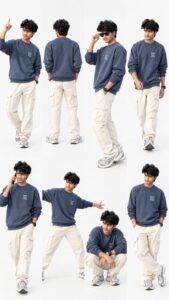
Using my uploaded photo, create an ultra-realistic, premium fashion photography collage featuring the exact same person in 8 different poses. Strictly preserve my real face, identity, hairstyle, skin tone, and natural facial features without any changes. OUTFIT: A stylish oversized slate-blue/charcoal-blue sweatshirt with subtle white lettering on the chest, cream-white cargo pants, and matching grey-and-white chunky sneakers. Add a simple black wristwatch. No cap or hat. Keep the outfit consistent across all 8 poses. POSES: 1. Standing confidently while pointing upward. 2. Full back view showing the outfit. 3. Side pose adjusting black sunglasses. 4. Walking naturally with a stylish stride. 5. Walking while talking on a smartphone. 6. Dynamic wide-leg pose with arms extended. 7. Relaxed crouching pose with elbows resting on the knees. 8. A stylish casual pose looking sideways. COMPOSITION: Arrange all 8 full-body and medium-body poses in a single seamless collage, similar to a professional fashion lookbook. Use a clean, bright white studio background with soft natural lighting, realistic shadows, accurate body proportions, and sharp clothing details. Keep every pose distinct and naturally spaced, with the entire collage clearly visible. STYLE: Photorealistic, high-resolution, premium streetwear editorial, realistic fabric texture, natural skin details, professional studio photography, clean minimalist aesthetic. IMPORTANT: The same person must appear in every pose. Preserve facial identity accurately. No extra people, no distorted hands, no duplicate poses, no unnecessary objects, no dark background, no borders, and no large text. Vertical 9:16 composition.
Pehle subtitles type karne mein ghanton lagte the. Ab natural language processing tools na sirf accurate Hinglish transcription karte hain, balki voice modulation ke hisaab se specific focus words ko alag colour highlight aur bounce animation dete hain.
Studio Voice Reconstruction
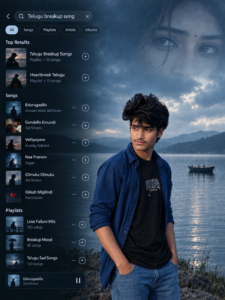
Prompt Prompt A Uploaded image create Create a cinematic, ultra-realistic 3:4 wallpaper combining a Telugu heartbreak music search interface with a melancholic romantic movie scene. On the left side, display a dark translucent music streaming app search screen with the search query “Telugu breakup song,” rounded category tabs, album thumbnails, and a vertically arranged list of Telugu sad songs and breakup playlists with white text and subtle circular plus icons. On the right side, show a young Indian man with curly black hair, , standing alone on a upload image same Pose conveys deep sadness, loneliness, and. In the background, a vast calm lake stretches toward distant hills beneath a cloudy blue-gray sky, with a small boat on the water and a subtle faded close-up of a woman’s eyes in the upper-right corner, symbolizing memories of lost love. Use moody blue-gray color grading, soft natural overcast lighting, atmospheric mist, realistic water reflections, detailed textures, cinematic depth of field, and a premium Tollywood heartbreak poster aesthetic. Blend the music interface seamlessly into the dark left side while keeping the man clearly visible on the right. Photorealistic, emotionally powerful, high detail, 4K quality, no watermark, no unnecessary text, portrait composition. Suggested style: Cinematic Telugu love-failure aesthetic, melancholic, dark blue tones, realistic photography, vertical smartphone wallpaper..
Poor audio quality audience ko turant screen scroll karne par majboor karti hai. Algorithmic voice isolation use karke kisi bhi noisy road, fan ki sound ya echo room se raw voice ko isolate karein aur studio warmth add karein. Clean audio direct authority establish karti hai.
6. Algorithmic Pacing: Viral Flow Create Karne Ka Blueprint
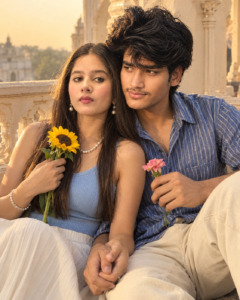
Recreate as an ultra-realistic romantic photo of a young South Asian couple sitting close on a heritage balcony. Preserve both reference faces and natural features. The woman wears a powder-blue sleeveless top, white pleated skirt, and pearl jewelry, holding a yellow sunflower. The man wears a blue-striped shirt and cream trousers, leaning against her while holding a pink flower. Their hands gently intertwine. Use warm golden-hour sunlight, cream stone railings, soft vintage film tones, realistic skin, natural smiles, detailed flowers, and a candid iPhone photography aesthetic. 4:5, high resolution. close up
Viral content accidentally create nahi hota; uske peeche calculated structural rhythm hoti hai. Maine apne studio ke pichle saikdon projects ko test karke ek timeline structure develop kiya hai jo sabse zyada retention convert karta hai:
Timeline Segment
Visual Strategy
AI Tool Functionality
Target Retention
00:00 – 00:03
High-energy visual hook + Text trigger
Automatic object removal + Depth relighting
100% (Arrest attention)
00:03 – 00:15
Fast value delivery + Multi-angle cuts
Smart B-roll placement + Beat markers
85%+ (Build interest)
00:15 – 00:35
Detailed explanation + Kinetic subtitles
Automated speech sync + Dynamic zoom-ins
75%+ (Maintain engagement)
00:35 – End
Clear takeaway + Direct Call to Action
Clean looping cut point generation
70%+ (Drive engagement)
7. Strategic Tool Selection: Smart Creators Ka Production Stack
2026 mein market naye tools se bhara pada hai, lekin professional work delivery ke liye aapko 50 software nahi, balki 3 solid platforms par mastery chahiye:
1. Unified Mobile Editing Suite (Runway, CapCut Pro Ecosystem)
Beginners ke liye desktop setup hona mandatory nahi hai. Cloud-based neural engines mobile phones par 4K real-time upscaling aur background in-painting handle karte hain. Tracking aur text animation yahan minute-level par set ho jate hain.
2. Generative Asset Builders (Midjourney & Kling/Luma Workflows)
B-roll shoot karne ke liye costly production setup ki zaroorat nahi hai. Agar aapko ek specific visual chahiye (jaise “retro neon room with floating gadgets”), toh aap exact generative prompt se 4-second clip generate karke transitions mein drop kar sakte hain.
3. Desktop Powerhouses (DaVinci Resolve Neural Engine & Premiere Pro Sensei
Agar aap high-ticket commercial editing ya YouTube long-form content target kar rahe hain, toh hybrid setup use karein. Masking, optical flow slow-motion aur scene-edit detection jaise heavy tasks automation par daalein, jabki fine colour adjustments manual trackballs par rakhein.
8. Bonus Tip: “Ghost Frame” Loop Technique Se 120% Retention Kaise Layein
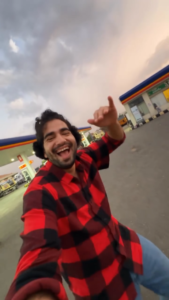
Ai Dance Video Prompt 👇
Recreate the uploaded reference video EXACTLY, shot for shot, as a new photorealistic vertical 9:16 video.
MOTION LOCK (from reference video):
Copy every movement from the reference video exactly — the same dance steps, arm and body movements, hand gestures, walking path, timing and rhythm. Copy the exact camera path: same handheld shake, same pans, same whip-pans, same 180° selfie rotations, same framing and cut points. Do not add, remove or change any movement. Use the reference video ONLY for motion, camera and timing — do NOT copy any face, clothing or texture from it.
CHARACTER REPLACEMENT (from reference images):
– Reference image 1 = THE DANCER. Replace the dancing man in the video with this person. He appears ONLY in the opening dance, performing the exact same dance moves. He never holds the phone and never appears in any selfie shot.
– Reference image 2 = THE CAMERA OPERATOR. He holds the phone for the entire video. Every time the camera turns around into selfie view (the first selfie turn AND the final selfie), the face shown MUST be this person, with the same expressions and movements as in the video.
– Reference image 3 = THE PASSENGER. Replace the man who steps out of the parked car with this person. He gets out and walks toward the camera exactly as in the video, and stands in the background during the final selfie. He never holds the phone.
Ek aisi professional editing technique jo main apne viral short-form edits mein continuously use karta hoon, wo hai Seamless Ghost Looping.
Jab video ka aakhri frame bina kisi audio drop ya visual jump ke pehle frame se seamlessly match ho jata hai, tab viewer ko pata hi nahi chalta ki video dobara shuru ho chuka hai.
- Apne aakhri sentence ko intentionally incomplete chodiye jo direct video ke pehle 2 shabdon se match ho kar ek meaningful sentence banaye.
- Video ke last 10 frames par machine-learning frame blending apply karein jo first frame ki brightness aur camera positioning se micro-morphing create kar de.
- Audio background track ko poore timeline par uninterrupted rakhein.
Is trick se aapki post ka average watch time 100% se cross karke 115%–125% tak chala jata hai, jisse recommendation engine video ko immediate boost deta hai.
9. Future-Proofing: AI Era Mein Apna Personal Brand Identity Kaise Banayein
Tools har kisi ke paas same hain. Agar 10,000 creators same template aur same automatic presets use karenge, toh content repetitive lagne lagega aur audiences use swipe karne lagengi.
Real value tool mein nahi, editor ke taste mein hoti hai.
- Custom Signature LUTs: Hamesha default automated colour profile par mat rukiye. Ek unique colour tone develop karein jo aapki pehchan bane.
- Audio Identity: Consistent background soundscape aur unique sound design cues (whooshes, risers, paper textures) maintain karein.
- Story Architecture: Automation ka use sirf monotonous technical tasks (jaise rotoscoping, subtitles, sync) ko fast karne ke liye karein. Edit ka emotion aur message hamesha aapke human mind se guide hona chahiye.
Conclusion
2026 mein AI photo and video editing se viral content kaise banaye, iska single-line secret yeh hai ki aapko technology ko apna creative assistant banana hai, director nahi. Automated tools aapko speed denge, lekin storytelling aur emotion aapko khud timeline par build karna hoga. Aaj hi naye automated workflows ko explore kijiye, rozana practical execution kijiye aur continuous timeline experimentation se apna unique visual standard set kijiye.

Transform the uploaded photo into a cinematic real-life and anime fusion scene. Keep the main subject completely recognizable, preserving their original face, hairstyle, body proportions, clothing, accessories, pose, and overall appearance. Add a small full-body anime version of the same person standing naturally behind them, wearing the exact same outfit and matching the hairstyle and colors. Give the anime character a polished modern anime design with crisp linework, expressive eyes, subtle cel shading, and slightly exaggerated proportions. The anime character should hold a powerful flashlight directed toward the real subject's back. Create an intense realistic white light beam with strong illumination, soft atmospheric glow, bright edge lighting, realistic shadows, and subtle light particles. Slightly darken the surrounding environment to emphasize the flashlight while maintaining the original sunset/outdoor atmosphere. Preserve the original background, camera perspective, framing, composition, and photographic realism. Make the anime character feel naturally integrated into the environment with accurate contact shadows and lighting interaction. Create a highly detailed, cinematic, realistic-looking final image with a seamless anime-meets-photography effect.