Mera naam MD Maqsood hai aur pichhle 7 saalon se main video editing aur motion graphics industry mein active hoon. Main apne YouTube channel m4editorofficial (13.6K subscribers) aur Instagram community m4_editor_official (145K followers) ke zariye trending visual effects aur editing techniques daily share karta hoon. Is blog ka mera seedha maqsad yahi hai ki har beginner creator bina kisi confusion ke authentic editing tools aur practical skills bilkul free mein seekh sake.
Alight Motion Download Kaise Kare? (A to Z Step-by-Step Guide for Android & iOS) M4 132
Agar aap social media ke liye cinematic reels, viral lyrical videos, trending XML motion presets ya high-level VFX create karna chahte hain, toh smartphone creators ki list mein ek app sabse top par aati hai: Alight Motion.
Aaj ke digital era mein mobile editing sirf cut, split ya audio mix karne tak limited nahi rahi. Creators ko chahiye professional-level keyframe animation, multi-layer graphics aur custom vector drawing tools. Yeh sabhi features traditional lightweight video editors mein available nahi hote. Yahin par kaam aata hai professional motion design engine.
Lekin beginners ke samne sabse pehla sawaal yahi aata hai: Alight Motion download kaise karein, iska sahi aur safe version kahaan se install karein, aur device par setup karte waqt kin technical baaton ka dhyan rakhein taaki editing ke dauran lag ya crashes ka saamna na karna pade? Is complete guide mein hum official methods, device compatibility, smooth setup aur secret performance settings ko step-by-step detail mein cover karenge.
Alight Motion Kya Hai Aur Creators Isko Kyun Pasand Karte Hain?
Alight Motion pehla aisa fully functional pro motion graphics application hai jo specially smartphones aur tablets ke liye banaya gaya hai. Aam video editing apps timeline cut-paste par focus karti hain, jabki yeh tool graphic design, visual effects compositing aur keyframing ke advanced tools provide karta hai.
Key Highlights Jo Isko Unique Banate Hain:
- Keyframe Animation Support: Aap kisi bhi element ke position, scale, opacity aur rotation ko frame-by-frame animate kar sakte hain.
- Vector Graphics aur Custom Shapes: Vector layers ko direct canvas par draw karke custom illustrations design kar sakte hain.
- Blending Modes & Colour Grading: Professional cinematic contrast aur colour correction ke liye industry-standard blending profiles milti hain.
- Visual Effects Library: 100+ inbuilt effects jaise Gaussian Blur, Motion Blur, Glow, Chroma Key, aur Displacement Map.
- XML Project Sharing: Banaye gaye complex animations ko XML file format mein save ya community ke sath instantly import/export karne ki capability.
Minimum System Requirements: Download Karne Se Pehle Yeh Zaroor Check Karein
Koi bhi graphics-heavy application install karne se pehle apne smartphone ki hardware capability ko samajhna bohot zaroori hota hai. Alight Motion real-time vector rendering engine par chalta hai, isliye agar device underpowered hoga toh render time badh jayega ya canvas lag karega.
Android Requirements:
- Operating System: Android 6.0 (Marshmallow) ya usse upar ka updated version.
- RAM: Minimum 3GB RAM (Smooth multi-layer timeline ke liye 6GB ya 8GB RAM highly recommended hai).
- Processor: Octa-Core processor (Qualcomm Snapdragon 6-series ya MediaTek Helio G-series se behtar).
- Free Storage: Kam se kam 1.5GB free internal memory cache files aur temporary render ke liye.
- iOS / iPadOS Requirements:
- Operating System: iOS 12.2 ya uske baad ka system version.
- Compatible Devices: iPhone 7 se lekar sabhi modern iPhone models aur iPad family devices.
- Free Storage: Minimum 2GB free storage available honi chahiye.
Android Phone Par Alight Motion Download Kaise Kare? (Official Step-by-Step Guide)
Android ecosystem mein application install karne ke kayi raaste hote hain, lekin security, stability aur automatic security updates ke liye hamesha Google Play Store sabse verified aur safe platform hai.
Step 1: Google Play Store Open Karein
Apne Android smartphone ki app drawer mein jayein aur Google Play Store icon par tap karein. Ensure karein ki aapka phone active internet connection ya stable Wi-Fi se connected ho.
Step 2: Search Bar Ka Istemal Karein
Play Store ke top par bane search icon par tap karein aur type karein: Alight Motion. Search button dabate hi sabse pehle result par official app dikhai degi.
Step 3: Developer Details Verify Karein
Hamesha verify karein ki app ka developer name Alight Creative, Inc. likha ho. Verified app hone par aapko millions of downloads aur green Play Protect badge nazar aayega.
Step 4: Install Par Tap Karein
App name ke samne bane green color ke Install button par tap karein. Download process shuru ho jayegi. App ka standard size lagbhag 80MB se 130MB ke beech hota hai (yeh device build ke anusar thoda vary kar sakta hai).
Step 5: Verification Aur Permissions Setup
Installation complete hote hi Open button active ho jayega. Pehli baar open karne par app aapse Photos/Media/Files access karne ki permission maangegi, taaki aap apni gallery se video clips aur sound import kar sakein. Is permission ko Allow kar dein.
iPhone Ya iPad (iOS) Par Alight Motion Download Kaise Kare?
iOS devices par motion rendering A-series aur M-series Bionic chips ke hardware acceleration ki wajah se aur bhi zyada stable output deti hai.
Step 1: Apple App Store Open Karein
Apne iPhone ya iPad par App Store application ko launch karein.
Step 2: Official Listing Search Karein
Bottom right corner par diye gaye Search tab par tap karein aur search box mein Alight Motion type karein.
Step 3: Developer Authenticity Check Karein
Yahan verify karein ki app developer ka title Alight Creative, Inc. ho. App ka logo aur official interface screenshots check karein.
Step 4: Get Button Par Tap Karein
App ke saamne bane Get icon par tap karein. Agar aapke phone par biometric verification set hai, toh Face ID, Touch ID ya apna Apple ID password enter karein.
Step 5: Complete Installation
App automatically background mein install ho jayegi aur aapke Home Screen ya App Library mein show hone lagegi.
Alight Motion Ko Smooth Run Karne Ke Liye Important Settings
App install ho jaane ke baad direct timeline par 10 layers import mat karein. Smooth timeline editing ke liye app ko apne phone ke processor ke sath sync karna padta hai:
- Low Power Mode / Battery Saver Ko Turn Off Karein: Jab aap edit kar rahe hon, tab phone ka general battery saver off rakhein taaki CPU processing limit na ho.
- Canvas Preview Quality Adjust Karein: Agar aap high-resolution clips use kar rahe hain, toh project settings mein preview resolution ko 1080p ke bajaye temporary editing ke waqt 720p ya low preview frame rate par set karein. Isse real-time playback bilkul butter-smooth chalega.
- Internal Cache Clean Up: Har 4-5 dynamic projects edit karne ke baad app settings ke andar se render cache ko clear karte rahein, jisse internal storage fill nahi hoti.
Bonus Tip: XML Presets Aur Smooth Keyframe Graph Ka Secret Setup
Ek pro video editor ka workflow XML presets aur custom graph editor par depend karta hai. Alight Motion download karne ke baad sabse pehle yeh smart workflow trick apply karein:
Jab bhi aap do keyframes ke beech transition animate karein, toh linear keyframes chhodkar screen ke left side mein bane Graph Icon par tap karein.
- Graph curve ko ek curve-in aur smooth curve-out shape dein. Isse aapke standard sliding transitions mein natural momentum aur friction generate hota hai.
- Agar aap social media par popular shake effects ya smooth zoom-in chahte hain, toh external XML package files ko directly apne file manager se select karke Share via Alight Motion select karein. App automatically us complex preset ko aapke project panel mein load kar degi, jisse ghanton ka motion design work sirf 2 clicks mein solve ho jata hai.
Safety & Security Advice: Unofficial Sources Se Kyun Bachna Chahiye?
Internet par kayi websites third-party modified installation packages provide karne ka daawa karti hain. Ek responsible creator hone ke naate, main aapko strongly advice deta hoon ki hamesha verified official sources (Play Store ya App Store) se hi application install karein.
- Account Security: Third-party files aapke cloud logins aur Google account ke liye data breach ka threat ban sakti hain.
- Corrupted Render Engine: Unverified builds mein hardware acceleration library properly update nahi hoti, jisse 4K ya 60FPS video export karte waqt files crash ya freeze ho jaati hain.
- Instant Bug Fixes: Official versions par updates aate hi naye visual effects aur OS stability patches instantly update ho jaate hain.
Conclusion
Alight Motion mobile creators ke liye ek unmatched visual editing tool hai jo high-end PC motion software ke barabar creative freedom deta hai. Is guide ke step-by-step methods ko follow karke aap easily apne Android ya iOS device par official application setup kar sakte hain. Sahi canvas settings aur custom graph techniques par focus karein, daily new animations experiment karein, aur apni video editing skills ko consistent practice ke sath pro-level par le jayein.
Full Project 👇
Xml File 👇
Alight Motion 👇
Photo Prompt 👇
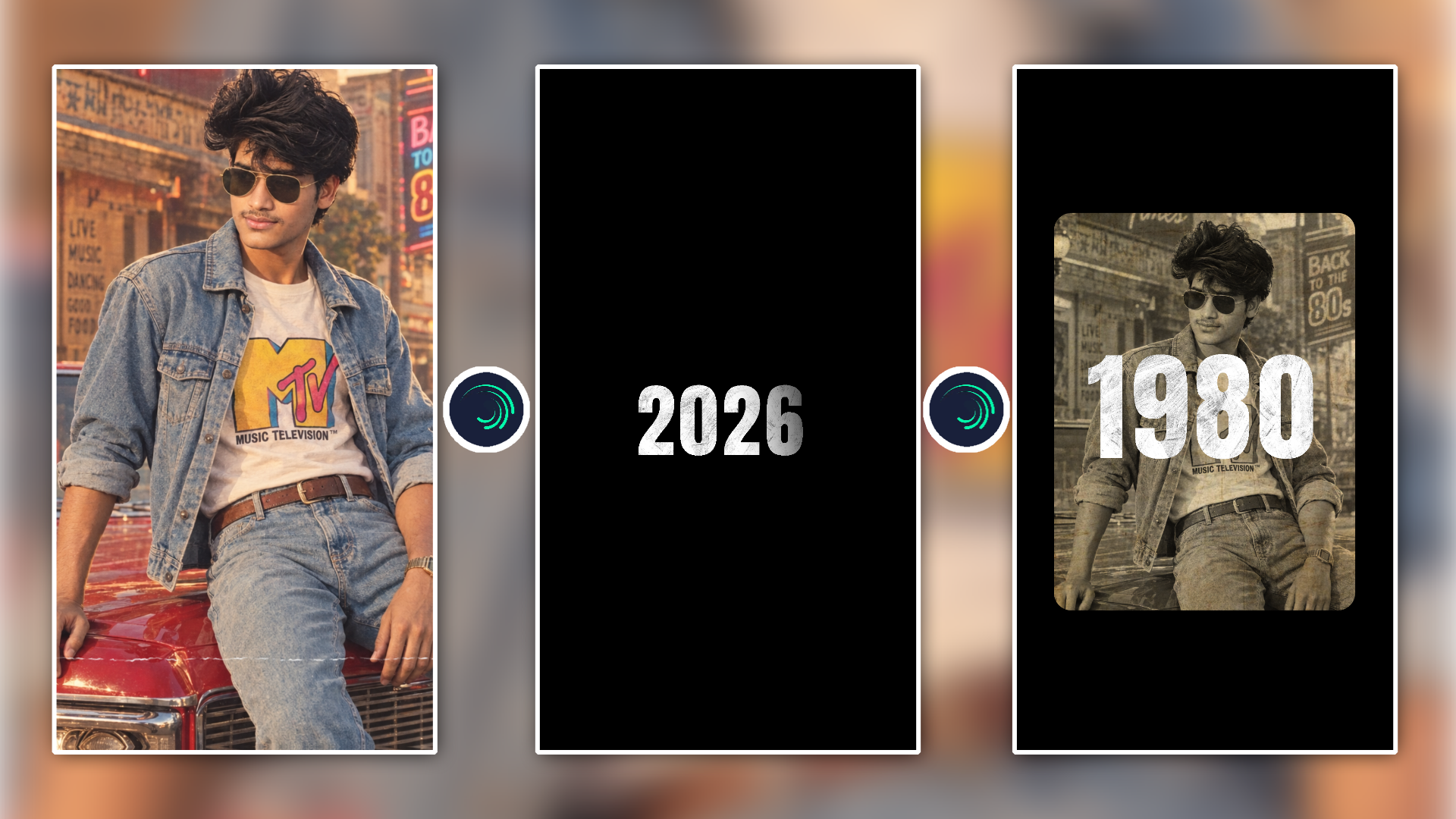
What would we have looked like in the 80s A Use the uploaded image as the primary reference. Create an authentic 1980s retro cinematic portrait of the same young Upload image preserving his facial identity, natural facial structure, hairstyle, skin tone, and overall likeness. He is seated casually on the hood/front of a classic vintage red car, wearing dark aviator sunglasses, a light blue vintage denim jacket with rolled-up sleeves, a white retro MTV graphic T-shirt, matching high-waisted light-wash denim jeans, a brown leather belt, and a vintage wristwatch. His pose is relaxed and confident, with one arm resting naturally on the car, looking slightly to the side. Environment: nostalgic 1980s urban street, vintage building facade, retro neon signage reading “Good Times” and “Back to the 80s”, old street lamps, subtle palm trees, authentic period details. Lighting & style: warm golden-hour sunlight, soft cinematic highlights, slightly faded Kodak/35mm analog film colors, realistic skin texture, subtle film grain, gentle halation, light dust and scratches, aged photograph texture, slightly warm muted contrast, natural shadows, premium cinematic photography. Composition: vertical full/three-quarter body portrait, subject prominently framed, vintage car visible in foreground, shallow depth of field, realistic perspective, cinematic 35mm photography, highly detailed, photorealistic, nostalgic 1980s Bollywood movie still. Important: preserve the reference person’s identity and natural appearance; do not replace or redesign the face. Keep the overall pose, clothing concept, vintage car composition, and nostalgic photographic character consistent with the reference. No modern objects, no futuristic elements, no cartoon/anime look, no excessive face retouching, no facial distortion.