Main hoon MD Maqsood, ek professional video editor aur visual creator jisko editing industry mein 7+ saal se zyada ka real-world experience hai. Apne YouTube channel “m4editorofficial” (13.6K+ subscribers) aur Instagram page “m4_editor_official” (145K+ followers) ke zariye main naye creators ko trending editing techniques, accurate AI prompts aur professional post-processing tricks bilkul free sikhata hoon taaki har koi bina kisi technical hurdle ke high-level creative visual content bana sake.
1980s Look AI Photo Editing Prompts 2026 | Create Vintage Retro Photos with AI M4 33
Aaj ke ultra-sharp smartphone photography ke daur mein social media par ek naya trend sabse aage nikal chuka hai, aur woh hai classic vintage retro aesthetics. Log apni modern, high-contrast digital selfies ko chhodkar 35mm analogue film jaisi photos create kar rahe hain, jisme soft warm lighting, faded paper textures aur natural film grain hota hai. Instagram aur visual feeds par 1980s Look AI Photo Editing Prompts 2026 ka craze is waqt peak par hai.
Is aesthetic ki sabse badi khoobi yeh hai ki yeh aapki aam picture ko seedha 40 saal piche late 80s ke golden era mein transport kar deta hai. Sabse achhi baat yeh hai ki aapko na toh kisi expensive retro film camera ki zaroorat hai aur na hi purani props ki. Aaj ke powerful Artificial Intelligence tools ke zariye aap apna exact real face and natural facial expression preserve karke aisi photos minutes mein generate kar sakte hain.
Niche hum aapko ready-to-use exact prompts de rahe hain bina kisi tricky formatting ke, jinhe aap directly copy karke WordPress ya AI tools par paste kar sakte hain. Saath hi alag-alag AI platforms par image banane ka step-by-step complete process bhi detail mein bataya gaya hai.
1980s Vintage Aesthetic Ke 4 Main Visual Elements
Kisi bhi AI tool ko sahi picture create karne ke liye clear visual direction chahiye hoti hai. Jab aap retro portrait banate hain, toh yeh chaar visual factors sabse important hote hain:
- Muted Analogue Colours: 80s ke Kodachrome aur Fujichrome film rolls mein extreme deep blacks nahi hote the. Wahan shadows thodi faded aur warm yellow-orange highlights hoti thin.
- Organic Film Grain Texture: Modern camera sensors pixel-clean images dete hain, jabki 80s ki images mein natural fine grain aur mild motion softness hoti hai.
- Period-Accurate Fashion: High-waisted pleated baggy trousers, acid-wash denim jackets, floral camp-collar shirts, retro leather belts aur oversized glasses.
- Cinematic Setting: Vintage background jaise classic cars, purane Indian roadside photo studios, wooden panel homes ya retro college corridors.
3 Best 1980s AI Photo Prompts (Ready to Copy & Use)
Aap in prompts ko bina kisi formatting issue ke simple text ki tarah copy kar sakte hain. Ye saare verified prompts aur extra creative updates aapko hamari official website m4editor.com par bhi available milenge.
Prompt 1: Solo Retro Vintage Car & Street Style Look
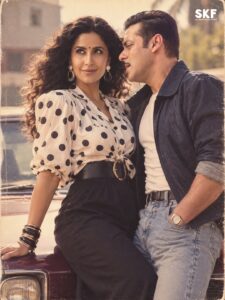
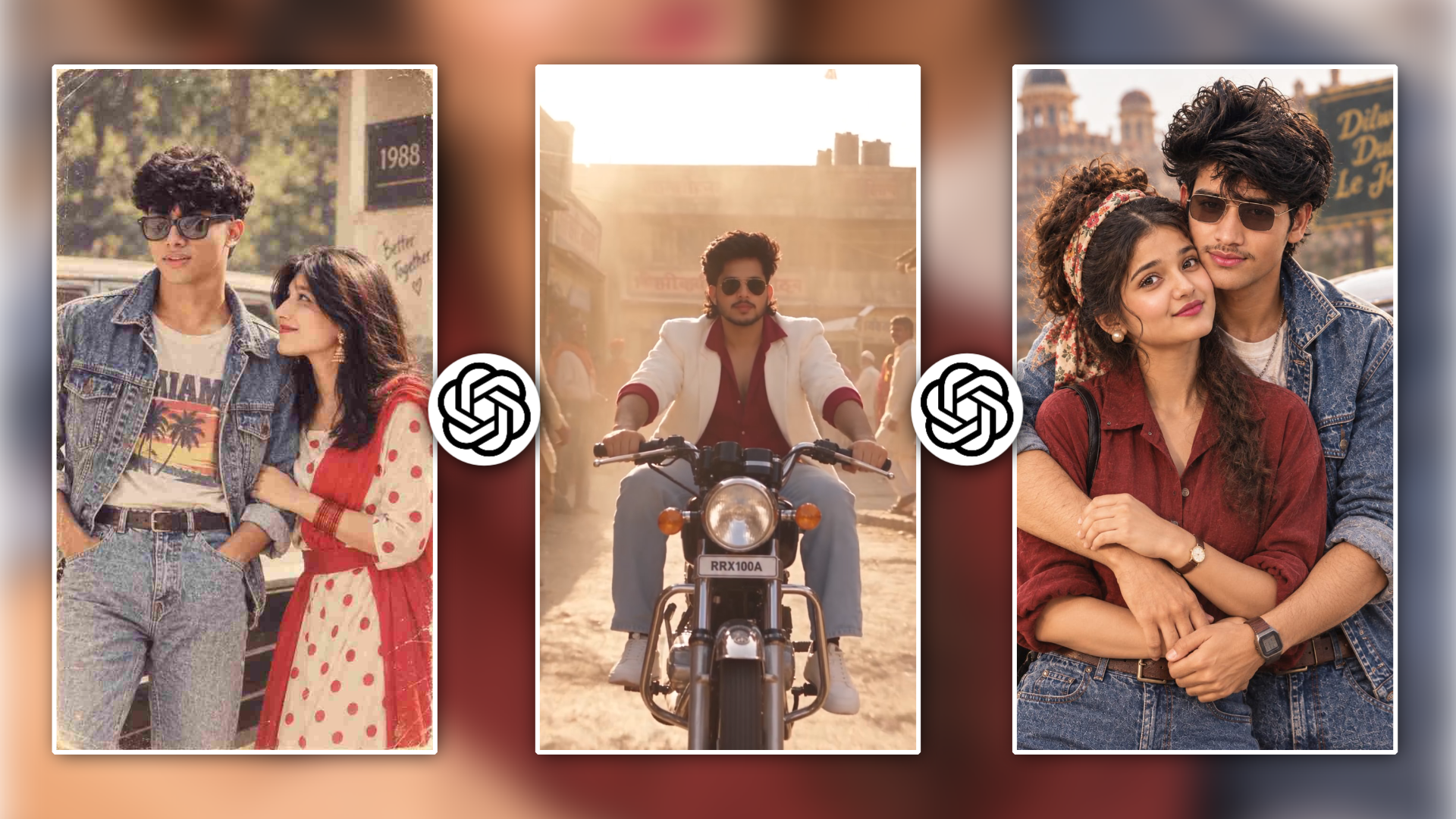
Yeh prompt single male ya female stylish solo portraits ke liye design kiya gaya hai, jisme classic 80s Indian roadside studio, vintage Coca-Cola signage aur retro sedan car ka aesthetic banta hai.
Prompt 1 Text:👇
Transform my uploaded photo into an authentic 1980s retro look. Keep my exact face, facial features, skin tone, expression, body shape, and identity completely unchanged. Do not alter, replace, beautify, or distort my face. Add a realistic 1980s hairstyle, vintage fashion, classic accessories, warm analogue lighting, faded colours, subtle film grain, soft focus, natural shadows, and an authentic old-camera aesthetic. Make the image look like a genuine photograph taken in the 1980s, while preserving my original appearance accurately.
- Styling Highlight: Pleated cream trousers, tucked-in checked retro shirt, vintage wristwatch aur classic car backdrop.
Prompt 2: 1980s Indian College Campus Nostalgia Look
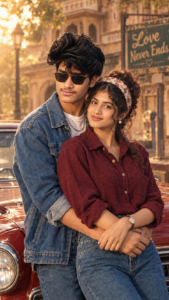
Yeh prompt un creators ke liye best hai jo classic Doordarshan ya late 80s Indian college student wali innocent aur candid retro vibe create karna chahte hain.
Prompt 2 Text:👇
Use the uploaded photo as the primary reference and recreate the same person as if they were photographed in India in the late 1980s. Preserve their exact facial features, face shape, skin tone, body shape, smile, expression, and overall identity with maximum accuracy. Do not alter, beautify, replace, or distort the face. Style them in authentic 1980s Indian fashion, such as high-waisted jeans, a printed shirt or denim jacket, retro accessories, and voluminous 80s-inspired hair, while keeping their natural appearance. Place them in a realistic Indian college, home, or street setting. Add warm faded film colours, natural analogue lighting, subtle film grain, slight softness, realistic shadows, mild colour fading, and authentic vintage camera characteristics.
- Styling Highlight: High-waisted stone-washed jeans, tucked printed shirt, classic belt, side-parted voluminous hair aur college corridor pillars.
Prompt 3: 1980s Indian Couple & Cinematic Reference Composition
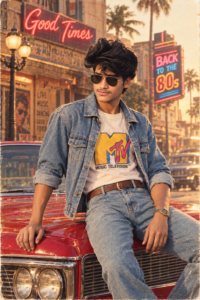
Agar aap chahte hain ki AI kisi particular reference image ka pose, composition aur vintage mood copy kare lekin face aapka hi rahe, toh is prompt ka use karein.
Prompt 3 Text:👇
Transform my uploaded photo to recreate the same composition, pose, setting, clothing style, lighting and vintage aesthetic as the reference image. Keep the same person/people from my uploaded photo and preserve their facial identity and features. Do not replace or alter their faces. Use the reference only for the scene, styling and photographic look. Create an authentic late-1980s Indian photograph with period hairstyles, fashion, Royal Enfield Bullet, natural greenery, warm sunlight, analogue film grain, faded colours, and realistic vintage photography. Reference = style/composition; uploaded photo = identity.
- Important Note for Exact Result: Jo photo humne post mein share ki hai, uska ek screenshot lekar use reference image ki tarah save karein. AI platform par apni original photo + reference image screenshot dono upload karein aur upar diya gaya Prompt 3 paste karein. Isse AI composition reference se uthayega aur facial features aapki uploaded photo se lock rakhega.
Prompt 4 Text: Video 👇
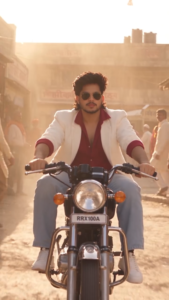
Create an ultra-realistic cinematic 1980s–1990s retro bike ride video featuring the same boy/girl from the reference image, preserving the exact face, facial structure, skin tone, hairstyle, body proportions, and identity.
The character rides a classic vintage motorcycle through an old-school city street, wearing authentic 80s/90s fashion: retro denim jacket, fitted jeans, vintage sunglasses, leather boots, and a stylish classic look. For a girl, use an authentic 80s/90s denim or leather jacket, high-waisted jeans, vintage sunglasses, and natural retro hairstyle.
Use a warm analog film aesthetic, slightly faded colors, realistic film grain, soft sunlight, subtle lens flare, period-correct motorcycles and cars, old buildings, street signs, and nostalgic roadside details.
Camera starts with a low-angle front tracking shot of the motorcycle, then smoothly moves beside the rider, followed by a cinematic rear tracking shot. Add natural wind movement in the hair and clothes, realistic motorcycle suspension, wheel rotation, road reflections, and subtle body movement while riding.
Authentic 80s/90s atmosphere, realistic motion, cinematic depth of field, soft vintage lighting, 35mm film look, detailed skin texture, natural expressions, smooth camera movement, high realism, 4K cinematic quality, vertical 9:16 video.
No modern vehicles, no modern buildings, no futuristic elements, no face distortion, no extra fingers, no identity change, no text, no watermark.
Top AI Platforms Par 1980s Retro Photo Kaise Banayein (Step-by-Step Process)
Har platform ka prompt handling aur image processing mechanism thoda alag hota hai. Niche humne sabhi main platforms ka clear process explain kiya hai.
Method 1: ChatGPT (GPT-4o Vision & Image Generation)
ChatGPT vision model complex instructions ko samajhne mein sabse smart hai aur identity preservation kaafi acche se handle karta hai.
- Step 1: ChatGPT open karein aur ensure karein ki GPT-4o model selected hai.
- Step 2: Message box ke left side mein bane Plus (+) icon par click karein aur apni front-facing clear photo upload karein. (Agar Prompt 3 use kar rahe hain toh saath mein reference screenshot bhi upload karein).
- Step 3: Upar diya gaya required prompt copy karke seedha text box mein paste karein.
- Step 4: Send button par click karein. AI aapke face structure ko analyse karke 80s analogue lighting ke saath matching photo render karega.
- Step 5: Agar pehli baar mein face thoda stylised lage, toh chat mein follow-up command dein: “Maintain my original face shape, nose, and eyes 100% strictly, and make the film grain more subtle.”
Method 2: Google Gemini (Imagen Engine)
Google Gemini natural skin tones aur daylight realism create karne ke liye ek reliable tool hai.
- Step 1: Google Gemini open karein aur login karein.
- Step 2: Chat input bar mein Upload image icon par tap karein aur apni clear daylight portrait photo select karein.
- Step 3: Prompt 1 ya Prompt 2 ko paste karein.
- Step 4: Prompt ke end mein add karein: “Preserve natural skin texture and avoid plastic AI smoothness.”
- Step 5: Enter press karein aur generation complete hone ke baad image ko high-resolution mein save karein.
Method 3: Midjourney (Character Reference & Image Prompting)
Midjourney professional film photography aur 35mm camera texture ke mamle mein sabse realistic results deta hai.
- Step 1: Discord par Midjourney open karein aur chat box mein apni photo upload karke Enter dabayein.
- Step 2: Uploaded image par right click karke Copy Link par tap karein.
- Step 3: Chat box mein /imagine type karein aur prompt box open karein.
- Step 4: Pehle apni image ka URL paste karein, space dekar hamara prompt paste karein.
- Step 5: Prompt ke aakhir mein identity lock parameter lagayein: –cref [Aapka_Image_URL] –cw 85 –v 6.1 –style raw. Yeh code aapke chehre ke structure ko strictly protect karta hai.
- Step 6: 4 generated options mein se jo best lage use Upscale (U1, U2, U3 ya U4) karke download karein.
Method 4: Microsoft Copilot / Bing Image Creator
Beginners ke liye jo bina kisi subscription ke high-quality visual results chahte hain, Bing Creator sabse simple rasta hai.
- Step 1: Microsoft Copilot app ya Bing Image Creator website open karein.
- Step 2: Image upload option par tap karke apni profile photo attach karein.
- Step 3: Prompt 1 ya Prompt 2 ko copy karke directly prompt box mein paste karein.
- Step 4: Create a button par click karein. Tool aapko 4 alag-alag vintage retro variations dega.
- Step 5: Jo result sabse natural aur accurate lage, uspe click karke full resolution JPG download karein.
Method 5: Leonardo AI / SeaArt AI (Face Consistency Mode)
Agar aapko precise control aur customizable sliders chahiye toh Leonardo AI ek premium option hai.
- Step 1: Leonardo AI dashboard open karein aur Image Generation section mein jayein.
- Step 2: Image Guidance tab par jayein, apni photo upload karein aur mode Character Reference ya Face Transfer select karein.
- Step 3: Strength slider ko 0.65 se 0.75 ke beech set karein taaki aapka chehra bilkul na badle.
- Step 4: Prompt box mein hamara prompt paste karein aur Generate par click karein.
1980s Retro Content Ke Liye Creative Scene Concepts
Agar aap apni photo series ko Instagram par carousels ya thematic posts mein share karna chahte hain, toh ye 3 classic concepts sabse zyada viral hote hain:
- Classic Doordarshan Living Room: Background mein wooden television set, crochet tablecloth, purana rotary telephone aur sofa par casual folded legs pose.
- The Retro Bullet / Highway Stroll: Acid-wash denim jacket, dark pilot sunglasses, background mein vintage Royal Enfield Bullet aur golden sunset lighting.
- Vintage Photo Studio Cutout: Soft velvet fabric curtains, studio key light reflection, haath mein single gulab ya vintage pocket diary ke saath classic passport-style pose.
Bonus Tip: Mobile Lightroom Se Final 35mm Analogue Finishing
AI se generated photo ko 100% authentic analogue print jaisa look dene ke liye Adobe Lightroom mobile app mein bas 2 minute ki minor colour grading karein:
- Lift the Blacks (Tone Curve): Curve tool mein RGB curve ke bottom-left point ko halka sa upar lift karein. Isse harsh black shadows muted matte finish mein convert ho jayengi.
- Vintage Colour Balance: Colour grading tool mein Highlights ko subtle warm tint (Yellow/Orange Hue 42, Saturation 10) dein aur Shadows mein minor blue tint daalein.
- Clarity Reduction: Effects panel mein jakar Clarity ko -6 karein. Yeh modern digital hardness ko reduce karke vintage lens jaisi softness add karta hai.
- Film Grain: Effects panel mein Grain ko +25 aur Roughness ko +45 par set karein. Yeh chhota sa step image par 80s film roll paper jaisa realistic tactile texture create kar deta hai.
Conclusion
1980s retro aesthetics sirf ek viral visual style nah,balki digital age mein purane daur ke timeless charm ko dubara jeene ka ek creative zariya hai. Upar diye gaye prompts aur step-by-step methods ka use karke aap bina kisi visual glitch ke apni unique vintage photos bana sakte hain. Inhe try karein, alag-alag poses ke saath test karein aur naye verified prompts ke liye m4editor.com par bane rahein. Happy editing!