About The Author
MD Maqsood ek professional video editor aur visual creator hain, jinhe post-production, VFX aur visual storytelling industry me 7+ saal ka field experience hai. Creative editing techniques aur realistic post-production workflows ko aasan bhasha me sikhane ke liye wo YouTube par m4editorofficial (13.6K+ subscribers) aur Instagram par @m4_editor_official (145K+ community) operate karte hain. Unka mission har ek aspiring creator aur video editor tak bina kisi expensive software barriers ke genuine editing guidance, practical workflow secrets aur trending AI techniques bilkul free deliver karna hai, taaki har koi independent digital creator ban sake.
The Rise of Transformer AI Video Editing: New Trend: Complete Beginner-to-Pro Guide M4 171
Aaj ke digital landscape me short-form video content creation ka rulebook poori tarah badal chuka hai. Jo high-end cinematic morphs aur supernatural transitions pehle Hollywood-level VFX artists ko weeks of frame-by-frame rotoscoping aur 3D compositing ke baad milte the, aaj wo advanced neural models ki wajah se seconds me render ho rahe hain. Agar aap Instagram Reels ya YouTube Shorts regularly consume karte hain, toh aapne ek unique visual trend zaroor notice kiya hoga—ek normal person simple gesture (jaise finger snap ya eye blink) karta hai aur uska roop ek divine, cinematic avatar me smoothly morph ho jata hai, wo bhi bina kisi face distortion ya identity loss ke.
Is massive badlav ke centre me jo technology khadi hai, use hum Transformer AI Video Editing New Trend ke naam se jante hain.
Yeh basic mobile overlays, Snapchat-style AR face filters ya typical CapCut glitch transitions bilkul nahi hai. Yeh generative diffusion aur spatial-temporal attention transformer models ka ek behad advanced fusion hai jo continuous frames ke beech micro-level consistency, natural cloth dynamics, volumetric lighting interaction aur facial geometry preservation ko flawless banata hai. Agar aap ek beginner hain aur chahte hain ki aapki reels internet par viral engagement generate karein, toh yeh in-depth guide aapke liye ek complete practical manual banne wali hai.
Transformer AI Video Editing Kya Hai Aur Yeh Kyun Trending Hai?
Generative AI video tools ke initial phase me sabse bada issue hota tha temporal flickering—har agle frame par character ki aankhein, naak ya skin texture thoda morph ho jata tha, jisse video artificial aur distracting lagti thi. Naye transformer-based diffusion architectures (jaise spatial-temporal patch transformers) ne is issue ko fundamentally solve kar diya hai.
- Spatial-Temporal Consistency: Yeh models sequence ke starting frame se lekar aakhiri frame tak har pixel ki physical trajectory track karte hain, jisse subject ka face shape aur expressions stable rehte hain.
- Volumetric Light Adaptation: Jab character ka costume ya background badalta hai, toh new elements ki shadows aur highlights subject ke skin tone par natural tarike se react karti hain.
- Zero-Distortion Morphing: Hard jump cuts ke bajaye skin, hair aur fabric ek realistic physical liquid state ki tarah seamlessly transform hote hain.
Jab social media audience is level ki visual fidelity aur grand aesthetic transformation dekhti hai, toh audience retention rate aur loop count skyrocket kar jata hai, jo kisi bhi video ko viral push dene ke liye sabse important algorithmic metric hai.
Complete Step-by-Step Production Workflow: Divine Morphing Video
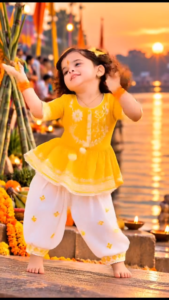
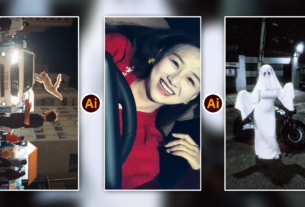
Text-to-Video Prompt (Kling / Runway Gen-3 / Luma / Sora) > Prompt: Full-body vertical 9:16 video of an adorable 3-year-old Indian girl with bouncy curly dark hair, wearing a small yellow butterfly hair clip and a delicate red-and-yellow tilak on her forehead. She is wearing a bright mustard-yellow peplum kurti with white floral embroidery and white dhoti pants, orange bangles on her wrists, barefoot. She starts with folded hands in a polite namaste pose, then bursts into a joyful dance, hopping, twirling, and clapping with cheerful facial expressions and a wide smile. The setting is ancient stone ghat steps beside a sacred river during Chhath Puja at sunset. Surrounding her are lit clay diyas, marigold flower garlands, and woven bamboo baskets filled with fresh fruits and offerings. Warm golden hour glow reflecting on shimmering water in the background, cinematic shallow depth of field, natural fluid movement, 4K resolution, photorealistic. > Image-to-Video Motion Prompt (If using an existing reference image) > Motion Prompt: The little girl begins with a folded-hands namaste gesture, then happily transitions into a traditional festive dance, swaying side-to-side, spinning with open arms, and playfully hopping on the stone steps while smiling brightly at the camera. Subtle river breeze moves her curly hair and yellow dress. Flickering diya flames and shimmering golden river ripples in the background. Smooth camera tracking, natural joyful motion, 24fps cinematic. > Key Prompt Parameters * Subject: 3-year-old Indian baby girl, curly hair with yellow butterfly clip, orange tilak, expressive joyful eyes. * Outfit: Vibrant yellow peplum top with white lace embroidery, white dhoti pants, orange bangles, barefoot. * Action: Pranam / Namaste gesture, joyful festive dancing, hopping, twirling, playful hand movements. * Environment: Chhath Puja river ghat steps, marigold garlands, lit earthen diyas, bamboo sup/daura with fruits, sacred river backdrop. * Lighting & Style: Golden hour sunrise/sunset, warm cinematic backlight, water reflections, vertical aspect ratio (–ar 9:16).w
Is trending visual effect ko execute karne ke liye professional pipeline ko follow karna zaroori hai. Niche humne iska structured, practical workflow breakdown diya hai:
1. High-Fidelity Base Reference Shoot
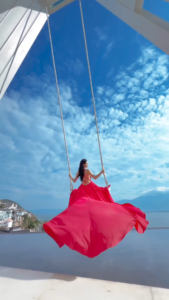
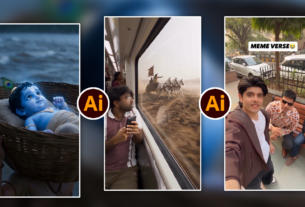
Primary Video Prompt > Prompt: A wide-angle, cinematic slow-motion shot of an elegant woman with long dark hair seated on a tall rope swing suspended beneath a modern white architectural pavilion. She wears a backless, flowing crimson-red gown with an ultra-long train. As she swings outward over a reflective infinity pool, the expansive red satin fabric catches the wind, billowing dramatically behind her across the frame like vast wings. Below lies a picturesque coastal town and calm blue water, with soft mountains on the horizon under a vibrant azure sky filled with delicate white clouds. Bright natural daylight, sunbeams filtering through geometric canopy slats, luxury fashion editorial travel aesthetic, highly detailed fabric physics, 4K resolution. > Modular Breakdown * Subject: An elegant woman with sleek dark hair in a floor-length, backless scarlet-red dress featuring an oversized, lightweight flowing train. * Action & Dynamics: Gentle, graceful swinging motion moving outward toward the open horizon; the fabric opens and billows upward with realistic wind physics and weightless drape. * Environment: A high-vantage luxury terrace pavilion with minimalist white columns, sleek marble flooring, a glassy reflective pool, an open coastal landscape, white cliffside buildings, and distant mountains. * Lighting & Atmosphere: Clear, bright sunny daylight with sharp, clean shadows cast by slatted architecture; deep blue skies with wispy cumulus clouds. * Camera Work: Low-angle rear-to-mid shot positioned behind the swing, framing the subject centered against the open sky and following the arc of the swing smoothly. Alternative Stylized Variation (Golden Hour / Sunset) > Prompt: Low-angle cinematic tracking shot of a woman in an enormous flowing ruby-red satin gown swinging on a high cliffside swing above a mirror-like infinity pool during warm golden hour. The dress flutters and expands into a massive parachute of red silk against a gradient sunset sky of orange, pink, and deep blue over calm bay waters. Lens flare, soft warm rim lighting outlining the subject, 24fps film look, photorealistic. > Would you like to tailor this prompt for a specific AI video generator (such as Runway Gen-3, Kling, or Sora), or adjust the time of day and setting?
Generative transformer model ko feed karne ke liye input material ka clean hona basic requirement hai:
- Framing & Aspect Ratio: Subject ko vertical 9:16 frame me centrally compose karein. Headroom natural rakhein taaki mukut ya traditional headgear add hone ke baad frame crop na ho.
- Consistent Front Lighting: Ek diffuse ring light ya twin softbox setup ka use karein. Face par sharp, unwanted shadows nahi honi chahiye taaki facial landmarks easily detect ho sakein.
- Controlled Gesture: Subject camera lens me direct eye contact maintain kare aur hand snap action chest-to-shoulder height ke paas clean execute kare, jisse frame me blur minimum rahe.
2. The Official AI Master Prompt
AI video generator interfaces me precise instruction feed karna critical hota hai. Niche humne official optimised prompt provide kiya hai jise aap seedhe use kar sakte hain

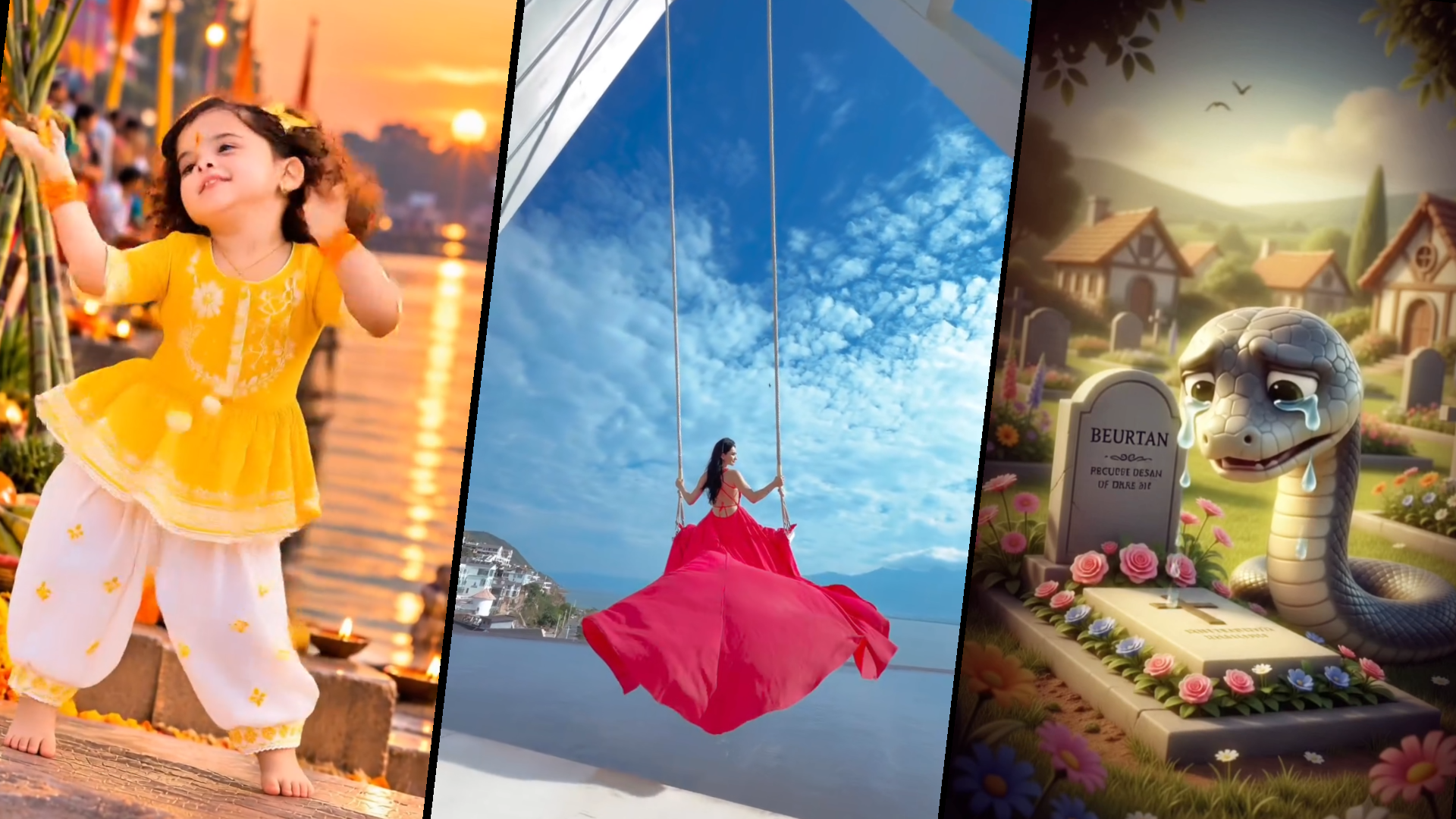
Scene 1: Angel Snake in Heaven (Looking Down at Earth) Image Generation Prompt (Midjourney / Flux / Bing Image Creator) > A cute 3D Pixar-style green snake with large expressive glossy eyes, coiled peacefully on top of a soft, fluffy white cloud in heaven. A glowing golden halo floats above its head. Divine radiant god rays and golden light beams stream down from behind. Below the cloud, planet Earth is visible floating among soft mist. 3D animated Disney character design, octane render, smooth textures, vibrant cinematic lighting, vertical 9:16 aspect ratio –ar 9:16 –v 6.1 > Video / Motion Prompt (Kling AI / Luma Dream Machine / Runway Gen-3 / Minimax) > The cute green snake moves its head gently, speaking and looking down toward Earth with an expressive face. The golden halo shines softly while light rays shimmer through the drifting clouds. > Scene 2: The Girlfriend Snake Moving On Image Generation Prompt (Midjourney / Flux / Bing Image Creator) > A whimsical fairy-tale village garden with green lawns, colorful wildflowers, and cozy cottages in the background under bright sunny daylight. Two cute 3D Pixar-style snakes laughing together: on the left, a pastel pink female snake with a cute pink ribbon bow on her head, eyes closed in laughter; on the right, a bright sky-blue male snake smiling affectionately at her. Vibrant 3D cartoon aesthetic, depth of field, cheerful romantic atmosphere, highly detailed –ar 9:16 –v 6.1 > Video / Motion Prompt (Kling AI / Luma Dream Machine / Runway Gen-3 / Minimax) > The pink snake with the bow laughs cheerfully, swaying slightly, while the blue snake smiles warmly at her. Gentle breeze moves the surrounding flowers and grass. > Scene 3: The True Friend Mourning at the Grave Image Generation Prompt (Midjourney / Flux / Bing Image Creator) > A heartbreaking emotional scene in a peaceful cemetery. A cute 3D Disney Pixar-style greyish-green snake coiled sorrowfully beside a stone tombstone and grave. Huge glistening cartoon tears stream down its face from big sad glossy eyes, head drooping in grief. The grave is decorated with pink roses and colorful flowers. Soft melancholic overcast lighting, blurred tombstones and cottages in the background, 8k render, high emotional detail –ar 9:16 –v 6.1 > Video / Motion Prompt (Kling AI / Luma Dream Machine / Runway Gen-3 / Minimax) > Close-up on the sad grey snake leaning against the gravestone, large teardrops rolling down its cheeks as it sniffles and blinks slowly in grief. Flowers sway gently in the somber breeze. > Production Workflow Tip * Base Images: Generate the vertical (9:16) base keyframes using Midjourney v6.1 or Flux.1 [dev]. * Animation: Upload each image as the starting frame in Kling AI, Luma Dream Machine, or Hailuo (Minimax) and apply the video motion prompts with a low camera-motion scale (Motion 2–3) to keep character consistency stable. * Meme Cut: Insert the live-action reaction clip (e.g., Kay Kay Menon / Vijay Raaz "Hain?") between Scene 2 and Scene 3 in your video editor (CapCut / Premiere Pro).
Yeh verified prompt aur iske custom aesthetic variants aapko hamari official website m4editor.com par direct mil jayenge, jahan se aap aur bhi viral presets download kar sakte hain.
3. Generation Control Parameters
Prompt enter karte waqt platform settings me in values ko balance karein:
- Aspect Ratio: 9:16 Vertical (Optimised for Reels & Shorts).
- Motion Amplitude / Strength: Value ko 3.5 se 4.5 ke beech lock karein. Excessive motion index set karne se hands aur fingers me unnatural warping hone lagti hai.
- Face Consistency / Anchor Weight: Agar aap Image-to-Video feature use kar rahe hain, toh identity retention slider ko 80% se 85% par set karein taaki subject ka unique facial character retain rahe.
- Seed Lock: Agar transitions multiple clips me break karke generate kar rahe hain, toh seed value copy karke reuse karein taaki overall colour temperature consistent rahe.
Visual Architecture Analysis: Trending Aesthetic Breakdown
Upar provide kiye gaye sample visual ke key artistic elements ko samajhna zaroori hai taaki aapka prompt aur camera staging accurately align ho sake:
- Halo Backlighting (Prabhamandal): Background me bright circular halo light subject ke silhouette ko background separation deti hai aur divine ambience create karti hai.
- Traditional Ornaments & Headgear: Traditional Bengali/Indian classical Mukut, floral mala framing aur heavy bridal Kundan choker neckpiece grand visual appeal build karte hain.
- Traditional Shringar Details: Forehead par traditional chandan artwork, lal bindi aur haatho me applied red alta cultural authenticity provide karte hain jo emotional engagement badhata hai.
- Fabric Texture & Sheen: Raw silk ya brocade saree ka high-specular reflective texture generative model ko rich dynamic range render karne me help karta hai.
Post-Production Enhancement: Final Polish Workflow
Transformer model se raw render milne ke baad direct upload karne ke bajaye mobile apps (jaise CapCut, VN Editor) ya desktop software (Premiere Pro, DaVinci Resolve) me 5 minute ka final touch dein:
- Snap Sync & Beat Alignment: Snap moment ko video audio track ke base drop ya traditional conch shell (shankhnaad) hit ke sath frame-accurate sync karein.
- Flash / Glow Accent: Finger snap ke exact 2 frames par ek subtle soft-glow ya exposure pump (+0.4 EV) add karein, jisse AI morph cut natural optical effect ki tarah integrate ho jaye.
- Subtle Motion Blur: Transition zone par directional ya radial motion blur apply karne se micro-pixel artefacts hide ho jate hain aur transition smooth dikhta hai.
- Contrast & Sharpening: Output render par sharpening filter (+10 to +15) apply karein aur blacks ko slightly crush karein taaki jewellery highlights stand out karein.
Smart Workflow Tips for High Content Virality
- Audio First Strategy: Rendering se pehle Instagram par currently trending divine instrumentals ya cinematic shlok tracks short-list karein, aur video ki timing unhi dramatic beats ke according lock karein.
- Clean Anchor Frames: Generation ke dauran jab ek form complete ho, uske aakhiri frame ko export karke next form ke initial image reference ki tarah use karein. Is continuous chain technique se multiple morphs me kabhi visual jerk nahi aata.
- Colour Balance Matching: Agar multiple prompts run kar rahe hain, toh LUT (Look Up Table) ya color tone warm-golden palette par lock rakhein taaki entire reel ek unified cinematic film jaisi lage.
Conclusion
Transformer AI video editing trend ne content creation ki boundary ko redefine kar diya hai, jahan heavy VFX budget ke bina bhi ek solo creator massive cinematic visuals create kar sakta hai. Consistency aur clean execution is trend ka sabse bada secret hai; isliye prompt parameters ke sath experiment karein, face retention ko balance karein aur regular practice se apne visual craft ko continuously level-up karte rahein.